Please add Nebraska.
https://docs.google.com/spreadsheets/d/1MDbgn_fn7TspNrVgi0EOndPEbHhNARNUoP0hlpIw-_E
Thanks!
Sent from my iPhone using Tapatalk
Please add Nebraska.
https://docs.google.com/spreadsheets/d/1MDbgn_fn7TspNrVgi0EOndPEbHhNARNUoP0hlpIw-_E
Thanks!
Sent from my iPhone using Tapatalk
This is a great script. My only request right now is if you can set the link to open in a new browser session instead of another tab. Much easier to work with side-by-side windows. I currently copy the link over to a new session. Thanks again for this script!
I might have some basic options at some point, but in the meantime, most browsers support opening a link in a new window by holding the shift key when you click.
I was just about to go back and say never mind.  Wasn’t even thinking about all the other options on how to open the link.
Thanks again for this script.
I see WME GIS just updated. However, now it doesn’t work.

The town, county, and state now show as buttons, but none of them work. Before the update, only the county showed as a button, and it did cause the GIS map to open.
Yeah, I didn’t think ahead, and I published it a bit soon. The sheets need to be updated, which I’m working on currently. Hopefully all states will be fixed by tonight.
No problem.
What are the town and state buttons intended to do?
As I’ve been seeing how each state has many different situations for localities, I realized I can’t ever assume the correct GIS link, so instead I’m giving the option to have all of them. So for a location where the city/town has a GIS, and the county it is in has a GIS, and the state has a GIS, you now have easy access to all of them.
P.S. Pennsylvania is fixed
Nice. I see the google sheet still has only 2 columns, is there a new sheet format, or are the towns/states handled via rows with special names?
And yes, PA counties are working again, thanks.
There is actually a new column. You’ll see a second tab in the Google sheet with the new format. I left the old tab for now, to provide compatibility with the old version. I’ll delete it after a few weeks, when most users should have updated.
With the new buttons, it ends up hiding the X to close Street View. You can kind of see the X underneath the Pennsyvania button here.
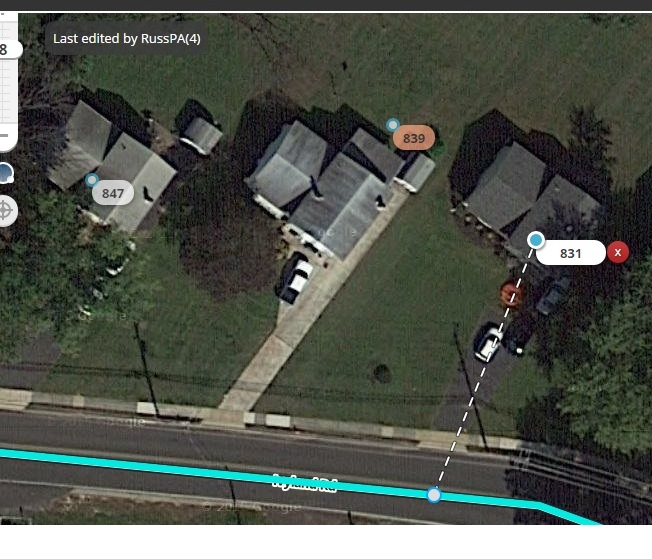
That’s just because the “Fix UI” script is hiding your top bar. If you disable that option (you don’t have to disable the whole script), then you won’t have that issue. Since it’s just a conflict with another script, and there is an option to avoid the issue, I don’t see what I can do to help that. Sorry.
You’re right, that is the issue. That Fix UI option also caused that odd looking font in the buttons. Easy fix
Is there a way to reduce the size links now that there are three of them?
I just pushed out an update that I think will resolve your concern. I don’t foresee this script having options anytime soon, so hopefully everyone finds this size acceptable.
Please add:
Tigard, OR: https://www.tigardmaps.com/mox6/publicinteractive.cfm
Wilsonville, OR: http://www.wilsonvillemaps.com:8080/maps/
I went ahead and added them, but generally the local owner of the sheet will be the one handling that, since I don’t have any local knowledge of any of the states. You can also request editing access to the sheet if you’d like. All of the state sheets are linked on the Greasy Fork page.
Phillistine11,
Love the script. Where are you getting the City GIS info from? Ohio does not have it on our sheet but in this case,
https://goo.gl/aeumOj
Fairfield is lit up as a city but the link takes you to Fairfield County, OH. Can we change that or do you have to?
Thanks!
Ron
Don’t think i’ve taken the time to thank you for this script. Before my region (and quite a few others) were using the census shapefiles as individual overlays per state. It would Show the counties so we would know which GIS system to use. This completely eliminates the need for that script and rickzabel couldn’t be happier to not have to update them anymore.
Thanks!
Are you the owner of the Florida spreadsheet? Can you add me for edit access if so? St John’s Co web address needs a minor change.