Chances are, anything hosted on arcgis.com will work, it’s just whether or not the publish all the data you’re looking for.
That said, Chesterfield County VA is now available.
Chances are, anything hosted on arcgis.com will work, it’s just whether or not the publish all the data you’re looking for.
That said, Chesterfield County VA is now available.
GIS Layers script stopped loading today – console shows the following error message:
GIS Layers: TypeError: Cannot read property 'trim' of undefined
    at fieldNames.forEach (chrome-extension://dhdgffkkebhmkfjojejmpbldmpobfkfo/userscript.html?id=80a395b1-10a8-4503-80ca-75ba8481abaa:3153)
    at Array.forEach (<anonymous>)
    at layerDefRows.filter.forEach.layerDefRow (chrome-extension://dhdgffkkebhmkfjojejmpbldmpobfkfo/userscript.html?id=80a395b1-10a8-4503-80ca-75ba8481abaa:3152)
    at Array.forEach (<anonymous>)
    at loadSpreadsheetAsync (chrome-extension://dhdgffkkebhmkfjojejmpbldmpobfkfo/userscript.html?id=80a395b1-10a8-4503-80ca-75ba8481abaa:3150)
Should be fixed now.
When I click the power button to toggle GIS Layers on and off, the layers toggle but the power button does not change from grey to green. Upon investigating, this happens when TB is running.
Release 2019.03.29.003
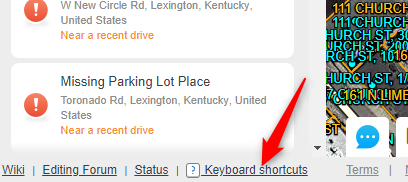
Click the “Keyboard Shortcuts” link near the bottom left of the WME screen.
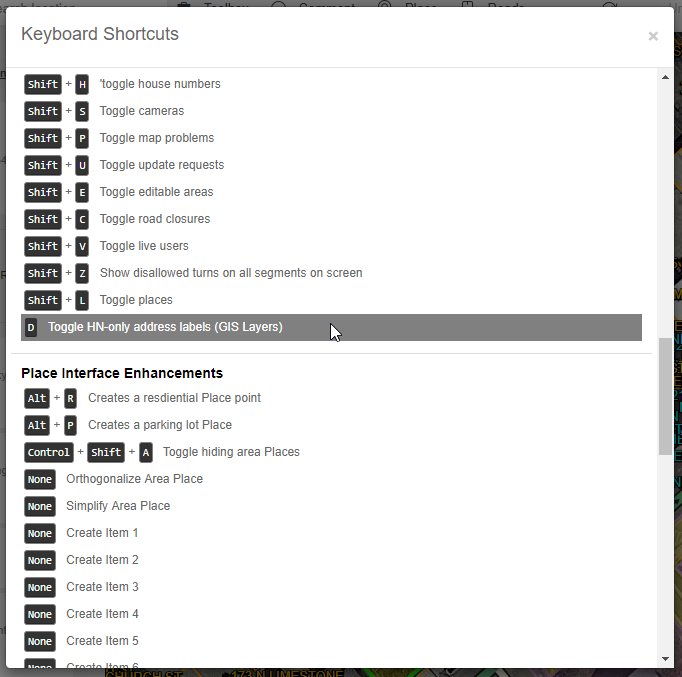
Then scroll down to the Layers section. Click on the option shown below, and enter the key or key-combination that you want to assign to this shortcut.
Release 2019.04.02.004
Added layer-shifting capability. Right click on a layer in the list to bring up the layer property editor (which currently only includes layer shifting).
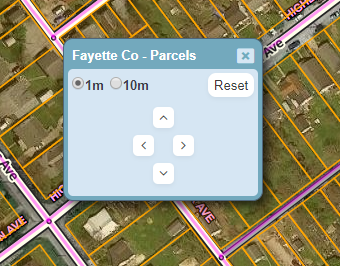
Choose the amount to shift by (1m or 10m) and click the arrow buttons to shift the layer. Click the Reset button to remove the shift.
Layer shifts are saved, so they should stick between WME refreshes. I plan to add some kind of visual indication of layers that have been shifted to the list of layers.
Side note: if you have Toolbox installed, the editor window should be draggable.
[UPDATE: With version 2019.04.02.005, the editor window should now be draggable with or without Toolbox]
I love GIS Layers! There’s just one problem, the font. The 8s and the 6s are nearly identical, which forces me to spend time figuring out what it should be. please change the font to something more legible when it comes to 8s and 6s. or please give us the option to pick our own font. thanks.
I generally have no problem with the current font, but I loooove having options for font, color, and especially size. 
I’ve added this request to my to-do list. I can’t promise it’ll be done soon, though. I haven’t received any other complaints about the font so it’s not high on my list.
Erie County parcels in Pennsylvania can probably be added to the GIS Layers Script. It is hosted by PASDA as an ArcGIS RESTful web map service here: https://maps.pasda.psu.edu/ArcGIS/rest/services/pasda/ErieCountyParcels/MapServer
If you have control over how labels and/or links display, additional parcel information besides just the Parcel ID can be found by appending the Parcel ID to this URL: https://www.eriecountypa.gov/property-tax-records/property-records/property-tax-search/parcel-profile.aspx?parcelid=
Thanks for the link. I’ve added the parcel boundaries layer. Unfortunately I don’t (yet) have a way to show labels with related info from other sites/pages.
GIS Layers doesn’t seem to be loading the layers for 2 counties in Pennsylvania. Both show in the state list as having parcels and address points available.
Looks like they switched over to https but the sheet calls back to http
Updated. Let me know if that didn’t fix it.
Washington State parcels are not showing up, but other states I’ve tested have, problem has persisted for about 8 hours. Is there a user-level task or procedure we can do to test whether the problem lies with the script or with the source, for people such as myself who are not script writers? I mean, I guess I’m grasping at straws here but I wish there was a way to know if the source was changed and will require a script update (notify the script admin), or if the source is just offline (tough luck, be patient and wait).
(EDIT: Now over 24 hours, WA parcels still not working, but highway mile markers are…not sure if they come from the same data source…)
(EDIT 2: 36 hours later, WA Parcels are back.)
Sorry, I didn’t see your post here until just now. Usually if you post in the #gis-layers channel in the Scripts server on Discord, you’ll get a faster response. But this works too… just might take a little longer.
They moved the WA parcels from a folder labeled “2017” to another folder labeled “2019”, so I updated the URL that GIS-L uses. I’m assuming it’s newer/better data, so hopefully that’s good news.
As for determining the root cause of layer failures… I don’t really have anything designed in the user interface that would help. There are so many different potential causes, it’d be difficult to do that… or at least to do it well. But there are several people that help me maintain these links, and we’re all willing to dig into issues. Just posting the name of the layer that’s failing (in Discord, ideally) is normally enough for us to determine if it’s something we can fix, or if it’s completely broken, i.e. no longer usable in GIS-L.
**Edit: If you’re familiar with the Chrome console, you can sometimes see errors posted when layers aren’t working. You can also turn on the Verbose log level to see the URLs that GIS-L is querying for data. It usually requires some investigative work from that point.
not loading on FF
Script error in [Greasemonkey script https://greasyfork.org/users/45389/WME GIS Layers; version 2019.07.23.001]:
ReferenceError: jQuery is not defined WME GIS Layers:3873:19
<anonymous> user-script:https://greasyfork.org/users/45389/WME GIS Layers:3873
Absolutely love the new municipal boundaries feature added to GIS-L, thank you!
One suggestion, is it possible to have the CDP shading made less opaque? They’re pretty brightly colored and wash out the detail beneath them.
I’m seeing peculiarities with the parcel data from Winnebago Co, Wi. It appears to be pulling the secondary/mailing address data instead of the parcel physical address.
Not sure if this is a known issue or not, as it’s hard to search the thread from my phone.
Sent from my iPhone using Tapatalk
Any chance Kootenai County, Idaho, can be added? https://gis.kcgov.us/app/kcearth/