Already covered this in the design using callouts.
OK, a sample. I used this: https://www.waze.com/editor/?env=usa&lon=-74.81995&lat=39.91052&zoom=8&segments=82045410
Here’s what JAI looks like now, and what it could look like, roughly: http://imgur.com/a/E6KsO#0
In each case, the upper arrow closer to the junction indicates the instruction (left/right) when heading from the JAI markup segment toward the junction and then onto the selected segment. The arrow farther away from the junction indicates the direction to get from the selected segment onto the segment displaying JAI. Add three arrows for keep/exit, and done. Everything fits easily within the circle (which is the same size as the current JAI instructions circle
I would suggest not using the ↑↓ arrows for continue (BC), and instead use waiter nothing (no instruction), or a smaller icon (•∅).
Sent using Tapatalk for Android 4.4.2
WHat’s the issue with a straight arrow? It actually matches the Waze glyphs (app, Livemap).
Its the same as the turn arrow, Waze has a different turn arrow. I think it looks off when the straight and then arrows are the same just rotated, and the alignment can be rotated as well. It makes it harder to tell at a glance
Sent using Tapatalk for Android 4.4.2
Where do the app or the livemap give a straight arrow? They either give an arrow indicating an instruction or no arrow (because no instruction).
I recalled also that I have some old account on GH.  I will try to use it for any potential future fixes in order to make JAI development easier.
JAI version published by me on GF has been deleted with replacement URL to the JAI version by @milkboy currently synchronized with GH:
https://greasyfork.org/en/scripts/7887-wme-junction-angle-info
All future updates triggered by the current users of my version will be redirected to it - the only requirement is increased version number! There are currently three distinct versions (includeing my one) numbered 1.8.4.1 - which is bad, since it prevents from automatic script updates. I suggest a bit more attention paid to the version numbering in order to avoid unnecessary problems with script updates.
Good idea! This would likely also help in solving the versions numbering issue.
Try creating a route with no turns, i.e., origin and destination are on the same street. Livemap gives it (as does route checker).
App doesn’t, so I may have been mistaken there, though I thought I saw it appear in some circumstance. Anyone care to check the graphics on a phone?
New version (1.9.0) is out :geek: Anomalies and meltdowns may happen, so please report any findings that our testing didn’t catch yet (either here on the forum or as a GH issue).
Big thanks to FZ69617 and wlodek76 for code contributions and everyone else for ideas.
Edit: typos
Hmm, actually this was long time ago, just forgot to tell:
Shows as EXIT, but waze gives KEEP.
https://www.waze.com/editor/?env=row&lon=24.14486&lat=56.96636&layers=453&zoom=9&segments=177746788,153859370
Is it right or left, Waze only gives exit on the typical side for each country. Perhaps the script needs to evaluate which country your in.
Sent using Tapatalk for Android 4.4.2
right side driving (wheel on the left)
Indeed, Livemap shows “keep right” for this route:
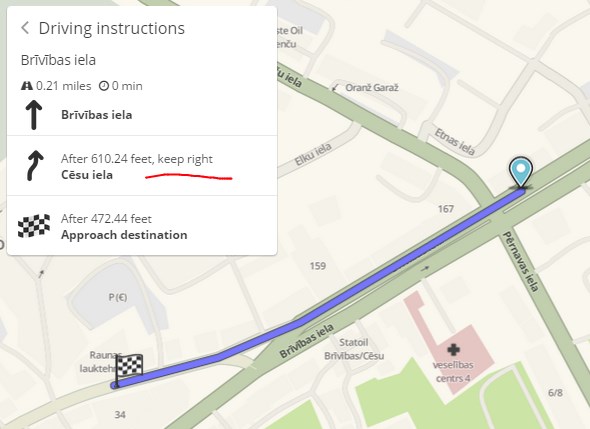
However, Waze client app gives an “exit right” instruction here:
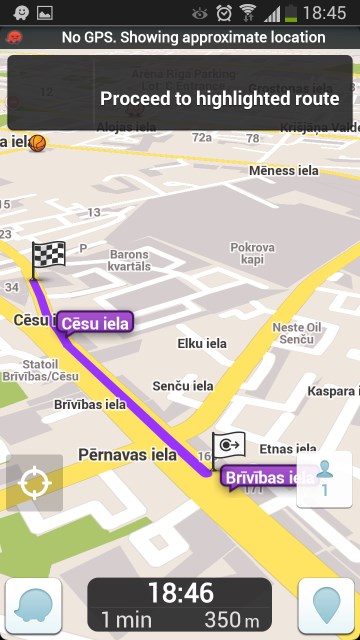

Exactly what JAI suggests in this particular case.
As far as I know Livemap never says “Exit”, it always says keep. The client app says exit when it is the proper road types, and it is on the typical side (the traffic side) of the road.
Sent using Tapatalk for Android 4.4.2
Ooook never noticed.
When selecting a junction (not a segment), do you want to use the absolute/departure setting, or always absolute?
Can’t really calculate an “out”-angle without a defined “in”-angle 
Heads up: the best continuation algorithm is about to change. So the predictions must be adjusted, but this time I hope it will be easier to parse.
Sent using Tapatalk for Android 4.4.2
I use departure, so I don’t have to select several segments.
Where is the source of changes to algorithms?