conveying appreciation for the latest update. feeling incomplete without it.
Spaseeba 
conveying appreciation for the latest update. feeling incomplete without it.
Spaseeba
Updated script to v.0.9:
Bug
When place selected, there are two same settings
Enable resize - Enable resize.
One of them should be enable rotate.
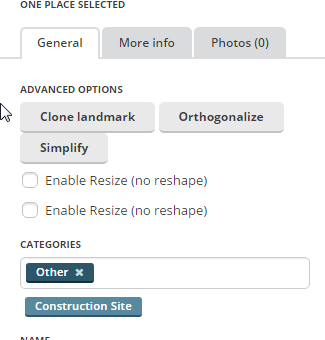
This is how it works in OpenLayer JS Library, the library Waze Editor is based on - it’s either resize or reshape 
Thanks, will fix shortly!
Hi! Something is wrong to Magic Wand. Does not create landmarks by clicking on the google satellite image. Please check it.
Hello,
Comme RIFF_RAFF, impossible pour moi de créer des landmarks en cliquant sur les vues satellites Google. Une solution? Merci.
Forum’s translation service ON :geek:
He’s saying:
“Like RIFF_RAFF, impossible for me to create landmarks by clicking on Google satellite views. A solution? Thank you.”
Forum’s translation service OFF :lol: 
Will this ever be shortly fixed? (Just one string, on line 232, under “var insertLandmarkSelectedButtons = function(e) …”)
probably now is the best time to look into an update for it lol
Hey! Sorry for a huge delay but I’ve started a new feature back then and couldn’t just update that button 
Happy to say that WME MagicWand has been updated to support newest Editor version plus I’ve introduced a new Highlight mode: set “Enable Highlight” option ON to highlight those landmarks that need to be orthogonalized.
Thanks everyone for your feedback!
Can you add highlight for places that are smaller than manually entered area?
What is “manually entered area”?
Area of places in square m2.
Thanks fo the Update!
I am having an issue: Whenever I try to create a landmark by clicking on the map I get an error:
Cannot create landmark, need at least 3 points to create polygon
What do I do wrong?
FYI: Chrome 51.0.2704.84 (latest) is used.
EDIT: This happens using the default “Color Distance” mode, using “Human-Eye”, the browser windows gets unresponsive.
Appreciate your help.
I have the same problem… What is the solution please?
???
Hello,
i have a big problem here, the first thing that appears wen i open the wme: unable fo find appropriate control element, script is broken
what should i do ?
How funny. I just did a search for this error and didn’t see anything. I then restarted my computer and still saw the error. I narrowed the error down to this script and then here is another report of the problem. :lol:
I just disabled it for now and the error goes away while it is being investigated.
But now i can´t move any places 