I would like to present a small script to install with Greasemonkey or Tampermonkey : Greasyfork
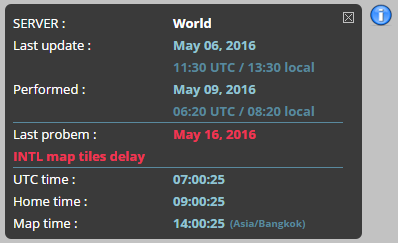
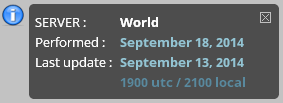
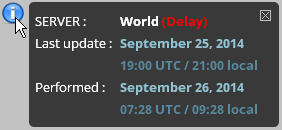
It gets the date and time of the last server update on status.waze.com and displays it at the start of WME as well as moving the mouse on the icon (i) and when there an update.
It also displays local time (at home) and the map time (where you are currently editing)
This script :
Check an update every half hour.
On mouseover, you will have the date of the last update to the server.
When you click it, you’ll go directly to the “status.waze.com” page.
Multilingual (all languages WME)
Multiserver (International, US or Israel)
Displays the popup green background when a map update is detected and purple when it’s a WME update
Displays announced delays update and others messages
Displays differents times (UTC, local and map time)
Well, I guess there’s no accounting for poor taste – I liked it the old way, the “me” tab was relatively useless, and having this info there was handy to see when WME was first loaded.
Obscuring the map seems like a step down.
I’ve noticed the same thing as nhanway – it doesn’t move with UR/MP’s, but the zoom controls do.
Right! That’s what I was trying to explain. The zoom controls move to the point where the I is bellow the - to just barely coving the + between the zoom controls and the UR/MP info bar.
ah, I don’t use either of those on a regular basis. I thought Validator made its own tab.
I’d really like to see a lot of these small scripts worked into something larger – perhaps Toolbox? This would allow for multiple people to be working on it (and not just the little parts), in addition to reducing the potential conflict between scripts.
This is great! If you wanted to, you could probably glean the time of day the update was performed – if you mouse-over the date in the line “This entry was posted in North America Tile Updates on September 18, 2014.” it gives you the time of day…
Also, it would be awesome to include this in Toolbox… are you sure I can’t persuade you to join our team?
I don’t know about join toolbox’s team. I saw the source code, I have great difficulty understanding.
This script is passive (only show). On toolbox there are only active tools. Are you sure you want to include ? I would lose the paternity of my script ?
Toolbox has plenty of “passive” tools as well. And we’d like to build some more in, like a list of Places (similar to the list of Segments).
We would ensure you’re credited in the Acknowledgements for the continued work on TB, and you’d certainly be able to keep working on that portion if that’s all you wanted to do.
The big thing is that it would be available to everyone who uses TB – which I believe is one of the most widely distributed scripts.