Update (v1.02) :
- Bug fix with dates
Now, it’s good :oops:
Update (v1.02) :
Now, it’s good :oops:
Update (v1.03) :
Installed. Will give this a shot.
Can GPS layer date be found somewhere?
serega_12, a shot ?
Olestas, I think not, I will look
Just noticed after latest WME update this script doesn’t load.
Update (v1.04) :

Fastest fix in history of history 
Haha, 1 minute… Great!
I posted the version during the request
Thanks guys!!
Update (v1.05) :
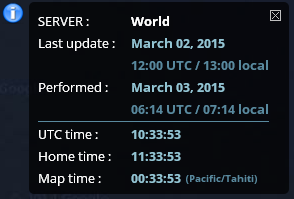
Hmm… I am home, and map time differs from home time… Whos fault is this? Wazes or apps?
Update (v1.06) :
Thanks Olestas
Bon, je viens de voir qu’il y a un souci avec la page de status :
https://www.waze.com/forum/viewtopic.php?f=16&t=152159
On va donc attendre tranquillement que ça soir résolu 
Does not work with new Tampermonkey. Keeps getting blocked as:
A userscript wants to access a cross-origin resource.
Pressing Always allow or Always allow all domain does not help.
There is also a explanation of some sort:
Please note that userscript authors can avoid this dialog by adding @connect tags ⬀ to their scripts.
Production WME loads very slow with this script enabled. Beta WME seems to load with no problems. This is running chrome.
I have been experiencing intermittent ‘loading hanging’ on WME with part of the satellite view showing and the rest still hidden.
I did a ‘binary search’, disabling half my extensions until I narrowed the problem down to THIS extension that seems to be causing the problem.
Disabling allow WME to load and run.
Chrome on Win7 ent
Hi all,
I just update this script (v1.08)
I hope you will not have no more problems. :?
(Next release : compatibility with Beta WME)
EDIT : Update v1.09 (bug with Firefox)
Script update (v1.10) :