Ok I have found the problem, some other extension of Chrome goes into conflict, now I am looking for what it’s.
[edit] I have found which extension created the problem, is this Emoji for Google Chrome
I am seeing the following issue with PIE’s Place Menu Customization:
- When I select a category or the Point option to the right, everything works great.
- When I select the Area option to the right, the category of the resulting area displays as: 'UNDEFINED
- If I select Parking Lot, that creates an area and works fine.
I’m using: - WME Place Interface Enhancements 2017.12.13.01
- Chrome Version 63.0.3239.108 (Official Build) (64-bit)
- Windows 10 Home
Reproduced in WME Prod and Beta
I am seeing this issue as well (Prod and Beta).
It’s working fine now in PIE 2017.12.30.01
Thanks!
Forgot to post here…
Update released - 2017.12.30.01
Fixes the new area Place bug YourEvilTwin reported.
This is incorrect. Places need to be at least 550 m2* to be seen in the client.
- Testing in progress
Update released! 2018.01.16.03
WMEPH’s hours parser is now available in PIE! The same functionality will carry over - “Add hours” and “Replace all hours” buttons and shift+enter & ctrl+enter will insert new lines while just enter triggers the “Add hours” button. WMEPH and PIE will be using the same library for the parser so what works in one will work in the other.
The parser will be available below the Add Open Hours button on the More Info tab.
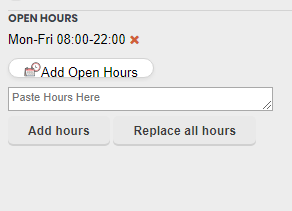
This is one of the first steps MapOMatic and I are taking to move/duplicate some WMEPH functionality in PIE as we identify features that make more sense for PIE than WMEPH so WMEPH can focus more on the harmonization aspect.
1 Like
Update released - 2018.01.16.05
Made it a little more obvious the WEBSITE label on a Place is a clickable link (WEBSITE is now underlined and the cursor turns to a pointer) that will open that Place’s website in a new tab. This has been in PIE for quite a while but not many know about it and the interface didn’t make it apparent.
1 Like
Love the Hours feature! It helps when copying and pasting from the PP’s website isn’t feasible. Thanks a billion!
Is it possible to have an automatic populate next address number when you copy a RPP? Have a key add 1, or add 2, or add a selectable increment? Similar to WME Quick HN?
Hello,
the new version 2018.01.23.01, installed 50 minutes ago
prevents me from creating the POI: the track disappears at the time of the double click.
@+
Should be fixed as of 24 minutes ago
How effective!
it’s fixed, thank you very much.
@+
Hello,
alas, three times alas, the problem is found identical this morning …
Sorry, but I disabled PIE
A+
Do what you gotta do 
I cannot reproduce any issues with Place creation.
Hello,
to ask you to excuse me!
But I had to delete the previous script and to install your last version!
and your magnificent script restarted as nine!
Cordially.
Update released - 2018.02.13.01
I finally found the proper incantation to make the entryExitPoint adjustable before saving when creating RPPs with PIE. Woo! Now please excuse me while I wash off all this sacrificial blood.
1 Like
Thank you Justin
Hello,
to make me - almost - forgive, could I suggest an extra palette to your script.
The old script [Script]WME Places tools v0.9 was used to display or hide POIs according to their category.
Alas, it is not corrected by myriades and appears only partially in the banner on the left.
Would it be possible to hide at will one of the main categories and at best several?
For example, to hide forests that do not have a “NAME”.
Thank you