I thought that might play into the situation, lol. I’m technically not supposed to be running Chrome on this machine at all. I used to be able to use sneaky means to install and upgrade it on this network, but no more. No one has noticed it still here yet, though.
I’m having the same issue with Chrome version 62.0.3202.75. Names will show with modifying any Show names setting. All scripts are disabled except PIE.
Names are now appearing without having to poke the settings. If a change was made, thanks. If not, whatever was causing it seems to have been fixed, at least for now. Cheers.
He pushed an update late late last night, but probably didn’t have time for a forum post. The latest version (v2017.10.27.03) should have that fixed. 
Additional observation, saved place categories from the place dropdown are not staying locked in, reverting to default choices. Seems to work OK until you go into HN editing mode for something, after that the choices are reverted to default. Reloading WME restores your custom settings.
Update released - 2017.10.29.01
Bug fix: Rebuilding the custom new Place menu when exiting HN edit mode
Hello, this seems like a bug - Place category buttons are visible even when the relevant option is not selected. The icons hide when the option is poked but they return when places are being updated.
I am not able to reproduce this. Could you provide steps to reproduce, including a screenshot of all options you have enabled?
I’m not sure if it’s a bug or just me, but if I create an exit/entry point, then decide to move the PP, I get a save error. If I tap undo once, the entry/exit point reappears and I can save. With PIE turned off, this doesn’t happen.
https://prnt.sc/hc0sl2
https://prnt.sc/hc0sqa
https://prnt.sc/hc0szf
https://prnt.sc/hc0t2r
https://prnt.sc/hc0t7k
Yes, you cannot move the entry/exit point immediately after creating a RPP - you either get a save error or it just snaps back to the original location. I haven’t been able to figure out why it ignores the moves, yet.
As a workaround, place the RPP where you want the point to be, then move the RPP where it should have gone in the first place. The point stays where you originally parked the RPP, and you can get all the work done in a single save.
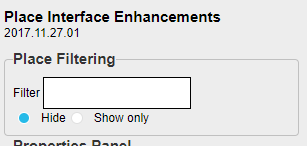
Update released - 2017.11.27.01
Place filtering allows you to hide all Places that match the regex supported filter or only show Places whose name matches the filter.
1 Like
just keeps gettin better.
Update released - 2017.12.01.01
Fixing a bug in WME beta where new RPPs couldn’t pull the closest segement’s name or city & it couldn’t automatically edit the RPP after creation due to a timing issue with some backend objects.
Update released - 2017.12.06.01
Enabling the Residential Place layer when creating a RPP from the PIE new Place menu
I would like to mention, in case you haven’t noticed, that Parking Space Estimator tool is broken. It doesn’t calculate the number of car spots anymore.
Till it is fixed we can calculate the approximate number of car spots by dividing the total plot area by 20 sq.m.
When I use this script I have a BUG
All Place don’t move when I move the Map or zoom in or out.
look video at 0.18 with WME PIE active https://drive.google.com/file/d/1QCHmMmIsfzQGHOm7iXA71OCWbwya8jxq/view
Please check your console and report any errors. I always have this script enabled and haven’t seen this behavior
I have this error in prod and beta editor
Uncaught (in promise) TypeError: Cannot read property 'backgroundGraphic' of undefined
    at initialize.eraseGeometry (vendor-e7e8255ff94a0f574f65.js:73)
    at initialize.eraseFeatures (vendor-e7e8255ff94a0f574f65.js:73)
    at initialize.removeFeatures (vendor-e7e8255ff94a0f574f65.js:73)
    at t.unselectFeature (vendor-e7e8255ff94a0f574f65.js:73)
    at t.destroy (app-1163a8649b7109b29781.js:1)
    at app-1163a8649b7109b29781.js:1
    at <anonymous>
Uncaught TypeError: Cannot read property 'graphicZIndex' of undefined
    at initialize.getZIndex (vendor-0ee1287518b8bfe18e82.js:73)
    at Object.Z_ORDER (vendor-0ee1287518b8bfe18e82.js:73)
    at initialize.Z_ORDER_DRAWING_ORDER [as compare] (vendor-0ee1287518b8bfe18e82.js:73)
    at initialize.insert (vendor-0ee1287518b8bfe18e82.js:73)
    at initialize.redrawNode (vendor-0ee1287518b8bfe18e82.js:73)
    at initialize.drawGeometry (vendor-0ee1287518b8bfe18e82.js:73)
    at initialize.drawFeature (vendor-0ee1287518b8bfe18e82.js:73)
    at initialize.drawFeature (vendor-0ee1287518b8bfe18e82.js:73)
    at initialize.moveTo (vendor-0ee1287518b8bfe18e82.js:73)
    at initialize.moveTo (vendor-0ee1287518b8bfe18e82.js:73)
getZIndex @ vendor-0ee1287518b8bfe18e82.js:73
Z_ORDER @ vendor-0ee1287518b8bfe18e82.js:73
Z_ORDER_DRAWING_ORDER @ vendor-0ee1287518b8bfe18e82.js:73
insert @ vendor-0ee1287518b8bfe18e82.js:73
redrawNode @ vendor-0ee1287518b8bfe18e82.js:73
drawGeometry @ vendor-0ee1287518b8bfe18e82.js:73
drawFeature @ vendor-0ee1287518b8bfe18e82.js:73
drawFeature @ vendor-0ee1287518b8bfe18e82.js:73
moveTo @ vendor-0ee1287518b8bfe18e82.js:73
moveTo @ vendor-0ee1287518b8bfe18e82.js:73
pan @ vendor-0ee1287518b8bfe18e82.js:73
panMapDone @ vendor-0ee1287518b8bfe18e82.js:73
callback @ vendor-0ee1287518b8bfe18e82.js:73
dragend @ vendor-0ee1287518b8bfe18e82.js:73
mouseup @ vendor-0ee1287518b8bfe18e82.js:73
triggerEvent @ vendor-0ee1287518b8bfe18e82.js:73
handleBrowserEvent @ vendor-0ee1287518b8bfe18e82.js:73
(anonymous) @ vendor-0ee1287518b8bfe18e82.js:73
Neither of these look to be from PIE. What were you doing when you received the errors?