I have this script installed but disabled
I think “red square” is related to script WME Fix UI
If I disable it, it disappears
The red square IS from WME Fix UI, and is intentional. It’s in the forum topic, and WME FU left sidemenu, and the post of Ianhouse, in this thread on the previous page… 
True, but every enhancement opens the door for another. :lol:
Does WME’s interface allow for mouseover tips when hovering over the Google Place link or possibly even the PP itself? Essentially, if it’s orange: a “Possible POI duplicate” bubble when hovering over one of those areas.
You mean, like it also already does? 
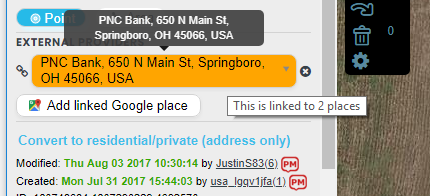
I’ve noticed that the tooltips on the Google link fields don’t always show. I haven’t had time to track down exactly why yet.
Suggestion: Maybe it’s a good idea to add an option to Map Changes menu that displays which Places are linked and which are not. Thus we can check the map at a glance.
I’m sorry, I don’t follow. What do you mean “toggles which Places are linked and which are not”?
I mean an option that hides or shows which Places are linked similar to the “Show lock level” option. It could be “Show link Status”. Or this could be a check in Magic script - I am not sure how important is Place linking for Waze map.
Yes, this is more of a function for Magic. It is on my to-do list already.
URO+ has such feature and the script although being very elaborate and helpful, uses pop-up windows to display its information which is not the best scenario - an editor has to point at every single place in order to check its status. I want to mention also that certain Waze Places don’t have corresponding Google Places which could be a challenge for Magic Script highlights.
Loving the Google Link Enhancement add-on!
Anyhow using Firefox Quantum with TamperMonkey – which WME PIE will not display in the production editor, though works great in Beta. Have tried clearing the cache, reinstalling script, isolating script… nothing seems to work.
I’ve been chatting with B-ryYKA in Discord. I added a workaround in PIE v 2018.03.25.01 that I thought should solve his problem. However, it didn’t appear to work initially but after a refresh or two, PIE started working again. So… still not 100% sure exactly why the fix didn’t take right away, but hopefully it’s solved now. I’m also not sure why some FF users are experiencing corrupted link caches. The workaround simply catches the error and empties the cache. Worst case, it just means more API calls for those specific users if it continues to happen.
Hello
First of all, this is one of the most useful extensions. Good job.
I do have a request, not sure if anyone has asked so far: is it possible to add, as an option, icons on the map? in other words replace the dot circles to include an icon to be able to tell, at least, the main category of a place without need to hover it or click on it?
Interesting request. I am not sure how useful it may be, but I could see it as an option if it is able to be done.
Update released - 2018.04.16.01
Adding option to automatically open the PUR for a selected Place (should work even with the PUR layer disabled)
1 Like
Hello, may I request a little improvement to the script? Is it possible the script to hide relevant place names when Places Filtering feature is used to hide places? This will make the script even more convenient to use.
Best regards.
Yes - this was on my list a while ago and started looking at it and then squirreled. Can’t promise a timeline, though, because from what I remember it wasn’t straight forward to implement.
1 Like
I’ve met an RPP that is marked with a red circle by PIE. It proves that RPP may also be linked to an external provider. Is it possible to show the External Provider controls for RPP and enable changing them?
Please provide a PL
It’s already there, in the text. Here it’s again: https://www.waze.com/editor/?env=il&lon=35.03901&lat=31.07387&s=1161035223&zoom=6&venues=22937911.229641251.108252