Thanks! I’m mobile most of the day so I’ll take a look tonight
When there are multiple places linked to the same external provider, the places are highlighted. Sometimes in crowded areas (malls) if a place is incorrectly linked, you’ll get the highlight that there are multiple places linked to the same Google place, but then you have to go on a scavenger hunt to try and find which place is incorrectly linked. Can this have some sort of a line pointing to the duplicate link?
With the latest production of WME (and beta), with PIE (v2018.04.24.02) enabled, I seem to be having problems adding point places onto the map. Whenever I select a new point place menu option, the mouse cursor remains the same, without the ‘point place’ hovering with it (the hovering point seems to get stuck just under the menu in the grey bar).
If I click in the grey bar, when trying to add a new Point Place, the place is added, but the following console error shows:
userscript.html?id=5…2-12aa2e9589de:5989 Uncaught TypeError: Cannot read property 'id' of undefined
    at createPlace (userscript.html?id=5…2-12aa2e9589de:5989)
    at endPlacementMode (userscript.html?id=5…2-12aa2e9589de:5928)
    at HTMLDivElement.eval (userscript.html?id=5…2-12aa2e9589de:5812)
    at HTMLDivElement.dispatch (vendor-c9d9d1a….js:24)
    at HTMLDivElement.p.handle (vendor-c9d9d1a….js:24)
createPlace	@	userscript.html?id=5…2-12aa2e9589de:5989
endPlacementMode	@	userscript.html?id=5…2-12aa2e9589de:5928
(anonymous)	@	userscript.html?id=5…2-12aa2e9589de:5812
dispatch	@	vendor-c9d9d1a….js:24
p.handle	@	vendor-c9d9d1a….js:24
If I switch PIE off, and refresh, I can add Point Places as normal.
I’m able to add Area Places ok. So obvious workaround is to add an area place and convert it to a point.
I’ve switched all other scripts and toolbox off, so there’s no interference from anything else.
Justin said this is a known issue that he is working on fixing.
One of my favorite features of PIE appears to be missing after the WME update, the add Parking Lot button.
Thanks for all you do to keep the scripts running. Having the get broken now and then reminds us of how valuable they are.
I typed too fast, it is back now.
“Show lock buttons for RPPs” doesn’t work anymore.
It’s working for me. Check your console for errors.
app-9ab6972769d9aa79016c.js:1 Uncaught TypeError: Cannot read property ‘get’ of undefined
at F.s._showCurrentUpdateView (app-9ab6972769d9aa79016c.js:1)
at F.s.onRender (app-9ab6972769d9aa79016c.js:1)
at F.s.r (vendor-c9d9d1a013a1d34d7571.js:73)
at F.s.triggerMethod (vendor-c9d9d1a013a1d34d7571.js:73)
at F.s.render (vendor-c9d9d1a013a1d34d7571.js:73)
at N (vendor-c9d9d1a013a1d34d7571.js:73)
at F.s.show (vendor-c9d9d1a013a1d34d7571.js:73)
at F.s.show (app-9ab6972769d9aa79016c.js:1)
at e.value (app-9ab6972769d9aa79016c.js:1)
at constructor.<anonymous> (vendor-c9d9d1a013a1d34d7571.js:73)
Oops! After Empty Cache and Hard Reload the exception still happens, but lock buttons for RPPs now appear.
With the latest update I can’t even get this script tab to appear in WME. I’ve triple checked it is on the latest version and enabled, everything else is working normally. It must be something obvious… but I’m at a loss. It’s possible something is being blocked from remote access, are there any remote calls utilized by this script that could be blocked by firewall issues?
Thanks for your continued efforts on this very helpful script.
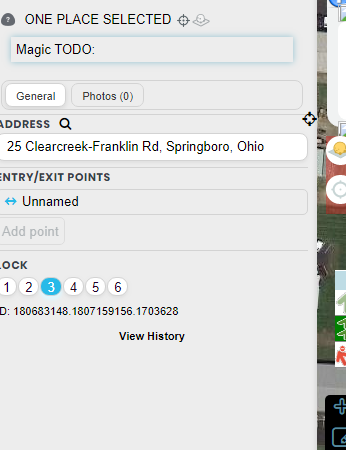
Adding RPPs today and noticing street name and city from the closest segment is not being auto-filled.
Make sure you have the latest version - I fixed that bug Thurs or Friday
Hi Justin,
When PIE is activated with WME Check Road Name, there is an annoying inter-action on WME Check Road Name.
Without other script or extension.
Windows10, Chrome, updated.
Console :
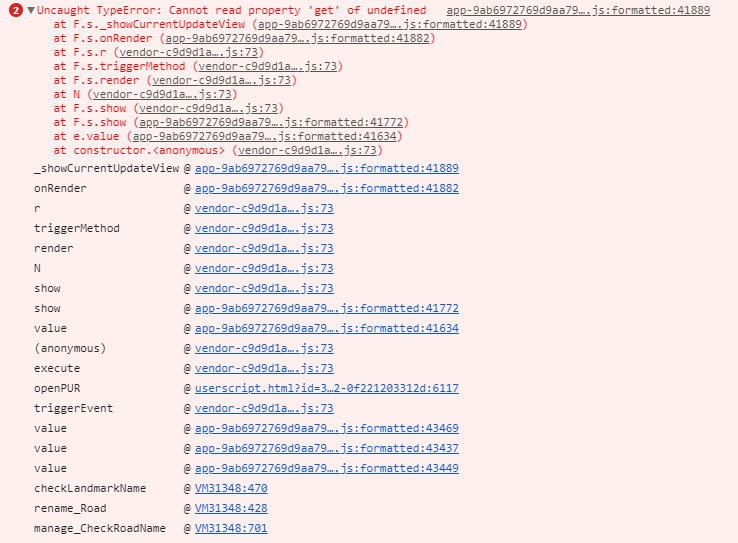
I can try to take a look but since that script is dedicated for France, I won’t be able to really test.
I still can’t see PIE at all even though it is enabled and on current version. Any troubleshooting tips?
Are you unable to see PIE in WME Production?
Could be a conflict with another script, what scripts and extensions do you have installed?
Prod.
I can no longer access/update TamperMonkey due to firewall issues on my main PC, but my laptop has no restrictions. Therefore I run updates on the laptop, back up my scripts to file and then restore them on the main PC. Setups are nearly identical, and shared scripts are 100% identical. PIE runs on the laptop but not on the restricted PC. No other script troubles. I’m guessing something about the PCs restrictions is blocking PIE.
Have you checked the console for errors?
I have no idea why my brain did not process that simple task, to check the console. Thanks. Here is the error I am seeing.
.
.
.