We have the same issue with many places with the same names - except they are not mosques. They go by the name “Starbucks” or “McDonald’s”. 
1 Like
LOL
We don’t have problems with McDonald’s and Starbucks names here because at the end of “Starbucks” or “McD,” there’s always the name of the area it serves. They also come with their own signboards. For example: Starbucks Tanah Abang, Starbucks Cilandak KKO, etc. The same goes for McDonald’s.
1 Like
We can have multiple Starbucks on the same street, and some can be on opposite corners of the same intersection. That means adding the area it serves is not necessarily helpful. We also argue that the address information serves this purpose in most cases.
1 Like
Of course, the number of Starbucks here isn’t as large as in their home country. We don’t have the luxury of having two Starbucks at a single intersection  .
.
1 Like
7 Brew is the way to go now!
1 Like
Hello,
Thank you for your script.
However, when I press alt+r, no RPP is added. I can only add an RPP using the g key, but the information is not pre-filled.
Is there anything special I need to do to make this work?
1 Like
Hello.
“Edit RPP address after created” in the new object section stopped working after WME update a month ago.
Everything else working fine (fill other information automatically, like street, city), but not ready for adding place number like it was when option works.
Is it possible to fix? as it reduce AT/POI creation process significantly.
Thank you in advance!
1 Like
Hi, is it possible to make setting New Places Lock to work for Residential Places too? Currently it doesn’t. Sometimes I add several Residential Places that would be nice to be automatically locked to L2.
1 Like
What do you have for settings? It works for me locking to 3.
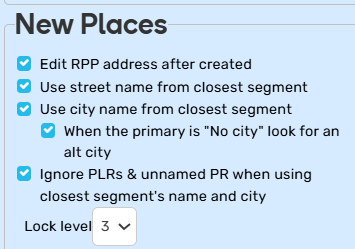
I use Alt+R to create the RPP. Street, city, and lock are all correct. I only have to add the house number.
1 Like
Thanks for the great script! I’m using version 2025.04.10.00 of the script with Chrome 141.0.7390.77 and Tampermonkey 5.4.0, and I’m running into a couple issues:
- Most of the “Properties Panel” options don’t seem to work (I see the Geometry buttons in the properties panel, but none of the other options that should be added).
- If I change the script settings and reload the page, they return to their default values.
Should the script be fully working with the latest WME? Is there something I’m doing wrong?
2 Likes
I am not seeing PIE at all anymore?
2 Likes
For me, it stopped filling in the city name. Is it a known issue?
3 Likes
The area size doesn’t work properly for me in Firefox. I have to select the place, then in PIE untick / tick the Show area box, and then go to the Select tab to check the area. Repeat for each place, because it disappears.
3 Likes
Hi there,
I have a new issue… with the newests versions (already on the 2026.03.18.01).
I create an RPP with the ALT+R shortcut and there is no autofill, the sidebar with information is not opened and the entry point can’t be deplaced whe (I need to leave RPP, and click again).
I’m here to discuss about my problem,
Good lulck, and thanks for your script.
3 Likes
I’ve experienced different variations of this over the last year or so.
It used to not automatically open the side pane to enter the house number. Now it does, but doesn’t automatically have the cursor in the HN field.
I can’t remember the details, but I have a feeling this behavior is caused by something WME related.
4 Likes
The switch “Highlight closed places” actually shows/hides all color marks related to Google places. Please consider providing a separate switch for every color mark.
2 Likes
Hello, I have already the bug on RPP.
I use the shortcut : ALT+R, is working.
But side window don’t opened…
the entry point is on rpp but not in my mouse movement.
v2025.04.06.01 work better for the rpp
Here a video screenshot: https://youtu.be/pE2TXTAZykM
1 Like
I submitted a fix for this a few days ago but it does not appear to have been approved yet.
1 Like
Hello,
I can’t get the ALT+R shortcut to work – nothing happens. What should I do?
For your information, I’m using the latest version of Chrome on WME Prod.