Thanks a bunch!
Thank you very much for putting this together. I used to modify the WME Mass Control script to do something like this, but since the major changes under the hood, I haven’t had the time to fix it.
One request: can you put in the ability to limit the number of segments that get selected? This was a very useful feature in Mass Control so that if we were doing updates, I could say “only select 100 segments at a time”. When you select more than that, on slower machines, each property change can take a long time.
I will add this to the next version.
I’ve released the new version 0.7 with following changes:
- wrong selecting segments with multiple alternate names corrected
- added the possibility to limit the maximal number of selected segments
Hi,
just started to use the script half hour ago.
it’s perfect.
Regards and Thanks,
Marcel
Please add STATE option. I have to deal with numerous state errors around Ga Fl Al borders, thanks!
I not sure I understand what you mean.
The possibility to select State in NA region was added in version 0.5 (the first internationally released version).
Sorry! I found this forum thread while reading on my ipad. The OP screenshot does not show state so I sent the post before loading the script. Now that I’ve loaded it I see it is there.
Thanks for a great script.
Need an option to allow selection of
Elevation = 0
or
Elevation = Null
I am seeing a bunch of new paved roads with ‘Null’ [WME shows ‘blank’ when they are selected] or ‘0’ [toolbox flags them as ‘0’ when <> ground option is selected] as an Elevation.
If I try for != ground, it doesn’t select them.
= ground does but it selects others also.
Thanks!
I’ve never seen this. Do you have some permalink with an example?
Ditto to that. Excellent addition to the arsenal of scripts to tackle map edits.
Thanks from me to you, and ALL the great scriptwriters on here. 
Steve
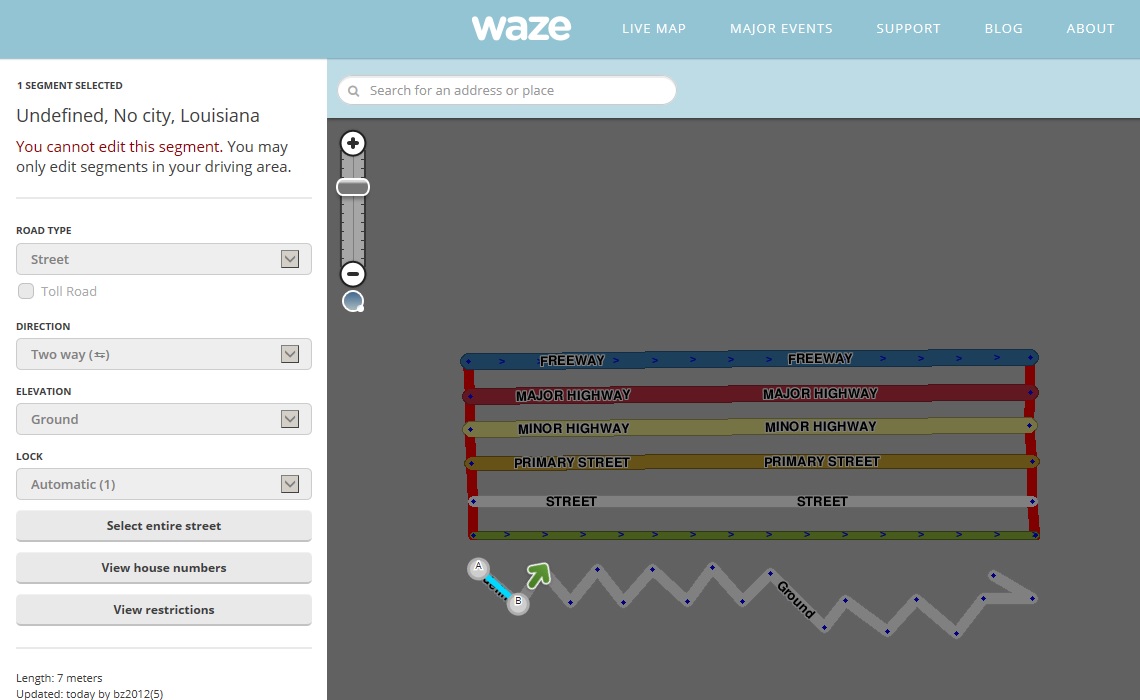
Easy enough to create, just set the elevation all the way above the highest number (blank)
on any segment.
Here are some (the vertical segments on the east end) those on the west end are at ground.
https://www.waze.com/editor/?env=usa&lon=-91.82838&lat=30.46820&layers=1924&zoom=8
Below that, there are segments at each level, as a test.
I may have just found another bug. Working in that same area, I decided to ask it to show me everything I created there or updated. It didn’t select anything! I then asked for those I created. It selected them all. I then asked for those I updated. Nothing selected. 
Strange. I did it and the Elevation is Ground.
Even in your example I see Ground.
Please send me the query you used. It is shown in the Selection area.
On the example, perhaps it is different if you are able to edit in the area.
If I have zoomed in and scroll the area, I find it displays as Ground. WME is apparently changing it when it refreshes after the scroll.
The thing is, I was working on an area someone had paved and the segments were all ‘undefined’ as to level. I wanted to select them to set them to ground but there was no way to do that.
I then noticed that they were acting as if they were set to ground, as far as Road Selector was concerned, but it was also selecting nearby roads set at ground.
as for the selection criteria
Selection
Updated by = “bz2012”
Returns nothing.
Selection
Created by = “bz2012”
selects all.
Selection
Updated by = “bz2012” OR Created by = 'bz2012"
returns nothing.
Known issue. See the WME and Toolbox threads.
WME has a big that returns a null elevation briefly after a segment has been updated in some manners.
The elevation returns to “ground” shortly after and will be correct on a screen refresh.
Toolbox/JNF contained code to mask this, and it was omitted on this build of Toolbox.
I’ve tested all 3 queries (with unchecked “Editable only” in my case) and all queries selected all segments.
I did similar test in my EA with my login (with checked “Editable only”) and the tool selected the segments updated/created by me as requested.
It is strange behavior you have but I cannot correct a problem I cannot replicate.
Understood. I will try to isolate factors that may influence. Thanks for trying.
EDIT: I have done some testing. I disabled all other extensions (except tampermonkey and WME booksmarks) No change.
Selector will NOT select in that test area, when I request (or include) updated by = me
It WILL select in an area I have worked in Baton Rouge, La.
Very strange. Do you have anything you would like for me to look at?
Additional infomation:
I scrolled away and zoomed out, went north to Krotz Springs and it did select there.
I scrolled back to my test area and NOW it selects there!
There must be some array of information that was refreshed by that action.
Is it possible to add a condition to select only segments that have or not a Time Based Restriction?(doesn’t matter the restriction details, just if the segment has it or not).
I have an area with multiple restricted segments (about 30-40) for events and holidays. It’s a pain everytime I have to maintain it. (add new event for example)
Thank you!
I’ve released the new version 0.8 with following change:
- added the possibility to select segments with/without restrictions
Can we get some kind of ‘busy scanning’ indicator, so that we know when it has finished the currently viewed area and can scan to another?
If it doesn’t find anything to match the criteria, I don’t know when it is finished looking.
Also, is there some way to integrate with toolbox so that we can define a shortcut key to press the ‘select roads’ button for us?