I tested the above examples but not working.
Could you give me yours so I can test as well please?
I tested the above examples but not working.
Could you give me yours so I can test as well please?
Hmm…interesting. I tested on FF and it’s working then I opened Chrome again and now both work. Anyway, thanks for added the Taxi mode 
I’m sorry if I misunderstood this script.
I thought it could show the route as it is before the map tiles have been updated.
Am I doing something wrong?
No, it shows the same route that the Livemap and the App will show, after tiles have been updated.
To see what instructions might be for individual junctions before map tiles update, have a look at Junction Angle Info.
To clarify, Tim means that it will show the route that Livemap would currently give, which is based on the most recent tile update, not on what WME has. Waze provides no way to calculate a route off of the WME map database, only the Livemap and app map databases (which are not always identical, by the way).
Are there any issues with roundabouts I should know about? For some normal roundabouts the script is giving the “at the roundabout take the nth exit” instruction: https://www.waze.com/editor/?env=row&lon=-69.95016&lat=18.44100&layers=1477&zoom=7&segments=141137079,141137089&mapProblemFilter=0&mapUpdateRequestFilter=0&venueFilter=0&update_requestsFilter=false&problemsFilter=false
and viceversa, for some not normal roundabouts it’s giving the “continue straight” instruction: https://www.waze.com/editor/?env=row&lon=-69.93801&lat=18.44679&layers=1477&zoom=7&segments=273246043,273246697&mapProblemFilter=0&mapUpdateRequestFilter=0&venueFilter=0&update_requestsFilter=false&problemsFilter=false
Also, i’ve noticed that sometimes if I select the entry segment to a roundabout to be the segment joined to the roundabout, the directions are off. I need to select the previous segment, and then everything is ok.
https://www.waze.com/editor/?env=row&lon=-69.94051&lat=18.44536&layers=1477&zoom=7&segments=251792718,251792752&mapProblemFilter=0&mapUpdateRequestFilter=0&venueFilter=0&update_requestsFilter=false&problemsFilter=false
Indeed, these examples do look very peculiar. You see the same instructions on Livemap too, so it’s a problem with Waze routing rather than this script.
[shrug]
I’ve added an experimental feature to v1.21 that will select the route segments for you.
Install from Greasyfork. Version 1.21 now also uploaded to Chrome.
Here’s what the new feature looks like - it’s a handy alternative to WME’s path selection feature:
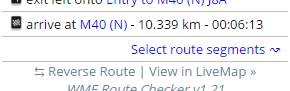
You may also be interested in this bookmarklet to Reselect Segments from Permalink.
What is WME’s path selection feature?
From Selecting multiple segments - YMMV
any chance of getting the script to work with RBS
Excellent!!! tested and approved
As this is a beta feature that only some testers have access to, probably not. We’ll see.
Sent from my Wileyfox Swift using Tapatalk
ahh ok… will stick to the traditional LM method then. cheers 
Hi for All. Anyone had problem when used route check on new wme plattaform?
I’m using forefox 42.0 and the route check doesn’t work.
Hi all i like to join beta tester, but login with my current waze account always invalid. Do we need to signup on centrecode.com event existing user on waze?
Thanks,
Sent from my iPhone using Tapatalk
This is not the place to ask for access to beta. Currently, there is no way to sign up for WME beta, you should talk with your local champ about that (though I would say you should get more experience as an editor before jumping into the beta). Only the app beta uses centercode and you do need to request an account there in order to be added to that beta (don’t know the exact sign up process, again talk with your local champ).
I’ve been having intermittent issues on Firefox for a while now seeing the navigation path and instruction overlay in WME. Note that the list of instructions are displayed fine on the left panel - I’m speaking of the purple line, arrows, and instructions on the map itself. Sometimes the route checker layer doesn’t seem to be on top. Through some quick WME layer toggling and/or scrolling around during slow page loads, I sometimes catch a glimpse of it. So it seems like it’s being drawn, but it’s underneath the current view. This same layer toggling (any layer, but mostly the satellite layer it seems) can sometimes correct the issue, but usually several page refreshes are necessary until it (seemingly) randomly starts working again.
Seen on FF 45 and 46 as recent as today.
WME Route Checker - v1.23
I’ve got the same problem as explained by aBshield.
The purple route is shown but hiding behind other layers. Turning off Satellite Imagery shows the pathway under the streets, turning off street layer shows the path perfectly fine.
Turning the script off and on again or refreshing the page works sometimes but not always. However the mistake shows up again in irregular intervals. At least I can not tell what triggers it.
I am using FF v47.0.1
WME Route Checker 1.23
Feature Request:
It’d be handy to have an indication of when the most recent edit was done along the routes being displayed, to save us having to click on each segment manually to see if there’ve been any changes made since the UR was submitted and which might then account for the WMERC results failing to confirm what the UR reporter is complaining about…