Can you get a route in the app between those points? I can’t get a livemap route between those points either. Looks like it might a waze routing problem not a script problem.
I am recieving the same error.
When I try and plot a route in the live map, it returns with an erorr:
Whoa! Something went wrong. Please try again later.
This happens in Chrome, Safari, and Firefox (on Mac)
Sounds like a routing server problem rather than a script problem to me.
Would be nifty to have a button which ranked the routes in the same order as Livemap. This wouid help a lot while investigating BDP issues.
I think the script does this automatically if you find have “try more” checked. Can you confirm please?
Sent from Android using Tapatalk
Nope. The only thing Try More does is increase the number of routes requested internally to 10 times the number shown in the selector box, then filter the best of the returned results out and display them according to the Route Type setting. I don’t think I’ve ever seen this script do Livemap ranking, except maybe when it was first under development.
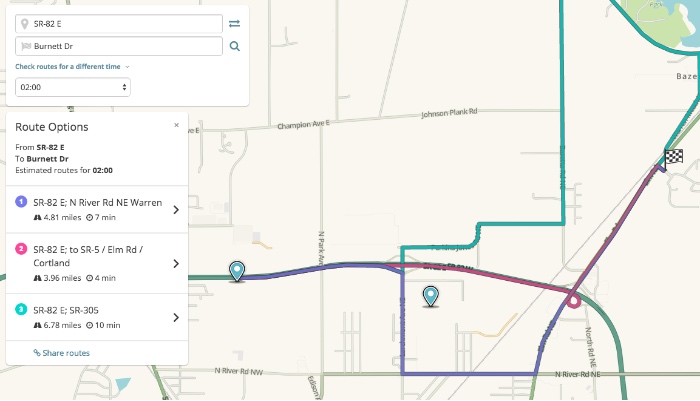
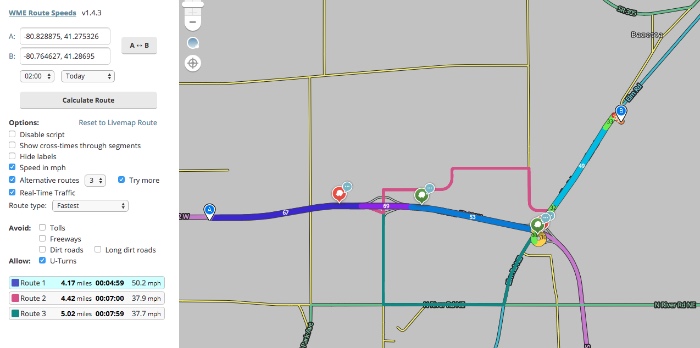
I meant to say inchecked before. Sorry.
I recently had a route return LM routes without try more, but not with try more.
Sent from Android using Tapatalk
Just to clarify, you understand that I’m talking about the order in which they’re listed, not which routes are listed? As I said, I’ve never seen it do that, and the sort routine in the script doesn’t seem to have any accommodation for presenting them in “Livemap order”.
I’d make the modification myself, but I’m not quite that code-savvy yet. (Not gonna stop me from trying, though  )
)
So, for completion, here’s the same thing without Try More checked.
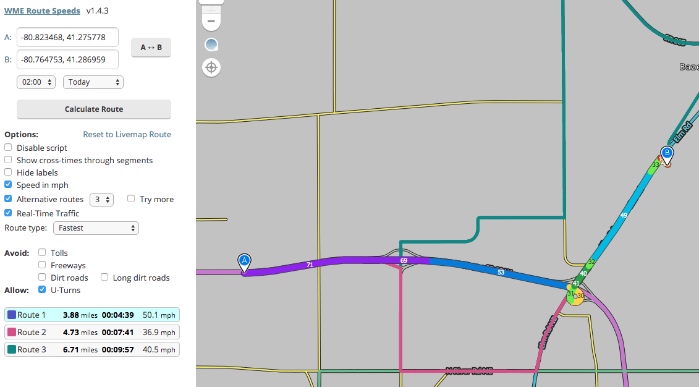
EDIT: I did manage to hack another checkbox in, which allows display in Livemap order.
Currently unable to get any routes in route speeds. (both normal or beta editors). All give error message
Livemap does give routes.
WME show routes doesn’t seem to be working as it used to work either. It is only showing a link to
Now that Taxi is enabled for some, it is going to add value if you could choose the vehicle type.
Is this in Beta, show routes isn’t authorized to work in Beta due to cross domain security, so this is the designed workaround.
Sent from Android using Tapatalk
I couldn’t get it to work in WME, nor in the beta editor, however it seems to be working in WME now.
Maybe I’ve just forgot it over the time, but I fail to see any way to stop the script displaying the routes, except the Disable script checkbox.
Could the Calculate route button turn into Hide routes, until any of the settings will change (what anyway results into the button flashing orange and the routes being recalculated & redisplayed)?
Sent from a touch display, which took care of perfectly scrambling my thoughts.
To use the script, select the Route Speeds tab.
Select your two segments, then manipulate the A and B pins for your start and end points (no segment selection is needed)
To clear out and stop using the script, just click to a different tab.
I can’t see route lines anymore in WME…
Any chance of getting the Avoid Ferries check added?
For quite some time I can only see one route option, even when I select more than 1 “Alternative routes” in the script menu.
Is this an issue just for myself?
I’ve been getting multiple routes most of the time.
I used to get many and up to 5, but for weeks now I only see one route and no other alternatives.
Same here, I almost always only get 1 route.