My apologies, you are corrected. The blue lines show normally.
But if you turn off the script, Street View images magically appear. 
That will be because you reloaded the page, not because you disabled the script  I’ve seen various reports about this from other people who don’t have the script installed.
FWIW trying to use SV with this script enabled results in a while screen.
This is what I see in the console log:
A cookie associated with a cross-site resource at http://google.com/ was set without the SameSite attribute. It has been blocked, as Chrome now only delivers cookies with cross-site requests if they are set with SameSite=None and Secure. You can review cookies in developer tools under Application>Storage>Cookies and see more details at https://www.chromestatus.com/feature/5088147346030592 and https://www.chromestatus.com/feature/5633521622188032.
Not sure if this is related but this is the only “new” error I see when this script is enabled and trying to drag a SV guy.
That seems to be a warning of Chrome that will no longer accept setting certain cookies. I am not certain where this cookie seems to be set. Even if this is coming from the images that get loaded to display the availability of Street View, I don’t think there will be an issue with the script nor do I think that this will have an adverse effect on the working of the Street View images.
All this script does is detect whether the street view button is visible (it is not visible when dragging) and then it changes the visibility of a map layer. The script does not interact with the Street View container, except for changes in the width. I’m not sure if anybody currently uses this part of the userscript, but I’m somewhat contemplating the removal of it. It just seems like extra functionality you wouldn’t expect from this script.
Thanks.
In any case - right now I have to disable the script if I wish to see streetview  Let me know if you want me to debug further.
You may want to check what might be interacting with this in some way. I am able to use streetview with the script. In fact, I have 42 scripts running…
The only thing I can imagine would be that changing the width of the Street View panel too early would somehow break the initialisation of Street View. I’ll try to remove that feature from the userscript tonight as I don’t see it as an added value any more.
Anyway, you can use FixUI to do it 
Just released version 0.8.3, which no longer contains the “preserve Street View container width” feature. If you wish to restore this sort of functionality, feel free to look at WME Fix UI.
After today’s WME update, when I click/drag the Google Street View person icon over a road the road does not light up blue when it has SV available. The arrow does still light up blue/red depending on if there is SV available or not.
Thanks for reporting this! I’ve adjusted the script to show the street view lines again.
There is May 2021 SV here: https://www.waze.com/en-US/editor?env=usa&lat=40.11505&lon=-78.56191&marker=true&zoomLevel=19&segments=517835662 It doesn’t look to be official from the SV car but from a GM user. 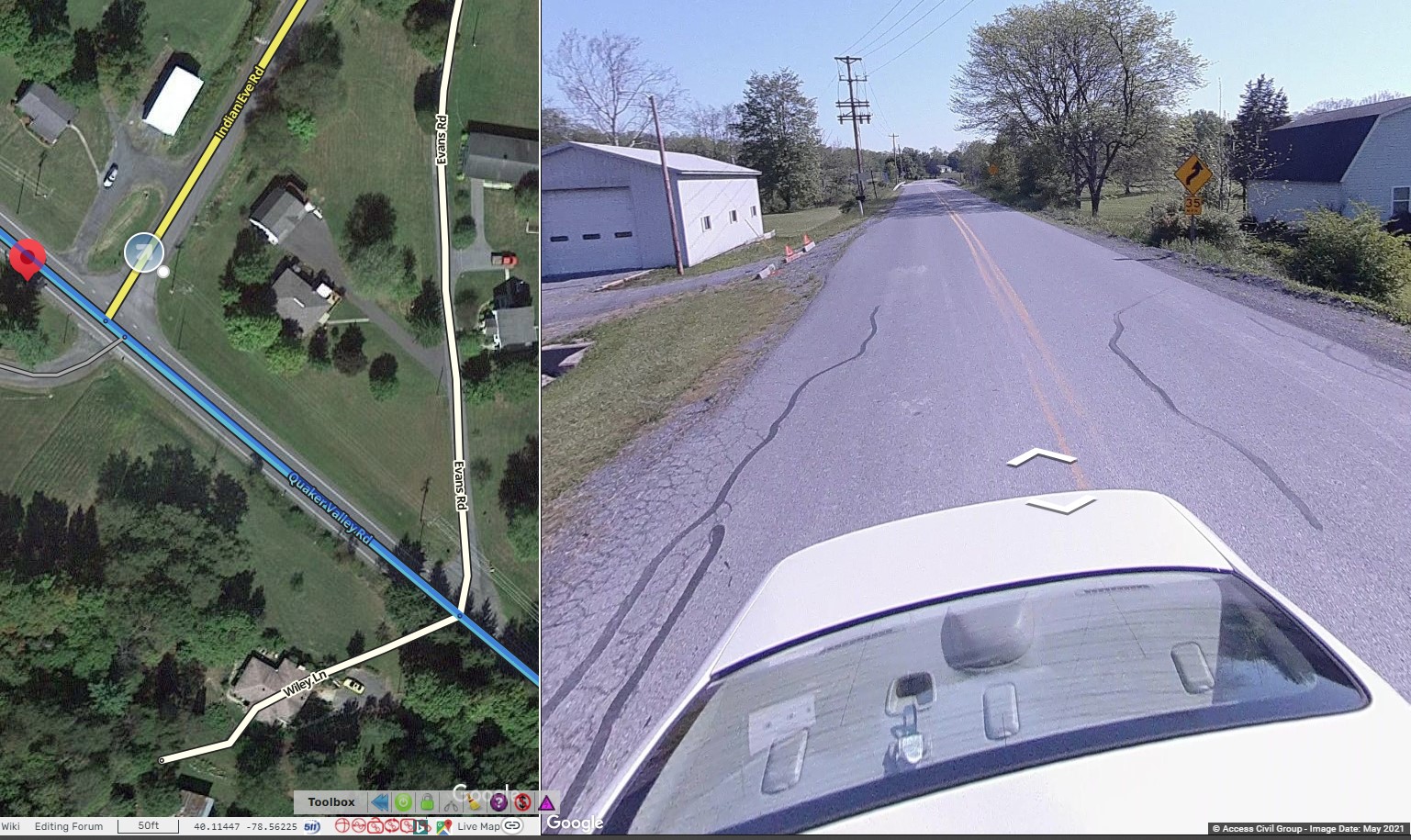
I noticed that the marker doesn’t turn blue when dragged over roads with SV like this or draw blue lines on those roads. 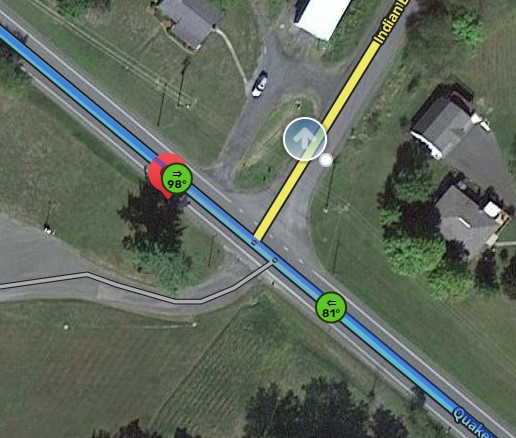
Does the marker turn blue and draw blue lines on roads only under specific circumstances?
I have noticed the same in a few places. In GM it turns blue, but it seems that users SV is different from Google SV
I assume these sources of Street View data didn’t exist yet when they made that map layer, and they’ve never bothered to add them afterwards, as Google Maps doesn’t use it any more. I’m afraid there’s nothing I can do about that.
Hi, I noticed that time stamp has been missing from Street View images for quite some time. Can you, please, bring it back. It is of help in certain occasions. Regards.
Do you mean the timestamp that was in the top left of the street view pane? If so, that came from Toolbox and was removed back in June. Link to the discussion: https://www.waze.com/forum/viewtopic.php?p=2152359#p2152359
For what it’s worth, the timestamp is still displayed (in smaller text) at the bottom right of the street view pane.
I have indeed removed that option once Waze implemented the feature themselves. It didn’t make sense to me to show the same data that Waze already exposes
Ha, now I see what’s is going on - I need a bigger screen so the date is not cut by the width of Street View side window
Ah, that explains things as well In that case it should also be possible to make the Street View window bigger. It should be possible to resize it by dragging the line between the Street View imagery and the map.