I used latest FireFox 108.0.1 and TB not working, thank you and happy new year !!
The last mention was
Toolbox 1.9.17 not working on chrome 108.0.5359.125 
I’m using the same versions of both and having no problems. Perhaps it’s a conflict with another script.
Just wanna chip in that there are users that would love to see a release on FF. Addon Store says it was last updated 6 years ago (!!!) and it will not even attempt to load on WME with a message saying that it “Can’t read and change data on this site”.
This is not being actively developed. Right now there is a scripter who is doing his best to keep it working as it is, but I would not expect new features or release for Firefox unless someone decides to take it on full time.
Something else to consider is that there may have been some change in the Firefox extension world that made it difficult to maintain this extension.
Version 1.9.18 is available.
IMPORTANT:
The JNF (Junction Node Fixer) “Q” function works again (mostly). However, you must manually assign it to the “Q” key using WME’s Keyboard Shortcuts
“Copy segment attributes” is not working yet :(, I’m in v1.9.18
Hi,
since the last update, the toolbox won’t start in all of my browsers, Chrome-Based and FF.
At startup, I get:

Are there any known issues?
Regards
Jan
What version of TB are you using?
I am using the version 1.9.18
Interestingly, the problem occurred today after the toolbox auto-updated.
Do you have TamperMonkey enabled? Currently, I believe that TM needs to be enabled with at least 1 script active in order for TB to load.
It was mentioned a few posts back that Toolbox isn’t supported on Firefox anymore, so that answers that one.
As for not working on Chrome, I think he is looking into it, several people have reported the same issue.
Thank you for the tip with TM.
It is working and loading now in Edge. It had TM not installed there.
After a cache-reset in chrome, the toolbox loads up but has no function. It doesn’t highlight anything and the tools are also not working.
It now shows the following in the console:
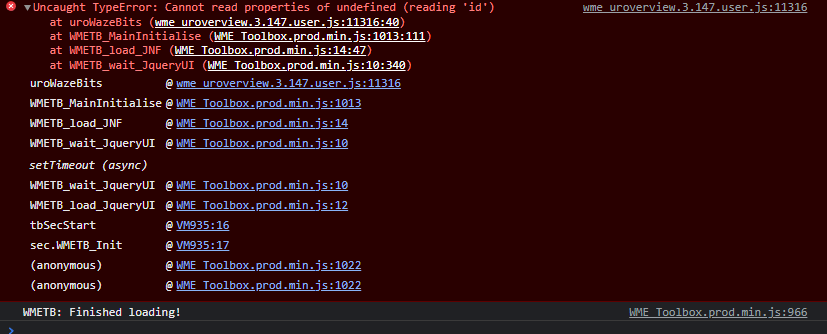
//edit:
Thank you. It’s running now in Edge, so it’s such a big deal anymore 
Try updating URO+ to the latest version and see if that fixes the issue.
Actually, if you have the URO extension installed, you should disable that and use the URO+ script for Tampermonkey. I believe the URO extension is no longer being maintained, but I’m not certain of that…
[EDIT] The URO author confirmed that the extension is still being maintained. Either way, I will fix this in the next TB release so people can continue to use the URO extension if they prefer.
I did as MapOMatic suggested and Toolbox works perfectly for me again. Thanks, MOM!
I’m only seeing this now: did the option to make the bar have two rows of icons disappear? If so: can it be reinstated?
Edit: Oh, it’s there now. I initially did not see the options in the general options tab below snap distance. Weird.
The Nudge HNs seems to be missing from TB. Unintentional? Or has it been removed? Thanks for all your work on TB. I use it daily.
Some TB functions are rank or role limited.