Glodenox, I’ve been looking for something like this. I have a layer using REST API that I’d like to add to WME. The data is from a public government source. FC, urban FC, speed limits, are the types of data available for a specific area of 82,000 square miles. Please PM if there is interest.
Actually, you’ll find that the second post on page 62 has me saying that there’s no need to worry about it, that I know what I’m doing and that this isn’t the right topic to discuss such things (the script isn’t even really published yet). (note: I’m aware it started on page 55, but the discussion died down only recently)
That is not up to you to decide and I’m afraid you’re wrong about your statement as the official statement adds that approved external sources are possible if the terms and conditions allow it.
I wasn’t even aware of the situation in Chile, but I already decided months ago that OpenStreetMap is never going to be in that userscript due to their terms and conditions. Please don’t presume I’m unable to read terms and conditions and know which restrictions apply to Waze (as that is literally the message you’re sending me now with your strong wording, which hurts).
That would be possible, but don’t expect that in the coming months. I’m currently limiting myself to sources that use the WMS protocol. The roadmap I have in mind for that userscript contains adding support for WMTS afterwards and custom maps later on.
Now, with all that said: can we return to the subject at hand please? WME Toolbox.
On page 55 I asked to make the Z-index of the layer with road speeds dynamic instead of just setting it to 101. I’ve now looked back at the code I provided there and found some issues, which I’ve fixed now.
I also proposed to hide this layer whenever the roads layer is hidden (as these speed indications have no use without the roads layer visible). Here’s how that can be done, though I suspect that the developers behind the toolbox are already experienced enough to do this themselves:
var roadsLayer = Waze.map.getLayersBy('uniqueName', 'roads')[0];
var lineLayer = this.LineLayer; // necessary as 'this' will be different inside the function
roadsLayer.events.register('visibilitychanged', null, function() {
lineLayer.setVisibility(roadsLayer.getVisibility());
}
Hi, I’m also having problems with the WME Toolbox speeds layer in combination with a custom script of me, and it seems that the solution of @Glodenox is the perfect fix for it. Can it be added to the next version of Toolbox please?
Many thanks!
We devs are currently all low on time, but I promise we’ll look into the layer issue asap. I’m very confident we’ll get this done.
What are you trying to say… You have Real Jobs, Family’s and a Live outside Waze… [emoji2]
Sent from my XT1080 using Tapatalk
Everyone, please move the copyright/other script discussion to a different thread or to a PM. This isn’t the place. The thread needs to be focused on TB so we know what needs to be addressed without having to dig through off-topic posts.
A fix for this has been implemented, it’s currently in testing. More news coming soon.
RE: Copy Segment Attributes
This is a very useful tool. Can “state” be one of the attributes copied?
Every once in a while, I come across a patch of segments with the wrong state along with other wrong attributes, and it would be convenient to change them all at once time.
Thanks for your help!
According to the code, the state information should also be copied as soon as you tick “Country”. I cannot try this as we have no states in my home country. Could someone test please?
I just did a brief test and even though it only shows check boxes for
country
city
street
it also copied the state.
You might be able to open WME in a ‘stealth mode window’ and play in the ‘practice mode’ to test things like this. I am not sure how well they work in practice mode, of course.
Oh! Because it did not give the option, I did not even think to check if it would do that. Thanks for the answer and thanks for testing.
We’ll update the field text to “Country / State” then.
Hello my friends.
I have a little problem with toolbox. I come from Venezuela and we don’t have Cctb. So we have the default toolbox configuration. In January I will be upgrade to Local champ. And the toolbox recognize me like an AN and CM. And I have more special tools with the script. But since one week the tool box don’t recognize me like CM. it’s recognize me like AM but no CM. And I continue to edit in entire country . So I don’t understand what happen with toolbox and me. Some one can help me with this problem. I don’t have solution. I reinstall the script . I change from country. I am AM in Thailand and I participate in MR in Brazil and soon I will be go tn Turkey. AND WITH ALL changes my situation don’t change. thanks for help me.
Lucas, no estas listado como CM. Por eso TB no te reconoce.
Lucas, you are not listed as a CM. That’s why TB don’t recognize it.
Check your usergroups here, at the forum 
I don’t know if someone has already requested this, but in case they haven’t:
Feature enhancement request for the color highlighting for speed limits: Would it be possible to change the way that it colors the edges of a street to make it obvious when a speed limit hasn’t been confirmed/verified? Maybe a broken color band for unverified, and solid (as it is now) for those speed limits which have been verified? The colors are useful for when scanning an area for speed limits, but if Waze has decided on a speed limit that hasn’t been verified by an editor yet, there doesn’t seem to be any way of knowing this. Kind-of defeats being able to use colors to tell where speed limits haven’t yet been set… 
So if that’s something that could be added, it would be great!
The toolbox backend doesn’t check the forum for CM status.
AM and CM are actual editing roles designated by Waze and the editor recognizes them as such. That is what TB checks for and uses.
Local and Global champ are community roles, not editing roles, so the editor doesn’t care about them. TB has a built in list of Global Champs it checks for the related functions.
If you are showing up as a CM in the editor then there is something wrong with TB reading your status.
As I am not getting TB to load at all right now it might be having issues since the latest update. But it very well could be me.
If you don’t want to wait, you might be interested in using Road Selector + Highlights integration to identify specifically unverified speed limits: https://greasyfork.org/en/scripts/search?q=WME+Road+Selector
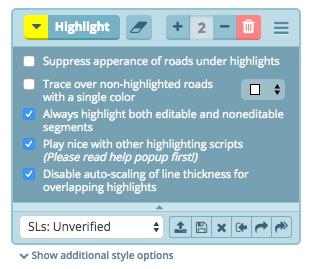
If you do end up trying it out, here’s something that you can import into RSel Highlights… You’ll probably have to also select the checkbox for the setting “Play nice with other highlighting scripts”:
[hide]{"Unverified SLs":{"HIGHLIGHTS":[{"rule":{"expr":{"type":"Speed","op":"6","txt":""},"text":"Has unverified speed limit","isValidated":true,"tryOnce":false},"style":{"strokeColor":"#e1201b","strokeOpacity":0.7,"strokeDashstyle":0,"strokeLinecap":0,"strokeWidthScale":0.2,"strokeDashSizeScale":1,"strokeGapScale":1,"underRoads":false}},{"rule":{"expr":{"type":"Speed","op":"6","txt":""},"text":"Has unverified speed limit","isValidated":true,"tryOnce":false},"style":{"strokeColor":"#ffff00","strokeOpacity":1,"strokeDashstyle":1,"strokeLinecap":2,"strokeWidthScale":0.2,"strokeDashSizeScale":1.5,"strokeGapScale":3,"underRoads":false}}]}}[/hide]
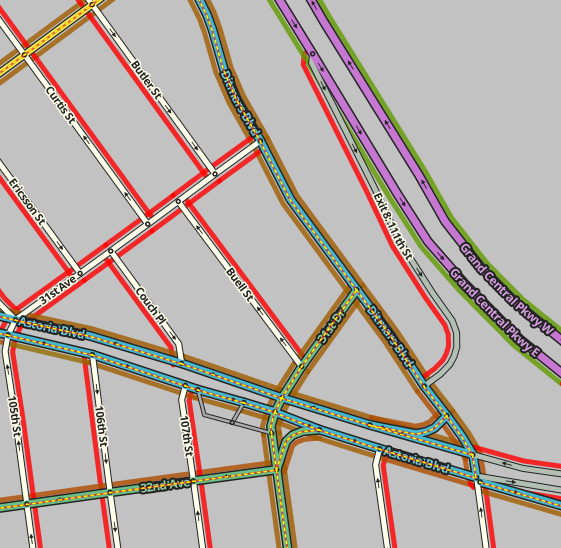
The result are the dashed lines going down the center of the road in this screenshot:
And here is the setting that you’ll have to check to get it to work with Toolbox highlights (2nd one from bottom):
Thanks, I’ll check that out when I have time. Or maybe they’ll be able to add something like what I’m hoping to see into TB before I have time to look into this, and then won’t need to worry about it.
Don’t get me wrong, it looks like a cool idea. I’m just really strapped for time right now.
Bringing up an older post…I’m with taco909 on toggling the default to save the PL without layers.
I’d like to go one step further since the last WME update…I’d like to be able to toggle which additional filter parameters are copied such as problemsFilter, update_requestsFilter, mapProblemFilter, mapUpdateRequestFilter and venueFilter. I prefer to strip them so the url is shorter and a glance can tell you what’s in the link.
$.02
Agreed. Most of the time, having those parameters (layers, xxxFilter) in the link is a nuisance. Someone will send me a link for something they want help on, and then poof goes my default settings and I have to change them all back again. Far better to have the default copy action not include those parameters.