FF users, please try to freshly install the addon now. So please remove it completely, and re-install it from the link in the first post. Somehow, the update seems to have gotten stuck, so the 1.6.1 version was still live (but which called itself 1.6.2). Now I’ve re-uploaded the “real” 1.6.2.
Yes, my FF has now loaded ver. 1.6.2 and appears to be working normally. Thanks, @BellHouse!
I did a manual “update extensions” in my chrome extensions page. That bumped it from 161 to 162 and solved the wiki page loop.
send from my SGS4, using Tapatalk
Thanks !
It is now working!
That fixed my problem! Thanks! 
Working ok in Firefox now, thanks!
Thanks, I’m kinda new to the whole Mac thing, my wife got a new MacBook about two months ago and I got her old one to replace my aging laptop.
Even so, it is still inefficient compared to the old functionality of the tool.
I have kept biting my tongue over entering this debate, but alas, I cannot restrain myself. HD, you said the question was about geometry nodes affecting performance of a) the editor, b) the app or c) the servers and more specifically, impact of more nodes vs. less. Obviously we do not know how that geometry information is stored but from the given response, that extra storage of nodes is not an impact that the performance, storage is not a factor. I might argue that the answer could be different if you had asked 100 nodes vs. 10 nodes (or 1000 nodes vs. 10 nodes). In a database the size of what the US maps would require, I am not surprised that what I believe is a very small portion of the data (and it has been stated that this data is simplified prior to sending to the app) has little to no impact in the scheme of things. As a comparision in WME performance, I would point to the Albany, CA example where the editor(s) added a residential place point for every house for MANY blocks. While I believe the app never gets that data, WME certainly does and it handles that overload extremely well.
Well said, in simple terms; additional nodes obviously must increase storage to some extent. But we have been assured it doesn’t negatively affect performance of the server, WME, or the client. Staff is not overly concerned about it either, so neither should we be.
[i]Take home message,
- don’t go around just creating a million extra geometry nodes for fun, it’s wasted effort since they will be simplified before going to the client regardless.
- don’t spend lots of time simplifying existing nodes, do something more important, there are automated processes in place to handle these geometry nodes. Your time is much better spent fixing issues, responding to URs, PURs, etc.[/i]
Sent using Tapatalk for Android
In the scheme of things, there is only a single impact that we probably can agree on. An overly complex segment requires more time editing later, down the road. A friend on another project had a saying for things like this, rather than saying use common sense, he said “Don’t be a jerk.” :o Don’t overcomplicate or oversimplify. Pick a happy medium.
Agreed. And now that I understand that geonode count isn’t the impact that I thought it was based on earlier comments made months ago, I’m not going to sweat them anymore, nor will you see me here complaining about the lack of a simplify segment tool. I’ve turned of Tb’s highlighting of simplifiable segments, since I see no point in being alerted about something that’s a non-issue.
Thanks to those who took the time to provide the additional information!
I agree that simplification obviously has some kind of minimal impact but the impact is so low (and consequences of using the tool incorrectly are so high) that it’s easier just to not have the tool.
My only real complaint at this point would be if there was a highlight but no tool to fix the highlight with. I guess it’s not visible to a rank 4 AM cause I’m not seeing the option, so I’m happy. (Yeah, you can turn it off, but pointless stuff is pointless.)
Hmm, spoke too soon. It’s still not showing toolbar half the time, and the only workaround is to close and reopen Chrome.
Without having further details, I can only guess this is either some temporary hickup, or your cache is somehow messed up. Have you tried clearing all browser caches?
Which browser are we talking about?
Chrome, as stated
Well, tried everything, like clearing cache and cookies, disabling every other WME script, and nothing, same result. It’s not working when calling WME the first time on any tab. I have to open WME and then close the browser with WME tab(s) opened. Then open the browser again, and then TB loads OK on the restored tab(s). Very weird…
I still cant get Toolbar working in Firefox. Tried removing it and reinstalling, without any success. The toolbar is working in the background, highlighting streets that I marked previously and showing turn restrictions. Just no way of any control.
I have the same problem 
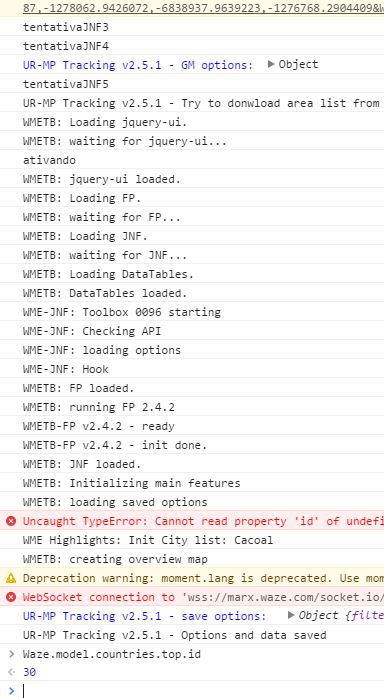
Does the console (F12) show any errors?