Yup, the WME update broke some stuff again. Waze seems to time the updates with my vacation recently, so it may take some days before a fix is available. 
I have the same problems and I think it’s because of a conflict with the toolbox 
Just let us know when you’re going on vacation next time, so we can plan for these WME updates. :lol: :lol: :lol:
:lol: :lol: :lol:
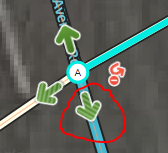
One question… this is considered by WME Toolbox as loop. Yes, it is a loop, but this kind of loop does not present issue for routing alghoritm, because it is handled by red arrows, so the alghoritm has always only one option how to get from one node to another. What do you think? Would it be possible to exclude these cases from WME toolbox detection and not to mark them as loops?
Even with red arrows and one way segments, Waze routing can be affected. It sounds counter-intuitive, but I’ve seen Waze route the wrong way on a pair of one way segments with properly set turn restrictions (all that was needed was the extra junction node to create a third segment).
Not the right place for it, but you can get the prompts you are trying to get without using an extra segment. Example.
It is not always possible to use sound override for that… Imagine you would try it here. You cannot because there are also streets coming to those nodes that would require turn left sound prompt…
As I said…not the right place to be discussing the finer points of editing. PM sent
I’d like to suggest the difficult turn icon be changed to something that stands out more than the current dark green on less dark green stripes. Maybe green/amber or green/red?
I’ve been slowly fielding a UR which I now see is caused by a difficult turn. I should have noticed it earlier :oops: but a more noticeable icon would have shown the issue right away.
Thanks for your consideration.
I wouldn’t know that Toolbox has a highlight for difficult turns.
look BellHouse:

For some reason I thought this was added by Toolbox. I don’t think WME used to have a visual indication. Is a better icon something that could be added by ToolBox? 
Ok, I see. The icon yianayas points out is the one for a temporary turn restriction, which also shows up for difficult turns (which was never intended, so I had forgotten about this detail).
But qazxcvbnmm seems to refer to another highlight, as the icon above is certainly is not “dark green on less dark green stripes”.
I believe qazxcvbnmm is referring to the striped turn restriction arrow indicator. The stripping is native to WME and is not any script.
This is the green/green icon for difficult turn. Sorry for the confusion as jm6087 is right. The (hard to see) striping is done by WME.
After windows crash (blue death), I can’t fix the little toolbox box. I set the position of it, but when refresh the WME page (F5), the position will be reset to this. What should I do?
Win 10, Chrome portable (I updated it to 68 from 67 before problem report)

This has been an issue for a bit. Not much can be done without an update for TB.
In the Toolbox menu, I’m able to select different things to highlight like speed limits and streets with house numbers. For some reason, many months back, I stopped being able to highlight road lock levels. I’ve tried reinstalling but no luck. Has anyone seen this? Thanks.
Please click the red lock icon in the menu (making it green), and the lock icons on the map will magically return. In other words, you most likely switched them off (by accident).