Sorry to be late, I was very busy at work.
v2.6:
- 180° bugfix
- tagged UR: search in posted comments
- WKT export of areas. (import in a future release)
Sorry to be late, I was very busy at work.
v2.6:
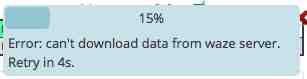
I’m still seeing the problem where the script cannot scan the whole country (UK). The scan gets to 15%; then an error pops up saying “Error: can’t download data from waze server. Retry in xs”, where x starts a 5 and counts down.
I suspect this is something to do with the new type of Map Problem related to closure suggestions from an external data source. In the MP list, they show a priority of “undefined” and a description of “Road closure”.
Javascript console output on starting a UK scan:
UR-MP Tracking v2.6 - Setup tiles for manual scan:   Object {type: "country", name: "United_Kingdom"}
VM2021:107 UR-MP Tracking v2.6 - Starting scan...
VM2021:107 UR-MP Tracking v2.6 - Tile count: 506
28VM2021:107 UR-MP Tracking v2.6 - Found: 0 URs + 0 MPs
VM2021:107 UR-MP Tracking v2.6 - Found: 2 URs + 0 MPs
VM2021:107 UR-MP Tracking v2.6 - Found: 13 URs + 0 MPs
VM2021:107 UR-MP Tracking v2.6 - Found: 8 URs + 0 MPs
VM2021:107 UR-MP Tracking v2.6 - Found: 11 URs + 4 MPs
VM2021:107 UR-MP Tracking v2.6 - Found: 20 URs + 3 MPs
VM2021:107 UR-MP Tracking v2.6 - removing old MP 3006043
VM2021:107 UR-MP Tracking v2.6 - Found: 0 URs + 0 MPs
VM2021:107 UR-MP Tracking v2.6 - Found: 2 URs + 0 MPs
VM2021:107 UR-MP Tracking v2.6 - Found: 1 URs + 0 MPs
16VM2021:107 UR-MP Tracking v2.6 - Found: 0 URs + 0 MPs
VM2021:107 UR-MP Tracking v2.6 - Found: 5 URs + 0 MPs
VM2021:107 UR-MP Tracking v2.6 - Found: 2 URs + 6 MPs
VM2021:107 UR-MP Tracking v2.6 - Found: 20 URs + 14 MPs
VM2021:107 UR-MP Tracking v2.6 - removing old MP 3013551
VM2021:107 UR-MP Tracking v2.6 - Found: 6 URs + 27 MPs
VM2021:107 UR-MP Tracking v2.6 - Found: 7 URs + 10 MPs
VM2021:107 UR-MP Tracking v2.6 - Found: 19 URs + 15 MPs
VM2021:107 UR-MP Tracking v2.6 - removing old MP 3009251
VM2021:107 UR-MP Tracking v2.6 - Found: 22 URs + 1 MPs
VM2021:107 UR-MP Tracking v2.6 - Found: 18 URs + 1 MPs
VM2021:107 UR-MP Tracking v2.6 - Found: 15 URs + 0 MPs
VM2021:107 UR-MP Tracking v2.6 - Found: 17 URs + 12 MPs
VM2021:107 UR-MP Tracking v2.6 - Found: 3 URs + 2 MPs
VM2021:107 UR-MP Tracking v2.6 - Found: 1 URs + 0 MPs
11VM2021:107 UR-MP Tracking v2.6 - Found: 0 URs + 0 MPs
VM2021:107 UR-MP Tracking v2.6 - Found: 1 URs + 4 MPs
VM2021:107 UR-MP Tracking v2.6 - Found: 10 URs + 5 MPs
VM2021:107 UR-MP Tracking v2.6 - Found: 24 URs + 5 MPs
VM2021:3365 GET https://www.waze.com/row-Descartes-live/app/Features?language=en&mapUpdateR…emFilter=1&editableAreas=true&bbox=-2.715427,51.104431,-2.215427,51.604431 500 (Internal Server Error)WMEURMPT_Injected.WMEURMPT.getMPs @ VM2021:3365WMEURMPT_Injected.WMEURMPT.updateListsFromManualScanNextStep @ VM2021:4190(anonymous function) @ VM2021:4501
VM2021:3365 GET https://www.waze.com/row-Descartes-live/app/Features?language=en&mapUpdateR…emFilter=1&editableAreas=true&bbox=-2.715427,51.104431,-2.215427,51.604431 500 (Internal Server Error)
Hello, i came up with problem. I just installed this script again. Used it on old laptop, so everything is gone here. Others scripts and plugins seems to be working. Also this script also seems working, but not 100%, there is nowhere to select countries for scan. I can’t add countries from list like before. It seems there is no function for me at all like that. But i know there is function like this. Anyway, here is screenshot how it looks like for me. Any ideas and suggestions?
Don’t mind that “Lithuania” text in box.
http://imgur.com/Kglc91y
Random question: How hard would it be to take the output and create a heat map from it? Something that would show areas with a lot of URs that may indicate map problems or just needs more attention?
#begin cheeky plug for one of my own scripts
If you haven’t already tried it, LMUR provides a wide-area overview of URs, MPs etc. using the livemap as its canvas. The markers can be filtered in the same way as by URO+, allowing you to quickly highlight areas that are truly in need of attention (e.g. where there are clusters of URs without any comments, or which are still open after x days).
#end 
:oops: D’oh I had gotten my head so wrap around what I was thinking, that I had totally forgotten about that. And it IS so MUCH better then what I was thinking about too!! :ugeek: :!:
@Zm0gis: I changed the access to country list from CM to L4+ (for SM). But I notice that your are CM and L3. I’ll change it for CM OR L4+. Sorry.
@iainhouse: I can’t reproduce the bug. If the response is “internal server error” it means that the server dislike something in the query, not in the answer. I’ll PM you.
Just to say that I also get the failure when attempting to scan a large area
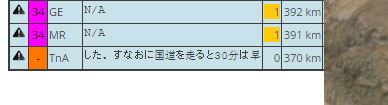
As the Japanese txt scrolls the columns keep shifting back and forth, making the PL column disappear.
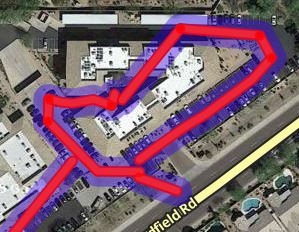
Filters intermittently not working.
In this case, I selected the top item from a list that should not have included any items with responses. The response ‘count’ column was showing a zero, but there are clearly more than 0 responses.
I also note that when ever I first go to this extension, it FAILS to ‘Hide all but …’.
I ‘work around’ the problem by switching the area to another and then switching back.
It is also failing to hide ‘tagged’ URs. (the one selected in this case was tagged).
URMPT has recorded that at your last visit, there were no comment. When you clicked on the target icon, URMPT has updated the data, and the UR has disappeared from the list (top item has not the green background).
This case should not happen just after a manual scan of an area containing this UR.
yes, already mentioned here. I’ll fix it.
When update is coming? (Waiting for change for “custom country” for cm as 3lvl)
PROBLEM:
clicking on ‘Filters’ does nothing for URs, it works normally for MP.
EDIT: immediately after doing a ‘clear all’ and before scanning anything, clicking on Filters seems to open the filter menu. However immediately after scanning, it will not open the filter menu.
So a work around appears to be
Google CHROME Version 44.0.2403.125 m up-to-date. Win7 ent 64 bit, up to date. WME (NOT BETA).
Refesh does not fix. I have a bookmark that opens the current location WME in a new tab. That often fixes things like SAVES that seem to be stuck. (The saved data is there, in the new tab even though the original tab is still greyed out, saving). That does NOT fix this problem.
No error messages. Clicking on Filters just does nothing.
I just re read your message and realized I needed to open the Javascript window to look for error messages.
I did that. No messages but while that window is open, clicking on ‘Filters’ works!
Not quite true, in one device mode, Filters works, in the other device mode, it does not work.
(I am not sure what ‘toggle device mode’ is doing, but it changes the look of things on the screen and the layout. Interesting. I can’t find a device mode that shows things exactly like I normally see things on my screen, and Filters works on all of the modes I have tried in that emulation mode. It still doesn’t when I toggle back to ‘normal’. ).
I think I have answered all your questions and have run out of ideas for what to look for.
Let me know what else I can do to help.
Can’t reproduce.
I did not touch this code for a long time.
Can you precise which browser, WME beta/prod, any error message in the console?
Did a WME refresh fixed it?
@Zm0gis: soon!
I added answers to your questions when I edited my original post.
Additional information: I Killed Chrome and all dependent threads and restarted.
THAT FIXED THE PROBLEM.
So something strange was hung and causing it. Sorry to bother you.
V2.7
I’m still getting an error when I scan. I had to disable the retry of MP data (lines 4478-4482)
    if (MPs == null && false) {
      WMEURMPT.info("Error: can't download data from waze server.<br>Retry in 5s.");
      window.setTimeout(WMEURMPT.getFunctionWithArgs(...);
      return;
}yes, not fixed yet because I’m still waiting for testing your bug (please, see iainhouse for more details).
I am having a problem with custom area. It doesn’t appear to save the custom area, and it has to be recreated often. Is there a bug here, or am I missing a save button someplace.
I could not import a WKT file. It asks me to choose I file even after selecting one and having it name behind the select file button.