All scripts disabled except for this one (and TamperMonkey to run it).
Chrome 70.0.3538.110
Windows 10 Home 1803, OS Build 17134.407
Network connectivity through employer’s unfiltered guest wifi.
Can see the USGB tab on the sidebar, all three checkboxes enabled. No city name or zip code at top of editing area, no red boundary lines.
Only one error in the console, appears to be related to native WME:
[i]Uncaught (in promise) Timeout - http://www.waze.com/:1[/i]
Next step will be to connect through my phone’s hotspot, which doesn’t work here, if you need me to go that route. Let me know. But the script is present and not throwing any errors…?? Strange.
If you read the script’s description at https://greasyfork.org/en/scripts/25631-wme-us-government-boundaries, you’ll see that it does not display true ZIP boundaries, but rather census block areas. However I’m sure you know better than to copy anything from an unofficial source into the Waze map.
[EDIT] Plus, looking at that private site, I notice that it shows a lot of ZIP code boundaries running down the middle of roads. That is very unlikely to be correct since, in most cases, the same postal route serves addresses on both sides of the street.
In one county I edit a lot (Sussex Co. Delaware), the county GIS system has a ZIP code layer. Unlike either the script or the private website, their ZIP code layer shows the boundaries running between streets and in many cases coming to a point at an intersection where the delivery route ends.
Unless you have a resource like this, the only 100% reliable way I know to identify the ZIP code for a given point is to type the address into https://tools.usps.com/zip-code-lookup.htm?byaddress and see if it returns a valid 9-digit ZIP. (Sometimes if you put the wrong city in, it will return a 5-digit ZIP and it looks like a valid address, but it’s not.)
Indeed and well aware, thanks for the friendly reminder. Just trying to find the best informational resource when deciding how best to define alt addresses.
Boundaries running down the middle of roads exists predominantly in both resources, so that attribute alone doesn’t seem to serve to help distinguish their usefulness from each other.
Some good discussion, and good finds. Honestly, the ZCTA thing is really just a guesstimate. Drawing ZIP code boundaries on a map will never be perfect since ZIP codes are defined by the routes driven, not polygons. The page russblau linked shows the routes (enter an address, and hover over the gray highlights on the roads), which is ideally what I’d like to draw on a map. If anyone has any suggestions on how to pull that data in… https://eddm.usps.com/eddm/customer/routeSearch.action
Looking at that map, you can find scenarios all over the place where a section of road on a ZIP code route crosses over one of the ZIP code service area “boundaries”, i.e. the boundaries aren’t 100% accurate. You can also see where the boundaries line up on top of a road, there is really just one ZIP code route there.
It does appear that the ZCTA’s defined by the 2010 census (and used by the script) could be outdated. I’ve overlaid the two maps here: http://arcg.is/1LmfWm
It’s interesting to note that a large % of the maps are identical, but there are definitely some differences, and even some zip codes that appear on the USPS map but not on the ZCTA map. My guess is that the USPS may have started with the ZCTA map, but has been modifying it over the years.
Unfortunately, I can’t use the USPS map the same way I’m using the ZCTA map in the script. I could probably have it display the boundaries and labels exactly as they appear in the USPS map (overlaid images instead of drawing the geometry by the coordinate data), but it wouldn’t be able to detect the ZIP code at the center of the screen and then display the city. One option might be to display the USPS map, and have a text box where you can enter the ZIP to get the “recommended” city. But it still won’t be completely accurate because it’s based on polygon boundaries. And to complicate things more, there are other city names that will work for some ZIP codes, not just the recommended one… yay!
So… yeah. It’s not a simple problem. To answer the question: the USGB script isn’t gospel, and it’s likely no script that draws polygon boundaries will be. I might trust it to some degree in the middle of a ZCTA, but maybe not so much toward the edges. Though now that I’ve seen where the USPS map has new ZIP codes drawn… I’m less inclined to blindly trust USGB anywhere that I’m not already kinda familiar :?
Just a quick update… I’m working on a script to pull the USPS routes from https://eddm.usps.com/eddm/customer/routeSearch.action and overlay them in WME. Hopefully that will serve as a double check for USGB’s ZIP code areas, and when the ZIP code area borders lay directly on a road.
Release v2018.12.28.001
Per the discussion below, you can now retrieve the actual USPS carrier routes and display them as highlights on the map. This should be more accurate for determining the mailing address city when compared to ZIP Code area boundaries (aka Zip Code Tabulation Areas, or ZCTA’s) that are also displayed by this script.
NOTE: this script can only display the “recommended” USPS Zip Code city. There may be other cities for a given ZIP Code that locals are familiar with and could use when searching for an address. At a minimum, the recommended city should typically be used but if you have local knowledge you may want/need to add alternate cities. Also note that city guidance may vary from state to state or region to region, so please consult the Wazeopedia and/or your SM or RC if you are unsure, before updating the city (or alt city) on any road segments.
Instructions
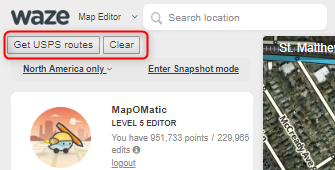
The script adds a couple new buttons to the side panel:
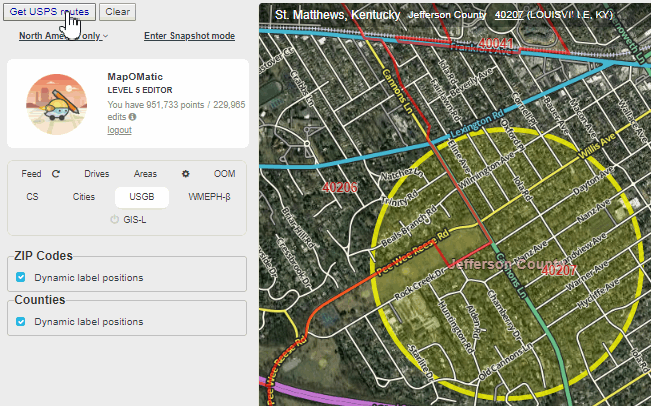
Hover over the “Get USPS Routes” button and you’ll see a yellow circle with a 1-mile diameter at the center of the screen.
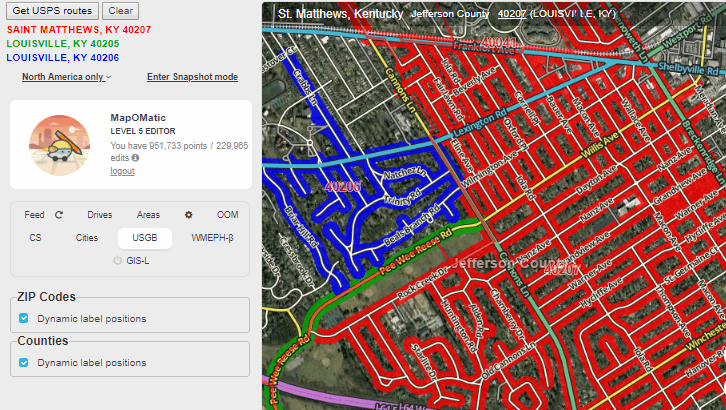
Click the button to retrieve all USPS carrier routes that intersect that circle:
The ZIP Code and the “recommended city” for the ZIP Code will be displayed beneath the buttons, color-coded to match the carrier routes.
Note that some routes may cross ZCTA boundaries and/or end abruptly midway on a segment, often for no apparent reason. In these cases, you may want to do some more research to make sure the displayed route is correct. e.g. look up specific addresses on the USPS site, look up business addresses on their websites, etc. In most cases I’ve studied so far, the displayed routes have been correct. However, there have been a couple reported cases in beta testing of a route being incorrect at the end where it meets another. I’ve also run across at least one case where routes overlap (two cities may apply?), and the script doesn’t currently make it easy to see that. So as with any external data, do your research if you have doubts.
Release v2018.12.30.002
Added a new time zones layer. Please note that the boundaries are very rough approximations. Also, they may not display properly (or at all) at zoom levels above 5. Something to do with a limitation of OpenLayers and how long the line segments are.
Thanks MapOMatic for the awesome ability to pull in USPS routes!
I’m seeing some instances where it is pulling in alternate cities rather than the default / recommended city. Here’s an example in Menlo Park, CA - zip 94025. The script is pulling back West Menlo Park, which is evidently an allowed alternate name, but it is not the common name, and it’s also not the recommended name using the USPS Zip Code locator searching for an address (I used 1185 Noel Dr, 94025 for my testing)
Hmmm, that’s odd. Have you seen more instances of that? I’d like to see if there’s any pattern. Unfortunately that’s the only city name provided in the data so I’m not sure what I could do to fix it. I don’t know why they’d list West Menlo Park, unless it has something to do with the facility being located in West Menlo Park (or it’s just a mistake). Both Atherton and West Menlo Park routes list “MENLO PARK” as the facility name.
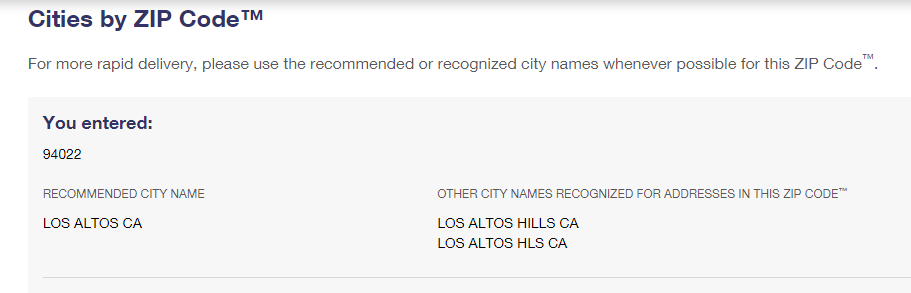
That one is at least returning the “recommended” city for 94022. I believe that’s a good example where local editor knowledge would have to prevail (unfortunately).
If you use the USPS Zip Code by Address search, and put the address in without city / state, and add the zip code, the search comes back with the “correct” city, at least in the two examples above (Menlo Park instead of West Menlo Park, and Los Altos Hills instead of Los Altos).
Understood. I just meant that if you go to the search for city by ZIP code lookup, the recommended city is Los Altos (but Los Altos Hills is also recognized). I can’t explain why it’s returning West Menlo Park as the recommended city.
I think this is good evidence that we shouldn’t blindly trust this tool. Still need to do some research when things don’t seem to make sense.
I’m getting Los Altos Hills when using the USPS Zip Code search. I entered the address and zip (25501 Chapin Rd, 94022) without a city name (or state). But regardless, clearly USPS has inconsistent data in he zip code search vs. the source you are pulling from, and edge cases will require local knowledge or additional verification.
Sorry, I probably wasn’t clear. I was referring to the search results from this page: https://tools.usps.com/zip-code-lookup.htm?citybyzipcode
People seem to be finding cases of inconsistent data fairly regularly, unfortunately. I was really hoping this would be more reliable and allow us to update city names with some confidence. But it’s looking more and more like it should be treated with a healthy dose of skepticism. I’ve been finding it very helpful in (most) rural areas of KY I’ve been looking at, but I’ve also found a couple head-scratching scenarios. I guess, as seems to be the case with most large collections of data like this, YMMV.