Since today, in Win Chrome, the script is not working anymore, even if it’s the sole script activated.
the Gov’t source layers are still operational
https://tigerweb.geo.census.gov/arcgis/rest/services/TIGERweb/PUMA_TAD_TAZ_UGA_ZCTA/MapServer/4/ and the script is working for me
Thx kodi, here it also works again… no clue what happened.
When I first started using this script, all I noticed was the zip code overlay / boundaries. I thought. ‘OK, but not very useful for my needs.’
Yesterday, the feature “Get USPS Routes” was brought up in our local Discord server. I was unaware of this feature until re-reading this thread. WOW! What a game changer. Thanks for this script, and especially this feature.
Release 2019.07.04.001
Clicking the Zip Code in the WME map header will now give you instant details about the cities that the USPS officially recognizes for that ZIP Code. You can click the link in the popup to go to the USPS site.
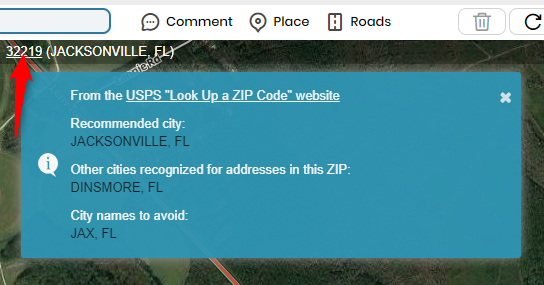
That’s a pretty neat addition there. Would the “other cities” be an opportunity (if the region allows) to add an alt city in case someone searches for an address with that city? Or is it just good to know? In Texas we have a few pseudo cities where everyone calls the town one thing, but the post office uses another name. We’ve been adding the primary or alt city depending and I believe what you’re giving us will now back up what locals already know. Is that the idea?
Thank you.
Respectfully,
Sean
To be honest, I’m not 100% sure there’s a “right” answer that applies to every situation. I think it could be used to help determine if one or more alt cities could be applied, but don’t just blindly assume it’s correct and fits with region/state guidelines. I’d use it as one piece of evidence in a wider investigation  I know… clear as mud.
Clear as mud, but an excellent answer nonetheless. I appreciate using it as another investigative tool at our disposal. Thanks.
The “Get USPS Routes” feature doesn’t seem to be working this morning. Unsure if it is an issue with WME or something on the back end. It just spins and spins and doesn’t load anything.
Just now tested, and it seems to be working fine for me.
Not sure what is going on on my end then. I’ve disabled every script and add-on in Chrome, including those having nothing to do with WME, and it still isn’t working properly.
Try going into your Tampermonkey dashboard and move the “sort” icon for it to the top or near the top. If that fails, remove the script and re-install the script.
I’m having the same problem as bart99gt.
Tried reinstalling and moving to #1 in the sort. Still just spins when I click “Get USPS Routes”. Tried different areas, same problem.
I’ve also been having off and on issues with the USPS route lookup feature. It is currently not working for me and the JS console is showing the following trace:
Uncaught SyntaxError: Unexpected token < in JSON at position 0
    at JSON.parse (<anonymous>)
    at Function.p.parseJSON (vendor-a2427bf79ad7854fc173.js:1)
    at Function.processUspsRoutesResponse (userscript.html?id=1000f362-916d-4965-91bb-99d40e8a1275:466)
    at <anonymous>:2:494
    at eval (eval at exec_fn (editor:1), <anonymous>:32:462)
I had something similar a while back and discovered it was my AdGuard software (MacOS/Chrome) but I disabled it and it was working fine up till very recently.
(Cross-posting from the Discord Scripts Server #General)
It looks like the USPS URL is using a slightly different WKID now. Other than the different lat/lon and radius automatically generated, the spatialReference part of the URL is the only difference. The current USGB url returned no features when I accessed it directly in browser; the new URL returned a full array of features.
URL used by USGB:
https://gis.usps.com/arcgis/rest/services/EDDM/selectNear/GPServer/routes/execute?f=json&env%3AoutSR=102100&Selecting_Features=%7B%22geometryType%22%3A%22esriGeometryPoint%22%2C%22features%22%3A%5B%7B%22geometry%22%3A%7B%22x%22%3A-80.93286%2C%22y%22%3A35.25243%2C%22spatialReference%22%3A%7B%22wkid%22%3A102100%2C%22latestWkid%22%3A3857%7D%7D%7D%5D%2C%22sr%22%3A%7B%22wkid%22%3A102100%2C%22latestWkid%22%3A3857%7D%7D&Distance=0.5&Rte_Box=R&userName=EDDMURL used by the EDDM page on usps.com:
https://gis.usps.com/arcgis/rest/services/EDDM/selectNear/GPServer/routes/execute?f=json&env%3AoutSR=102100&Selecting_Features=%7B%22geometryType%22%3A%22esriGeometryPoint%22%2C%22features%22%3A%5B%7B%22geometry%22%3A%7B%22x%22%3A-78.6001371%2C%22y%22%3A35.817210900000006%2C%22spatialReference%22%3A%7B%22wkid%22%3A4326%7D%7D%7D%5D%2C%22sr%22%3A%7B%22wkid%22%3A4326%7D%7D&Distance=1&Rte_Box=R&userName=EDDMAny updates on a fix? Still having the same issue…
Mine finally started working again today, actually, just now. Give it another try! Good luck!
@bart99gt - Version 2019.10.24.001 (published on 2019-10-27) includes a fix identified last week for the USPS Routes issue – the USPS GIS server where the data was housed had a configuration change related to which domains could connect to it. So far this fix has worked for everyone!
The new version pushed seems to fix that USPS Routes issue for me, thankfully.
It’s funny how a feature like that went from: (1) Interesting, why do we need it? to (2) I’ll use that now and again; to (3) DANG - I’m addicted to that, why isn’t it working??
One minor issue: Using the “Get USPS Routes” button appears to retrieve routes named for the Post Office, rather than the Geographic Name associated with the ZIP code. This may be specific to my area, or it may be more general.
To use my area as an example, I get some routes marked green for “WESTLAKE, MD 20817” and others for “BETHESDA, MD 20816”. https://www.waze.com/editor/?env=usa&lon=-77.12102&lat=38.97616&zoom=3 But “Westlake” is just the name of one of several post office stations (and ZIP codes) for Bethesda, MD. If you do a lookup on USPS.COM of an address on the “WESTLAKE” USPS Route, it will give you Bethesda, MD as the destination “city.” And the USPS site gives BETHESDA as the recommended city name for the 20817 ZIP code, although it also accepts WESTLAKE. I’d suggest going with the primary, recommended city name if possible.
As I say, I don’t know if this is area-specific or more general. But it appears from my example that there is not necessarily a direct correspondence between the “USPS Route” and the geographic name of the ZIP code.