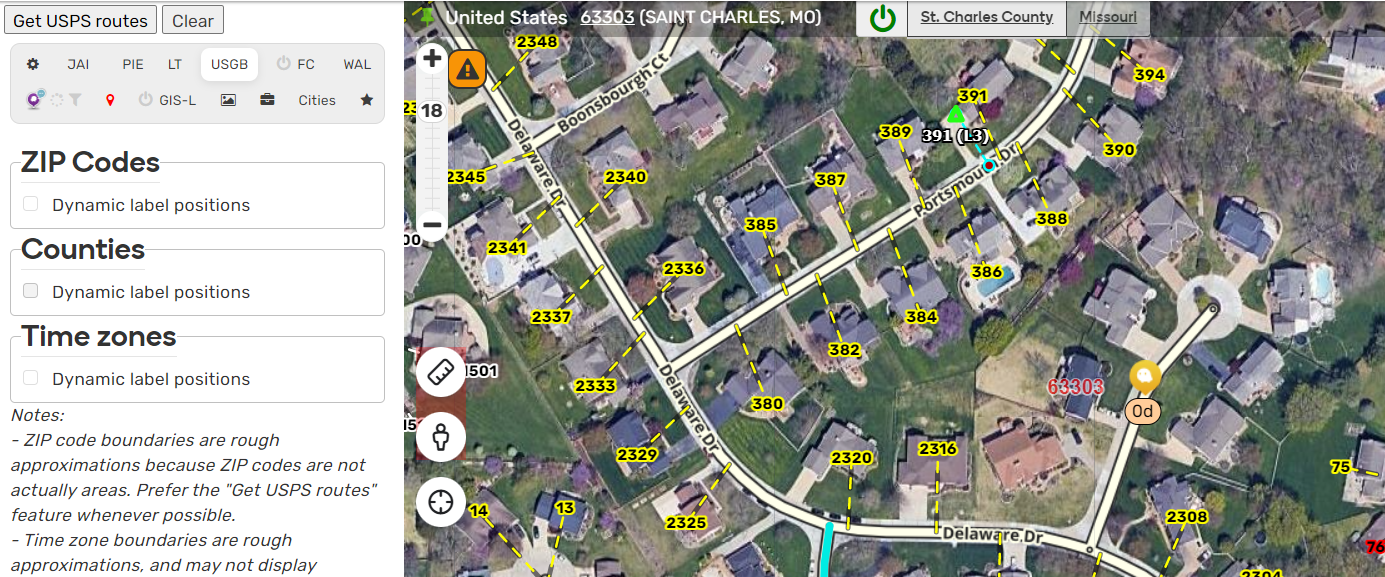
[Script] WME US Government Boundaries

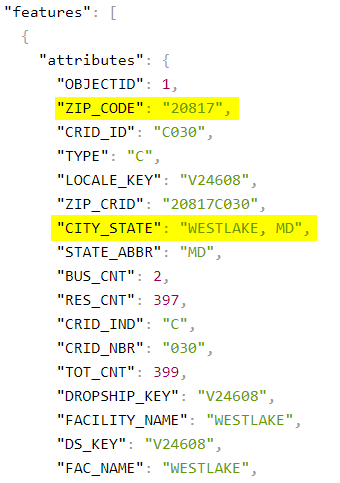
This appears to be a case where the USPS database the script is polling has bad data. The attached screenshot shows the data returned from the routes lookup database, and I’ve highlighted the fields that the script uses to display city name and zip – they are separate fields from the facility name, but as you stated are not USPS’s recommended city name for that zip code.

In order to return that recommended city name, the script would need to do a second lookup to the “cities by zip code” search from USPS. This was previously discussed on Discord as a possibility, but not a likely one as the author of this script is currently on a break from scripting. Although I do believe this is the first real-life example I’ve seen where the recommended city was not being returned by the routes lookup – it was previously theorized it was possible to have such a discrepancy, but all previous examples were ones where the returned city name matched the recommended, but locals used the alt name.

That said, I do have an outstanding pull request for this script that adds the “recommended city name lookup” link to the returned routes at the top left of WME that makes it much easier to confirm the recommended and alt city names. I’ll see if I can get someone from WazeDev to review that at some point this week since it would benefit your use case.

chrome_2020-02-10_08-06-26.png

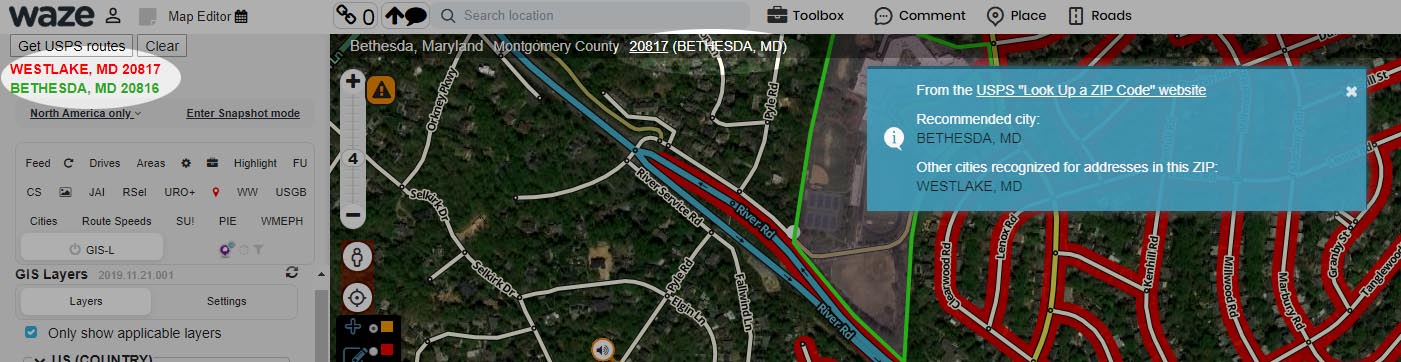
There is a workaround for this. As the image below shows, the ZIP code appears in two places on the screen – you’re looking at the one in the upper left. The one in the top center is a link; click on it, and you get the blue rectangle that shows you which city name is “recommended” by the USPS for that ZIP code.

Zip.jpg

Thanks, Russ!

Script is loading, I can see it in the left panel, but no map elements are showing up and no county/city label at the top.

I think this is the relevant error in the console, but I’m no expert. Is this meaningful?

USGB: Initializing... userscript.html?id=6514b9b4-ca28-4f2a-b8b8-32726e656296:184 USGB: Initialized userscript.html?id=f40f3db5-a599-417e-b189-5e55998fbdb7:53166 Uncaught TypeError: Cannot read property 'events' of undefined at _0xc7ef12 (userscript.html?id=f40f3db5-a599-417e-b189-5e55998fbdb7:53166) at _0x1f1f24 (userscript.html?id=f40f3db5-a599-417e-b189-5e55998fbdb7:53144) userscript.html?id=f40f3db5-a599-417e-b189-5e55998fbdb7:49986 Uncaught TypeError: Cannot read property 'appendChild' of undefined at _0x139c66.addMenuLayer (userscript.html?id=f40f3db5-a599-417e-b189-5e55998fbdb7:49986) at _0x1b34de (userscript.html?id=f40f3db5-a599-417e-b189-5e55998fbdb7:49351) at _0xb92414 (userscript.html?id=f40f3db5-a599-417e-b189-5e55998fbdb7:48628)

Did they move the data?
https://tigerweb.geo.census.gov/arcgis/rest/services/Census2020/PUMA_TAD_TAZ_UGA_ZCTA/MapServer/4/query?geometry={"xmin"%3A-11609646.476183%2C"ymin"%3A3457497.6947627%2C"xmax"%3A-11608000.691417%2C"ymax"%3A3458338.5020737%2C"spatialReference"%3A{"wkid"%3A102100%2C"latestWkid"%3A3857}}&returnGeometry=true&outFields=ZCTA5&spatialRel=esriSpatialRelIntersects&geometryType=esriGeometryEnvelope&inSR=102100&outSR=3857&f=json

That would explain the issue. It was working at of 7:30 am CDT 5/15/21.

Website must have been down for maintenance or something. It is back online.

Agreed

This script hasn’t worked for me in months.

To ask the obvious question, are you running a VPN? That blocks me about half the time.

No VPN

And the tier one “I.T.” question.

Do you have the layer(s) turned on?

Yep, that’s how I’m getting that error.

Sorry about that. I screwed up the version # a few months ago (used 2021.08.01 instead of 2021.01.08) so updates haven’t been pushing automatically for a lot of people. I just now returned the version # to the wrong format so it should update now.

If anyone needs to make any code fixes, just keep incrementing the last digit (don’t update the date portion) until we’re past August 1. Then we can get back to using the correct dated versions.
ZIP Codes don’t appear for me yesterday or today. Is this a problem with the external data source?

Check that you have the latest version (2022.08.05.001). Let me know if you still have problems.

I’m using version 2023.02.06.002 from gf and I also have the same issue.

It seems to be working. Are you still having issues?

After disabling some scripts I noticed it started working right. I don’t know which one was the issue but ya.

I take that back. It’s back. Screenshot 2023-02-09 110307.png