https://waze.com/en-US/editor?env=usa&lat=48.08351&lon=-123.11111&zoomLevel=20
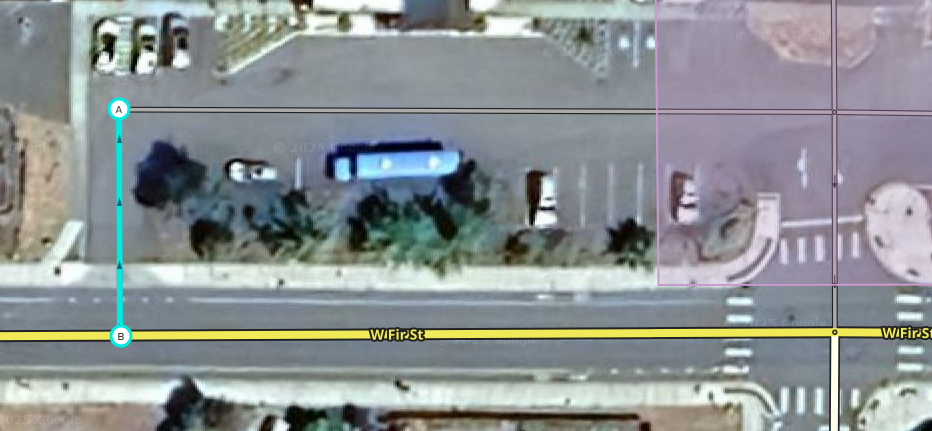
I don’t know if this is a valid edit, but the parking lot for the Sequim Boy’s and Girl’s Club could be clearer. The mobile app tries to route users to enter the exit.
I marked in red the correct directions into and out of the parking lot.
Thank you,
Todd
Well that’s no good. Do you need a downlock, are asking if you should fix it, or just need it fixed?
1 Like
It would be fine if you wanted to fix it. I’m working on getting leveled up so that I can do some of these without bothering anyone. Now that I’m retired, I have more time.
Thank you!
If you want to level up, having you do this will help with that. I have downlocked Fir Street so you should be able to go ahead and make the fixes to both ends of this parking area and get proper credit for your work. Just let us know when you’re done so we can restore the lock. 
Also, I’ve downlocked 5th Ave just to the west if you want to add the missing parking lot segments there as well.
1 Like
It’s not a bother at all. We’re here to help and answer questions.
I obviously have more learning to do. I believe I set the exit properly, but the entrance is kicking my butt. I can’t seem to get the connectivity/turn arrows to show on the created segment from Fir to the parking lot road.
https://waze.com/en-US/editor?env=usa&lat=48.08340&lon=-123.11084&zoomLevel=20&segments=539205121
Please let me know what I did so that I can do better next time. Meanwhile, I will go back and review some of the training resources.
Thank you,
Todd
The new segment you added that is highlighted still needs its name and city set, which is why it is showing up with a red outline in the editor. Select it, and in the left panel if you click the “address” field on the left it will expand to show “Street” and “City”. Choose “None” in the Street dropdown, and choose “Sequim” in the City dropdown. Make sure to click “apply” before saving your changes.
The connectivity issue is because somehow the edit has two extra geometry nodes under the endpoint (B). Don’t worry, it’s impossible to tell this unless you move it to see it, you didn’t miss anything, but I left it unfixed so you could get the practice with the fix. Click on the endpoint, select it and hold it with the mouse, and drag it out of the way somewhere. You’ll see what looks like one node underneath it. Place your mouse cursor over that node, don’t click the mouse, just mouse over it, and press “D” on the keyboard to delete the node. It will look like nothing happened because there are two stacked on each other. Mouseover and press “D” again to delete the second node. Then drag the endpoint (B) back down to attach it to Fir. When you attach it like that, all turns will be disabled, so click on both sides of Fir to see the red arrows and click on them to turn them green.
It’s like drinking from a firehose, a lot of this is not super intuitive. But we are glad for the help and happy to walk you through anything you want to try.
If you would like the most direct help, consider joining us on Discord.
1 Like
turbomkt is absolutely correct, Discord is fastest if you are OK setting up an account there, we can all help you through there as more of a chat than message posting here.
As to the area you’re working here, if you’re up to it, take a shot at attaching these other red points. You could do the yellow too. It is not as necessary, but if you do make that loop, make sure it is at least three distinct segments, not one big one. You could also enable the u-turn as shown in green for that lateral segment by the entrance, but also not super critical.
Thank you SeveriorumPatrem and Turbomkt!
I think I have it fixed. I did some of the work on the parking lot in the front of the school, but it looks like it will take more time getting the entrances and exits lined up correctly.
Please lock it back down.
Todd
I’m sending a message via chat.
Good morning piobaireachd42!
I realized that it might have been frustrating to get those extra nodes and not know why they happened, hoped it might help to explain.
When you draw a new segment in the interface, the UI does not know you want to end the segment until you do a double-click. If you click once, it drops a geo node and then expects you to continue the segment. So for example if you were drawing a large curved segment, you would click once to start it, and once each time as you drew the curve, at each point with a bit of bend in it, ending with a double click to tie it off.
I suspect when you drew that one segment with the hidden nodes, you clicked once to start it, and then clicked once where you wanted to attach it to Fir. But the interface only got one click, so it dropped a geo node instead of an end point, and expected you to keep going. Unsure what was wrong, you clicked that spot again - just once. And so the interface dropped another geo node. For your third shot, you double-clicked, and the interface responded to the double-click by ending the segment - with the endpoint on top of the two accidental geo nodes. And, with those geo nodes under there, the interface had conflicts and wasn’t able to attach your new segment to Fir.
If you want to try that again anywhere just to feel how it works (you don’t need to save changes), find a new spot, click once to start a segment, then double-click to end the segment on the end or middle of another segment, and you’ll see the turn arrows appear like you expected on this last one.
1 Like
Thank you, All. I’m going to go back and redo the tutorials. It’s been a few years.
Todd
Join us on Discord and we’ll help you out.
1 Like