I am unsure how to split a road segment into two.
https://waze.com/en-GB/editor?env=row&lat=51.37135&lon=0.62576&s=4703919893108846100478&zoomLevel=20
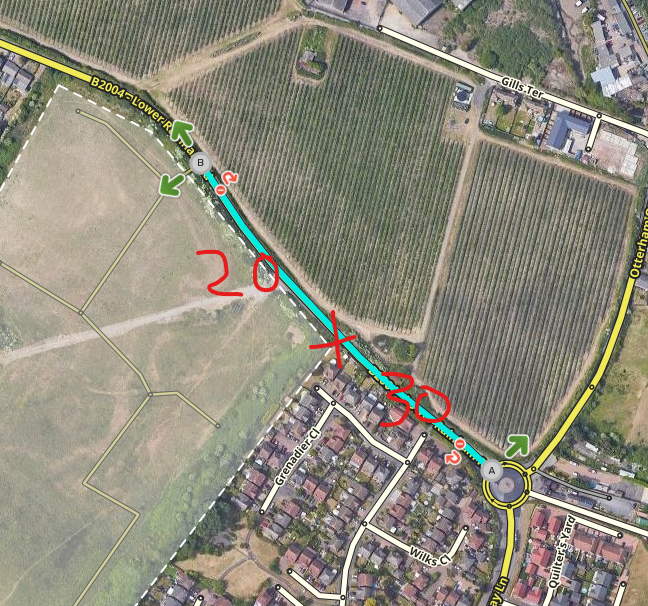
Right at this location, the speed between the edge of the new estate to the roundabout is 30, the other direction is 20 (see attachment). New signage.
Thanks for your post and details.
Since the segment is L(4) I have taken the liberty of doing the split and speed update for you on this occasion.
One technique is to create, and the immediately delete, a new road segment at right angles or thereabouts to the position required; this produces a ‘junction node’ rather than a simple geometric (positional) node, shown by the resulting changed segment(s) now highlighted as ‘not saved’. adjustments as necessary can be made and the results then saved.
There may well be some opportuities to experiment on the estate referencing https://www.redrow.co.uk/developments/hamlet-park-212797/interactive-site-plan-2883v4 (for confirmation of your own observations rather than copying.)
If you use scripts then Toolbox extension has the ability to split with one click - the scissors icon.
Note that Waze communicating is now largely done with [glow=blue]Discord[/glow]; see link below.
Many thanks for the change and the information. I did read about using junctions in post from 12 years ago, wasn’t sure that it was still the correct method.
