When I use Waze on a car head unit, the route I’m following is on the right half of the screen instead of in the middle. The same thing happens when I use Waze on my phone in landscape mode. Is there a way to have the arrow in the middle?
This is a design decision by Waze that allows users to see further down the route. If the “car” or current position is centered on the screen, the route is often cut off and obscured by the next instruction at the top of the screen. So, they nudge the current position to the right, and you can see the geometry of the route ahead, along with any upcoming alerts/hazards on your route.
This is a design decision by Waze that allows users to see further down the route. If the “car” or current position is centered on the screen, the route is often cut off and obscured by the next instruction at the top of the screen. So, they nudge the current position to the right, and you can see the geometry of the route ahead, along with any upcoming alerts/hazards on your route.
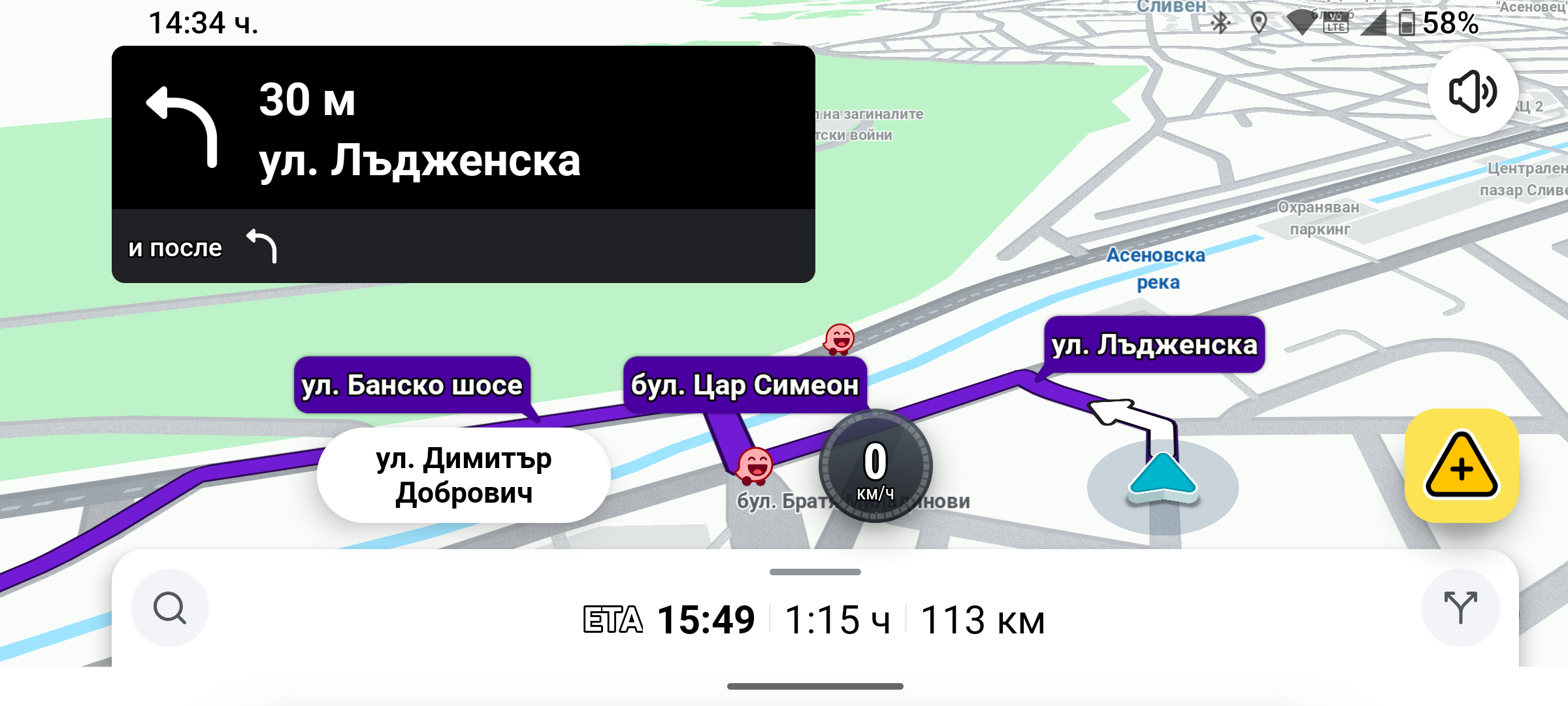
Do you think this position of the arrow is normal? When the phone is turned vertically, the arrow is in the middle.
На чт, 25.06.2026 г., 18:43 ч. Nick Zahn via Waze Discuss <discuss@waze.com> написа:
When I use Waze navigation on the car’s multimedia via Android Auto, the arrow is almost in the middle, just slightly to the right.
На чт, 25.06.2026 г., 20:54 ч. Georgi Peychev <iva6aundrumi@gmail.com> написа: