Traffic Light Layer in Production

Is this a…:
Standard bug
Steps to reproduce this issue:
I just had this layer on when I opened WME for some reason, and we found that it can be shared through PLs with layer settings.

Just to be clear - This occurred on a Chrome install which has no scripts installed, and may have never had any scripts installed. Since I am labeled a Beta tester - This is 100% in production.

Environment where the bug occurs…:
NA
Permalink:
Omitted
Browser name and version:
Chrome/Edge
Are you using scripts? Please detail which ones.:
No

1 Like

Adding to this

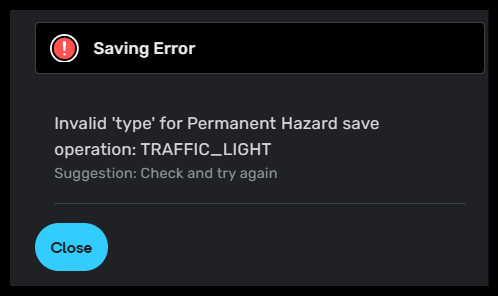
When connecting Signal Ave to Ocean Port Ave, I had a save error mentioning them in Production
https://waze.com/en-US/editor?env=usa&lat=40.31883&lon=-74.03411&marker=true&zoomLevel=18&segments=31882684

I was able to connect and save in WME Beta

The issue was with the hidden layer, its causing save issues in WME Production since it’s not visible (or supposed to be at this time)

1 Like

Hi @poland_fun,

Thank you for the report. Could you please share the PL you mentioned, which contains that layer enabled?

Edited: Welcome to the Community. We are happy to have you with us!

Regards,
Nataliia

1 Like

Hi @pasciakd,

Thank you for the report. We are checking with the team for possible reasons behind this, and I’ll keep you posted.

Regards,
Nataliia

1 Like

Sure thing - https://waze.com/en-US/editor?env=usa&lat=42.10118&lon=-75.92046&s=9463197878524956901374&zoomLevel=16

2 Likes

Thank you @poland_fun for the link. The team is checking the root cause of this.

Regards,
Nataliia

2 Likes

Hi Everyone,

I’d like to share that this issue has been resolved. The layer should no longer be visible, nor should it appear in errors or other messages when saving edits.

Please let us know immediately if you encounter the problem again in any location.
Regards,
Nataliia

1 Like