Understanding Waze Road Closures Management🚧
Okay, road closures are a big deal for Waze drivers. Studies have shown that road closure information is one of the most critical features for users of navigation apps like Waze.
Waze gets road closure information from a variety of sources, including you, our dear editors community, Waze Partners, Waze Operations team, user reports from the app, Waze autodetection and Geo. Waze has a mechanism to constantly validate closures and suspend them if a closure is believed to be no longer in effect.
*Remember, the lock levels for traffic events and closures are different in each country. If you have questions, reach out to your community manager.
So, how does Waze figure out when roads are closed?
Waze receives road closure inputs from multiple sources:
- Community Editors: Community editors can create closures using the WME.
- Waze Partners: Submit closure information through partner tools and feeds.
- Waze Operations Team: Waze closures team source closure information and add it using the WME (usernames: (1) (2))
- UGC (user-generated content): Waze drivers can report road closures via app.
- Waze Autodetection: Closures that are auto-detected by the Waze system.
- Geo Closures: Closures coming from the Geo (Geo autodetected closures will be under: “GeoClosures” username, Geo Operations team closures will be under “GeoRoadClosures” username.)
Closure WME Statuses
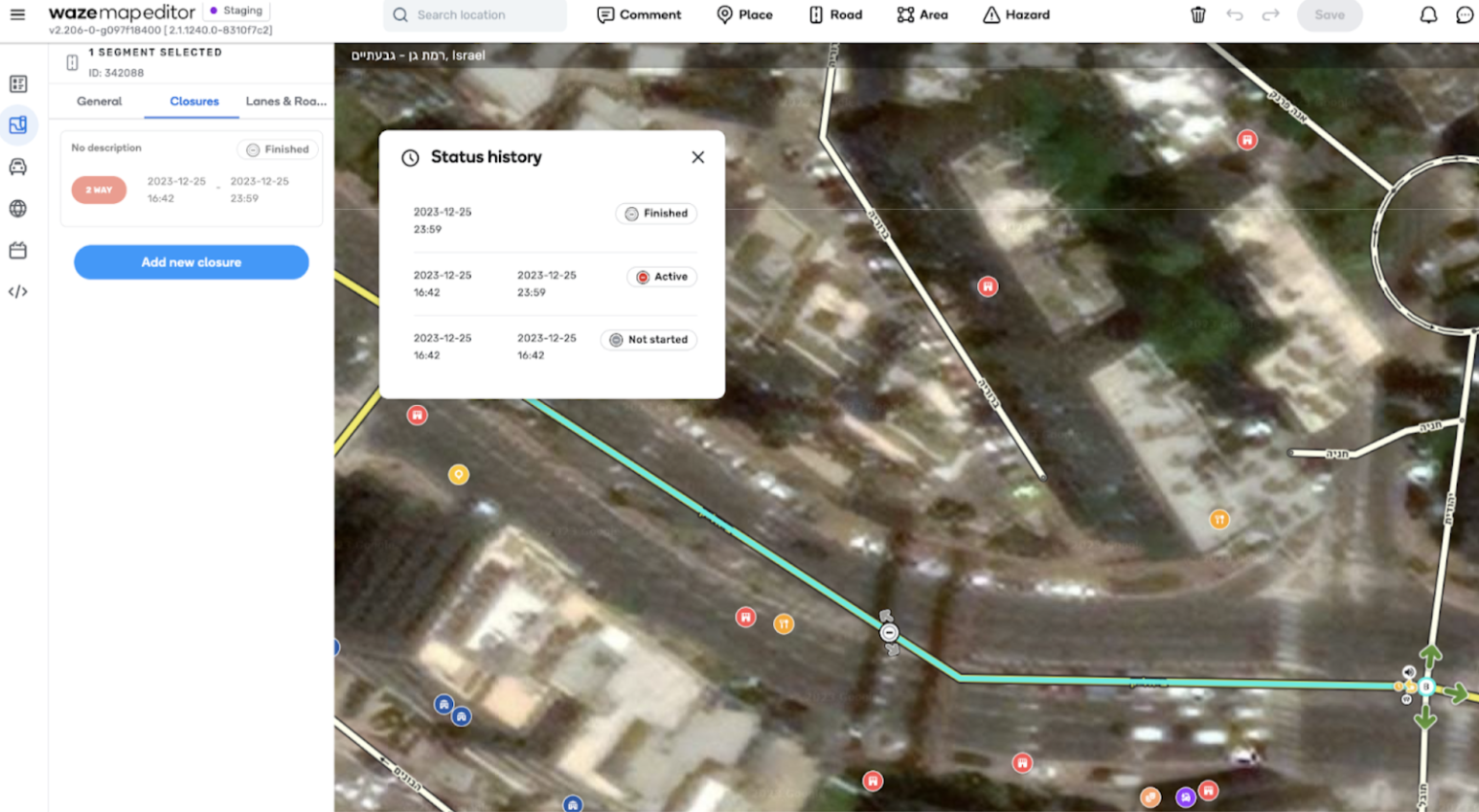
- NOT_STARTED: The closure’s start time is in the future; it is not currently active.
- ACTIVE: The closure’s start time has passed, the end time has not been reached, and the closure is active in Waze (blocks the segment in routing, surfaced to users).
- SUSPENDED: The closure’s start time has passed, the end time has not been reached, but the closure is not active in Waze (doesn’t block the segment in routing) since traffic was identified on that segment. Note: Closures created with the “HOV Permanent” in the WME attribute cannot be suspended.
- FINISHED: The closure’s end time has passed, and it is not active in Waze. Note: The closure will continue to be shown in WME for a week after its end time.
- FINISHED_EARLY - Closure was deleted before it reached its end time or collided with another active closure on the same segment, direction and times
- UNKNOWN - The System encountered an error in defining the closure state - please report such cases to us if you see such cases
Closure Prioritization and Activation Logic
When a few closure reports overlap, Waze needs to determine which closure to activate.
- If the same closure was reported by different sources, which closure Waze will activate? The most recently reported non-UGC closure will be activated or updated and take control of the road segment at the specified time, regardless of other defined closure times.
- Source Priority: Non-UGC closures have higher priority. UGC closures are considered less reliable. They are always removed when they conflict with a closure from another source.
Road Closure Activation example in case of a conflict:
Let’s illustrate the conflict activation logic with a simple example: A community editor creates a closure on segment X from 9:00 to 10:00, and the current time is 8:00.
Let’s explore potential scenarios where a Partner closure feeds conflicts with an existing closure.
Scenario 1: Feed Creates Closure Overlapping with First Half of Editor Closure
A feed generates a closure for segment X, effective from 8:30 to 9:30 AM.
- Outcome:
- 8:30 AM: The Partner closure is created and activated.
- 9:00 AM: The Editor closure activates, causing the Partner closure to end prematurely.
- 10:00 AM: The Editor closure ends.
Scenario 2: Feed Creates Closure Overlapping with Second Half of Editor Closure
A feed generates a closure for segment X, effective from 9:30 to 10:30 AM.
- Outcome:
- 9:00 AM: The Editor closure activates.
- 9:30 AM: The Partner closure activates, causing the Editor closure to end prematurely.
- 10:30 AM: The Partner closure ends.
Scenario 3: Feed Creates Closure Fully Overlapping with Editor Closure
A feed generates a closure for segment X, effective from 8:30 to 10:30 AM.
- Outcome:
- 8:30 AM: The Partner closure is created and activated.
- 9:00 AM: The Editor closure activates, causing the Partner closure to end prematurely.
- 10:00 AM: The Editor closure ends; the Partner closure is reactivated as it was ended prematurely.
- 10:30 AM: The Partner closure ends.
Scenario 4: Feed Creates Closure Within Editor Closure timeframe
A feed generates a closure for segment X, effective from 9:30 to 9:45 AM.
- Outcome:
- 9:00 AM: The Editor closure activates.
- 9:30 AM: The Partner closure activates, causing the Editor closure to end prematurely.
- 9:45 AM: The Partner closure ends; the Editor closure reactivates as it was ended prematurely.
- 10:00 AM: The Editor closure ends.
What happens when an editor removes autodetected road closures?
If an editor deletes an autodetected Closure - the closure will be deleted and removed from the system (will stop affecting routing and won’t be exposed to users).
However If the road signals will continue to show signs that the segment is truly still closed (it means Waze wont be able to detect traffic on the segment within a few minute time frame), the system will overwrite the current situation and will create another auto detected closure.
In case you want to report an incorrect autodetected road closure, please reach out to your community manager or to waze-closures@google.com.
Closure Suspension Logic
Waze uses a suspension logic to confirm the validity of closures.
- Suspension Criteria: Suspension Criteria: A closure is automatically suspended by Waze when a significant number of vehicles enter the closed segment within a short time period. This is based on user behavior, such as wrong turns and the number of drivers passing through.
- Unsuspension Criteria: A suspended closure is automatically unsuspended by Waze when very few vehicles enter the segment within the same short time period.
- Permanent Closures:
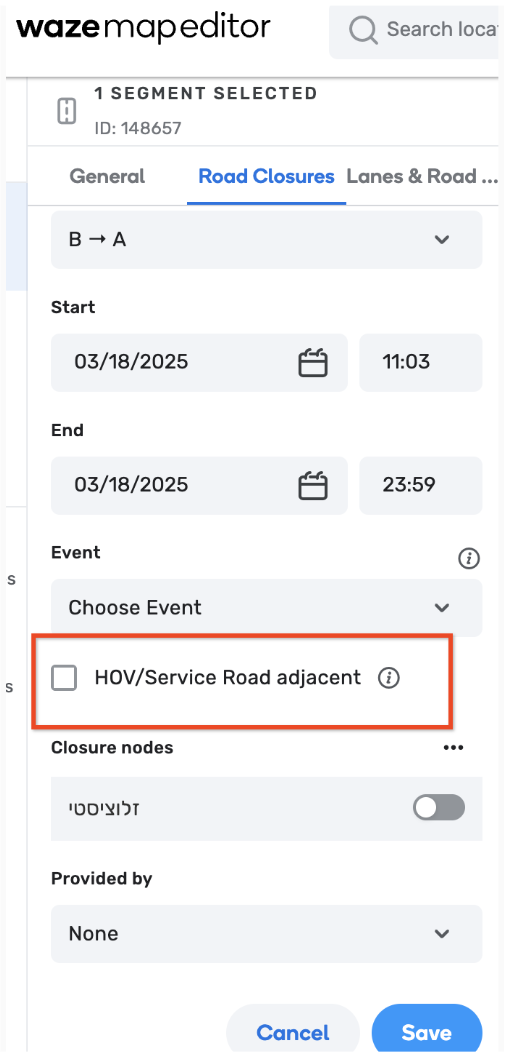
HOV/ Service Road adjacent WME feature: Closures marked “HOV” in the WME are never automatically suspended. Based on that, this feature should be used with increased caution
An example: The system will repeatedly check for traffic and may suspend or unsuspend the closure during the planned closure period depending on traffic conditions. Let’s look at an example on a closure scheduled from 7 pm to 10 pm:
Closure Timeline
- 7:00 PM: Closure is monitored. If traffic is observed, we wait until we see no traffic..
- 7:15 PM: The closure was set to start sooner than needed, but after 15 minutes, we observe there is indeed no traffic, and the closure becomes live.
- 8:30 PM: Traffic is observed, the closure is suspended.
- 8:35 PM: There is no traffic in the past 5 minutes , the closure has resumed (unsuspended) and is live again.
- 10:00 PM: Closure ends and is removed from the system.