Hi i’m on Map Editor level 1, I would like to create and name some places that are near from my work and waze does not have it on the map. The places are:
Just go to the last permalink that you posted here and you will realize that there is nothing (you have posted 3 permalink and i am wondering if you really check them before posting them :? ).
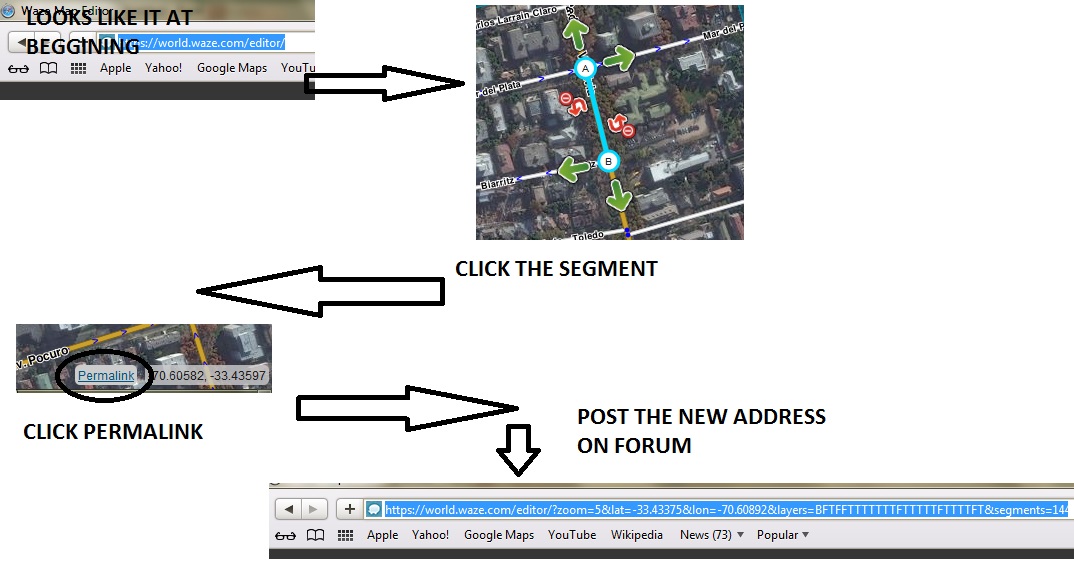
1.- Click the segment you want to add to the BROWSER address bar (map should be at zoom 4 or higher).
2.- When you click it, you will see the segment’s properties on the left side and the segment will get highlighted
3.- While the segment is highlighted (you can see the properties on the left side), Click permalink and you will see how the segment gets added to the browser address bar (http://…&segments=XXXX)
4.- Copy the new browser address link here.
Please don’t click the segment and then pan the map and/or modify the zoom before clicking permalink. When you click “permalink” it gets an exact link what you are viewing of at the moment. If you click the segment and then you click on somewhere else, pan the map and then click permalink, it won’t show the proper things.
Hi enhket and sorry for all the inconvenience, let me tell you that i’m doing exactly what says since the first post, but i do not know why when i click on permalink i see no (http://…&segments=XXXX) segments… Just the links i posted before.
I have taken some screen captures to show you.
Thanks again for your patience and sorry for my mistakes.
Have a great weekend!
1.- Click the segment or landmark
2.- Click permalink
3.- Copy the new address bar
I did never tell you to select the segments with a landmark or anything like that, so it shouldn’t ask you for a confirmation to “abandonar la pagina”.
My last try:
…
Unless you don’t have permissions to edit there and you think it is locked… :?
Well in the end i think i don’t have permition to edit that area 'cause the area doesn’t have cellphone signal… Oup!!! It might be possible that you open that area for me to edit it?


 'cause the area doesn’t have cellphone signal… Oup!!! It might be possible that you open that area for me to edit it?