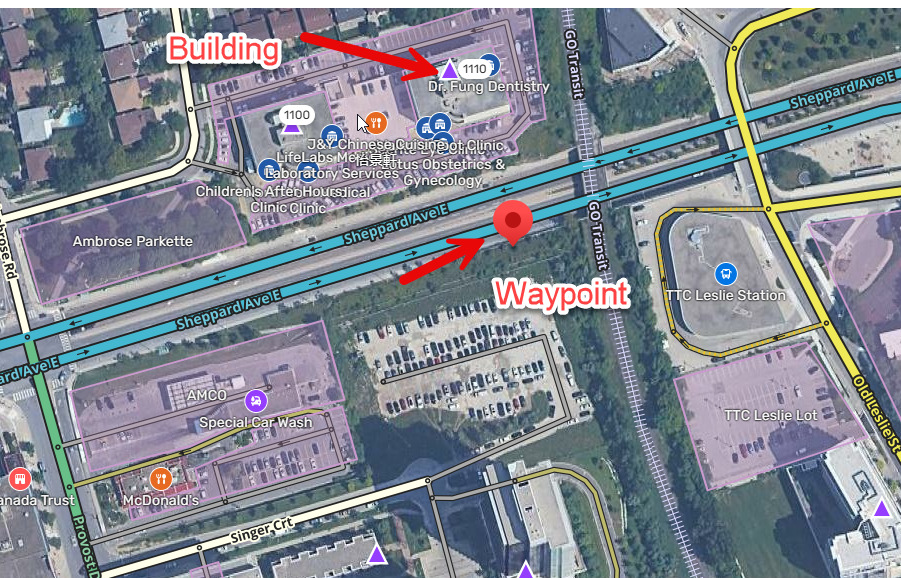
Hi, 1100 and 1110 Sheppard Ave are odd. They are totally inaccessible from Sheppard (i.e. driving, biking, walking, you cannot enter those buildings without climbing a wall or fence) because they are not at grade. Here is what it looks like: https://maps.app.goo.gl/H3MEbMCMpRhnFTEK8
Here is what Ambrose Rd looks like heading north approaching Sheppard - left or right turns required, straight through not allowed:
Here is what Ambrose Rd looks like heading south approaching Sheppard - left or right turns required, straight through not allowed:
Can someone please edit the map to reflect that the entrance to those buildings is via Eunice Rd, plus the straight-through-not-allowed restriction for traffic north & southbound on Ambrose at Sheppard?
Thanks!
Going forward, please provide a WME Permalink for reported issues (so that the editor responding can simply click the permalink to work on your problem instead of having to scroll the map or do a search).
One issue is that there are many ways an end user can set this location as their destination. Street address navigation can usually be fixed with a residential place point (RPP). However, there are lots of other ways a user can set this. For example, choosing the Google address instead of the Waze address in the search result will not be as easy (often requires using “suggest an edit” on the Google Maps website). Also, any businesses that are pinned to this building would each need to be addressed separately.
Getting back to specifics, both 1100 and 1110 already have Waze RPPs. Also, there is already a parking lot road that circles the complex. Any user-selected destination with a pin inside that PLR should get routed to the correct entrance. This seems to be working for me.
Could you please provide examples (with screenshots) of things that are not working so that we can track them down to see why?
Firstly, apologies for not responding here sooner - not sure why, but I didn’t notice a notification.
Going forward, please provide a WME Permalink for reported issues.
Yes, absolutely. Here is 1110 Sheppard Ave E:
https://waze.com/en-US/editor?env=usa&lat=43.77085&lon=-79.36873&marker=true&zoomLevel=18
Note the waypoint appears to be wrong:
Could you please provide examples (with screenshots) of things that are not working so that we can track them down to see why?
Yes:
- I launce Waze
- Hit search and enter “1110 Sheppard Ave e”
- It suggests “1110 Sheppard Ave E, Toronto, Ontario”
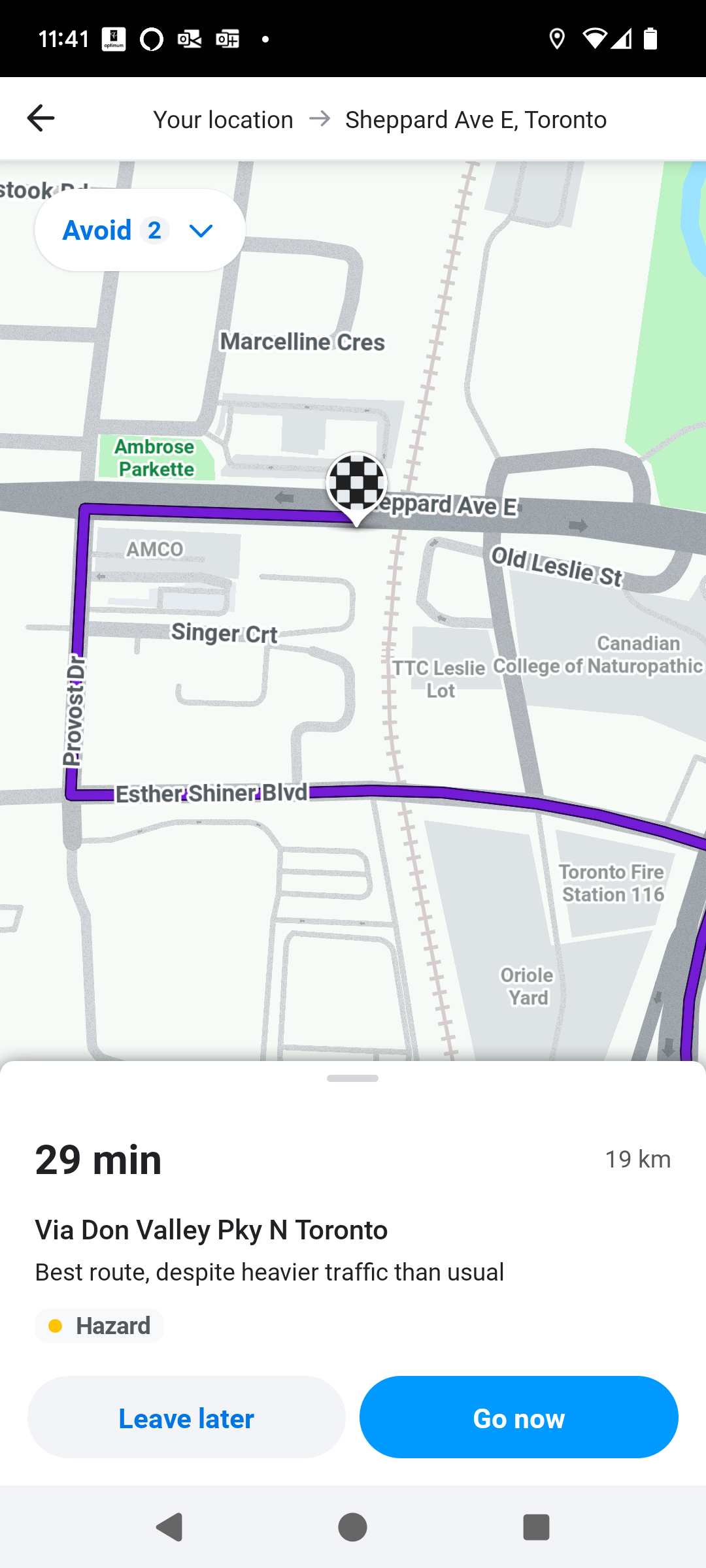
- I select that, and it gives me this final path which terminates on Sheppard, instead of taking me to the parking lot.
Let me know if more info is necessary.
Thanks!
This bad pin location is the issue. It does not match anything I can find in Waze or even Google Maps (a lot of our search results are pulled from GM).
Does the search result have a Pin icon? Or a Clock icon? If Clock icon, then this is a cached result from your local app (which would be hiding any more recent server changes to the pin’s location). To clear your cached locations, you can choose Settings from the top-left hamburger menu, then Planned Drives, then Remove Saved Addresses and confirm. This will erase all of your cached locations and get new results from the server.
The reason for the cache is to accelerate the drive startup process, and also allow you to function off-line if you’re ever out of cellular reception. There is a more complicated way to remove only one cache result individually. Let me know if you want those instructions instead of removing all your cached results.
The purple triangle you highlighted is our solution for fixing street addresses, If you click it, you will see there is an unnamed entry point included, which will force the driving directions to the parking lot on the south side of the building near the handicapped spots. I believe this is where guests should be directed (which is what we aim for – sending those who are unfamiliar with the destination to the best possible location). Residents can use the “Home” setting in Waze to save their preferred destination for Home without disrupting the main address pin (by expanding the bottom search section, scrolling through the favourites horizontally to find the More button, then find the Home entry and click the … and choose Edit Home and choose Your Location – that will set Home to the exact location of your device at that time).
Another option for you would be to not enter the street address, but rather pick one of the businesses at this location. Navigating to a business result almost always gives better results than street addresses (which in the early days of Waze were batch imported from postal lists and would be located at the curb, not the building entrance).
Let me know how it goes.
That address is a place I’ve only been one time and do not go to regularly.
When I first had the problem navigating there, it also would have also been the first time I’d ever typed that address into Waze.
Right now, I see both a “pin” and a “clock” result when I search. Interestingly, both of them now produce the correct navigation. So…no idea…, but appears to be working.
I guess I should just call this solved?
Edit, reply sent to wrong thread.
I would suggest that perhaps the location being used the original time was yet another pin location that doesn’t come up any more. I don’t have an another reason why it would be working now but not then.