Please help !!! Recently, ems was routed to the incorrect part of my road for an emergency health event/ fall/ afib/ and unconscuousness. My spouse was unconscious, in a pool of blood and and heart went into afib from the trauma ----facial lacerations and broken teeth from— a fall. Fortunately they have recovered after a stay in the hospital. This has has to be fixed! I live at 48 Bear Hill Road Patterson NY 12563. Ems and volunteer fire fireghters and others were routed to the lower elevation while access to my address is from the upper elevation of the road Map Correction Details:
Navigation apps are incorrectly routing emergency vehicles to the lower-elevation section of Bear Hill Road. There is no physical access or driveway to my home there (48 Bear Hill Road) from this bottom elevation. There is a hill. My house appears on maps to be closer to the bottom elevation which is why I believe waze maps are incorretly directing ems there.as my house sits geographically between the lower elevation and the upper elevation ( the driveway is located on the upper elevation. )
Correct Access Instructions:
Physical access to the house and driveway is located exclusively on the upper-elevation portion of Bear Hill Road. Please update the routing logic to direct vehicles via the upper elevation section of the road so emergency responders can reach the property. I also trie to fic this on google maps but Im just not tech savvy in this area. When I move the pin it denies the action. If someone can help me with that to indicate the correct access I would be very grateful . I notified local putnam county ems well over a week ago and they updated their notes but as we are volunteer here im concerned if the maps are not fixed volunteer s will utilize waze or google maps and be misdirected … Also if someone can help correct google maps Id be incredibly grateful!
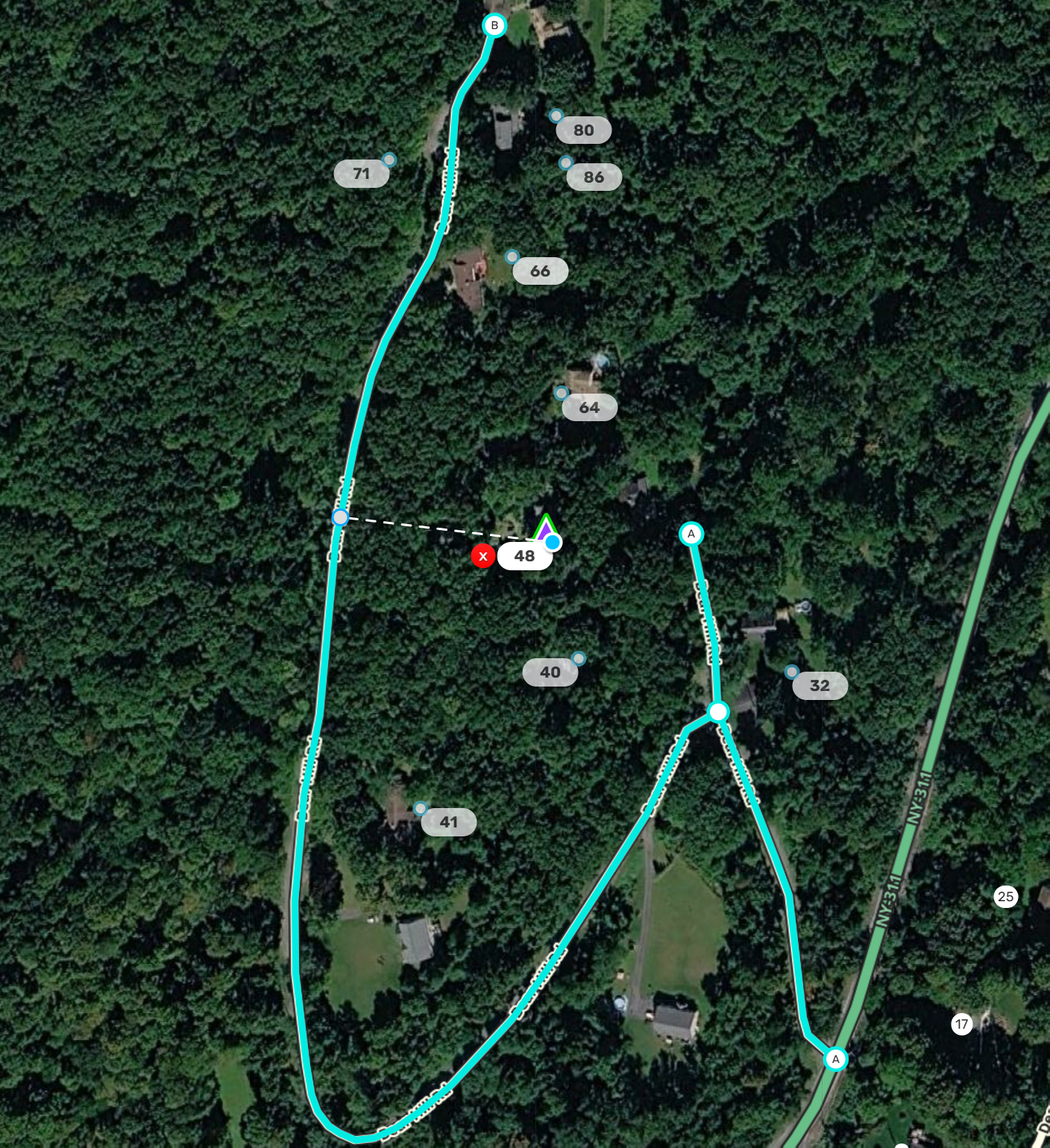
Hello, and thanks for reaching out. I’ve moved the stop location for 48 Bear Hill Rd to the western branch of Bear Hill Rd which appears to be higher elevation as you described. If this is incorrect please let us know and we can adjust it to the correct segment. I’ve attached an image of where navigation should end once the update hits the app in the next couple of days.
Please note that for the app to recognize the change, you must delete this address from your home, saved places and history and re-search for the result.
To remove your “Home” entry: go to the search page and long press “Home” and choose “Remove home”.
To remove a saved place: go to the search page and choose “Saved”, then find the entry and the dots to the right and choose “Remove”.
To remove an item from history: go to the search page and scroll down to find the entry in your prior drives, long press the entry and select “Remove drive”.
This will force Waze to retrieve the new location from the server when you search for it again. I would recommend doing this in a few days time to ensure that the update has hit the app.
I’ve also submitted a correction to Google Maps which is under review. I’m hopeful that the edit is approved and that Google Maps will also behave better in the near future.
Let us know if you still have issues here after the update hits the app hopefully by Friday and after you’ve cleared your history/home/saved places and re-searched.
Thank you , Justin! . I think that is correct/ close enough . The access point is actually a bit further " North" between 48 and 64 bear hill road … There is a small shared PRIVATELY MAINTAINED road from the Main Bear Hill Road that I share between my home and my neighbors at 64 bear hill road. ( the numbers are strange on this road as these were hunting cabins and a hunting association in the 30 's before it was broken and sold as parcels). Its very difficult to see via sattelite map as the trees are so dense. BUT, I will be placing CLEAR SIGNS on the road that clearly indicate the entrance and your corrected access point will easily show them that private shared road from the main road… . SO GRATEFUL !!! TY very, very much!
Hey… Hoping you can help again… Google maps has once again corrected itself and is sendong drivers to the lower elevation. I couldn’t believe it . when it happened today, I purposely drove out from my house a short distance and drove using google maps to double check that it had auto corrected and again takes folks to the bottom elevation… Can you help? This as you know is a serious issue given ems was misdirected by google maps to that incorrect spot on the lower elevation causing an emergency delay for a serious injury at my home… any help greatly appreciated, Mark
actually today it worked fine / showed the blue line taking me up the upper part / elevation of the road… … i ll just keep an eye on it and thanks again