Hey guys,
We are glad to announce a new version of the editor! 
There are many small bug fixes and UI improvements, but the main deal in this version is Places.
TLDR: There’s a new place updates layer, and editors can moderate place edits of client users and new editors. Please read the community created Places wiki page before diving right in, as tempting as it is 
As always, please let us know if you see any issues, or have any suggestions.
There some tiny polishes we will be fixing in the coming days. I will update in this thread.
Happy editing & moderation!!!
Long version:
Background
A new feature launched in version 3.9 is to enable client users to contribute local business data to the Waze community. Users can start adding and updating new places from the client using the report menu, and as part of their arrival to their destination. Since we want to maintain the high quality of our map in the places layer, some of those added places will go through moderation of the editing community.
What’s new in the editor
We have a few new items in the editor UI to support place moderation:
- The Place updates layer - similar to the UR and MP layers and contains icons for place updates suggestions.
- The Places layer now contains suggestions for new places along with existing places.
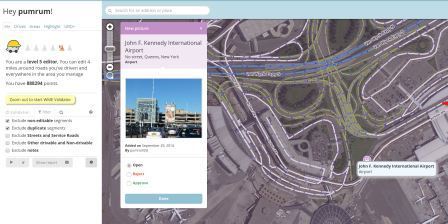
- New moderation panels for place update suggestions and flag suggestions.
- We have new icons for point places - smaller and less cluttering than the previous version. They also display the general category of the place.
- Peer review mechanism - users can now edit places which are locked above their rank. Their save won’t go through as usual - it will become a place update request that a user with an appropriate rank can moderate. After saving they’ll get a message that their edit is pending moderation.
Who can moderate places?
Users with rank 2 and up can moderate within their editing areas.
What requires moderation?
For new places: every new place which is created by a level 1 editor which is untrusted requires an approval by a level 2+ editor.
For place updates: every update which is done for a place which is locked above the user’s level will require a moderation by a sufficiently ranked user.
Flags: all flags (for potentially problematic images or places) need to be moderated by a level 2+ editor.
What is a trusted user?
Once some contributions by the same user have been reviewed positively by a moderator, we consider that user trusted. He can now add new places directly without any moderation. Updates to existing places are still pending a review if these places are locked.
What kind of places should we approve?
Almost anything which represents a real place should probably be approved. If a Waze user would ever make benefit from knowing that this place exists, it’s worth it. Exceptions are places which include private user information, inappropriate content, or otherwise irrelevant.
If at least some of the details of a place are correct, you are encouraged to approve it and then edit it accordingly.
What kind of photos should we approve?
Any photo which helps the user understand what this place is like is great. Outside pictures are even better, and we have a system that will try to show the arriving user the most relevant photo from his direction of arrival, time of day, etc.
Inappropriate pictures or pictures which are not related to the place should be rejected.
Please remember - rejecting both places and photos will prevent the reporting user from getting points and might even get him blocked.
Can I partially reject a suggestion?
Currently not. If a suggestion is only partially correct, it is recommended to approve it, save, and then edit the place to correct the wrong information.
Can a user become blocked from adding new places?
Every user (trusted or not) can become blacklisted and banned from adding places once they have tried adding a certain amount of places or updates which have been rejected. We also track places that have been flagged and removed - if we see a pattern where a certain user created many of these, he might be blacklisted.
Who gets the points for the new places created after an approval?
Users do not get points for pending places and updates - only when a moderator approved the suggestion the user gets the points for his contribution. The moderation action itself (either a rejection or an approval) grants the moderating user with an edit point.
Do we get points for creating places from the client?
We grant the exact same number of points for the same edit whether it’s done from the client or the web editor.
Advertisers
Some places can belong to one of Waze’s advertising partners. These places will be locked for community editing for the duration of the campaign, but editors can still suggest edits - the Waze ad operations team will review and consider all suggestions to these locked places.
Private and public places
Our main goal in this project is to improve the data our users can get about public places. Since adding places is fun and can be even somewhat addictive, we figured our users might want to add private places (their home, for instance) as well. We want to provide an outlet for that, so that we can avoid having private places wrongly listed as public.
Private places will not be searchable, and we will not expose the identity of whoever created them or attached pictures to them. We will be using the pictures and exact locations to improve our house numbers database and show photos to people driving explicitly to that address.
The different attributes of a place
Most place attributes are quite self explanatory. However, here are some points to consider:
Categories
We chose about 120 categories based on what Waze users currently search for. We aimed to have them as wide as possible, and we understand there might be a lot of places without an exact suitable category. For these places, please use the categories that could contain the category they’re in.
Point / area
Most places should be points. Use areas for places which are very large buildings (malls, governmental buildings), parking lots, clear landmarks, and so on.
Private / public
Public places can be turned into private places, but private places cannot be turned into public places. Use this to convert places mistakenly labeled as public into private. Private places only contain photos and an exact address, without all the other properties of a place.
Planned changes
As part of this project, we will be changing the appearance of URs and MPs to be the same as the way place updates are currently displayed.