Adding a photo is done from the client, that we know is instant. The question was if changes made in WME are instant.
Sent using Tapatalk for Android 4.4.2
Adding a photo is done from the client, that we know is instant. The question was if changes made in WME are instant.
Sent using Tapatalk for Android 4.4.2
It is immediate too.
Just tried to create a place that did not exist before, give it features like credit cards. Save then research in Waze, the place was here with all details.
The fact that the place is a point or an area change only one thing: if it is an area it will be visible only after a tiles update, but it is still possible to search it.
When changing the properties of a roundabout, I am unable to update more than one segment of the roundabout at a time, even after first creating one when all the segments are selected automatically. Has anyone else experienced this?
This is now working as expected. Not sure what the issue was before
minimal testing has shown that if you create/update a place name in WME or in the App, the changes are instant for Category Searches, but name searches seem to be delayed (perhaps not until the next tile update, again didn’t test thoroughly)
Example: If you create a place point “Starbucks” and categorize it “Coffee Shops” - you can almost immediately search “Coffee Shops” and your Starbucks point will show up. But if you search “Starbucks”, it will not show up for quite some time - I have a feeling until the next tile update.
@pumrum, no, on the two places I created, I searched for them by name and found them immediately.
BUG: In many cases it’s nearly impossible for entry-level editors to determine who their Area Managers are.
I know this is an old bug. I also know there is a workaround using URO+, and that searches of the forums and state wiki pages might turn up something. Entry level editors, however, can’t be expected to sort any of that out. We write documentation that says “contact your Area Manager” but that is, to be frank, a cruel joke.
It reminds one of Douglas Adams’ description of how “the plans have been on display for the last nine months.” Yes – on display in the cellar with no working lights, no staircase, in the bottom of a locked filing cabinet stuck in a disused lavatory with a sign on the door saying ‘Beware of the Leopard’.
are you sure you were seeing the Waze result?
As a test, I just created “Lynx Dog Hotel” (a name that couldn’t possibly exist anywhere in the US according to the google. I made it a place point about 1 block from where I’m sitting, category hotel, description “Dog Boarding”, and times 9-5 M-F
Immediately opened Waze on my iPhone (it was not open or running in the background). Searched “Lynx Dog Hotel” – no results. Well, there were results, but they were garbage and hundreds of miles away.
Canceled that search and instead just searched “Hotel” to trigger the category search, and Lynx Dog Hotel pops up immediately as the first result. Note that it shows on the Places tab, but not the Waze tab. When I click on it, I see the location, times, description, and the option to suggest an edit.
I will leave this point here for a while and keep checking back to see when it starts showing up in my name search.
Oh you are right in fact:
It is strange, in fact Google results appear and in many cases Waze associate it with it’s own place
I created a place that also exist on Google and a result appears, but Waze associate it with it’s existing place so I see the details provided by Waze.
But with another place I just created, that also exist on Google but Google’s location is wrong for that place, it’s still Google’s result that appears, but not matching with Waze’s version of the same place.
I don’t know how they do the matching as the name is the same, the address is also the same, just the place is not on the good side of the street for Google and Waze do not recognize it.
Anyway you are right and I was wrong, the new places are not searchable immediately but their informations are visible immediately if Waze is able to match with Google’s results.
Yea, I have noticed some very bizarre interaction between Waze and Google places. I was really hoping this version would indicate which search provider your result came from. Very annoying to have Waze results come up from a category search in the places tab, but not show up in the Waze tab.
Also newly added streets and numbers ARE NOT SEARCHABLE in client after map update, if there are no such streets in Google. This should be fixed asap, I don’t want to edit google map for addresses to be searchable.
The poor QA/QC/merge tools for new Places have been mentioned, but sometimes a picture is worth a thousand words. At least the deity’s name has been capitalized!
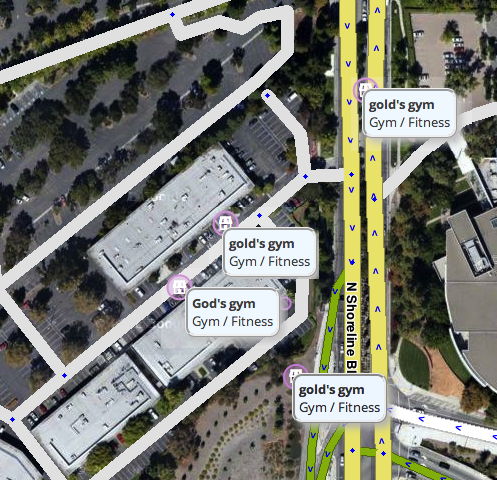
It appears the reverse is true as well. If you delete a place, it is immediately removed from category search but remains in the name search until the next tile update
Sent from my iPhone using Tapatalk
What do you mean by Category search? We can not search any categories…
Yes you can by using the search text box. Enter ‘fast food’ or ‘supermarket’ etc.
I’d be very interested to see how this is implemented world wide. If I enter “Fast Food” with “English (US)” selected as my language, I get “Fast Food” category results. If I enter “Fast Food” with “English (UK)” selected as my language, I get “Restaurant” category results.
An option that would be useful for places:
The ability to set the private attribute to a new place.
Many times people do a photo of their home, but set it as “other” or something else.
Sounds like a good use of the wiki! 
I’d like to see the places wiki updated to include search terms that will trigger a category search. It could be built to designate what language each term works for as well
I assume this isn’t something WazeHQ will hand out so perhaps we have to build it ourself?
Sent from my iPhone using Tapatalk
Nope, just get places with fast food or supermarket in name.
I haven’t had any issues accepting a new public place and changing it to private. You’re just not allowed to turn a private place public
I was hoping someone might have it. Was the localization team involved in adjusting such lists for other languages?