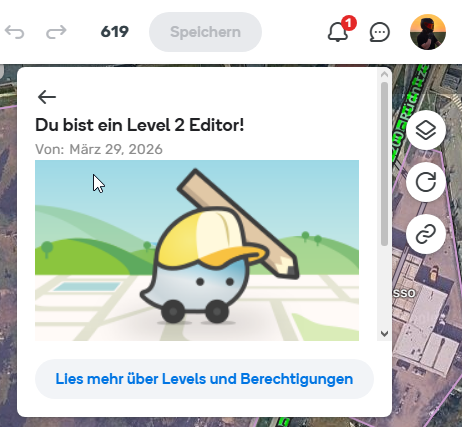
@tim_sch is an editor who has just been promoted to L2 and received this lovely notification via the notification bell in WME. Unfortunately, the link doesn’t work; he is directed to this link, which is broken:
https://wazeopedia.waze.com/wiki/Global/Your_Rank_and_Points#Waze_Map_Editing_Ranks
Could you please check this link and make any necessary adjustments?
Many thanks!
Kind regards,
Marcel
2 Likes
these links are for the old wiki and needs to be updated.
the new location is
For other uses, see Rank (disambiguation) or Points (disambiguation)
Waze uses a point system to track use of the the Waze client application, and the Waze Map Editor. Different actions give you different numbers of points. Your point total is compared to the point totals of other Waze users to determine your Waze rank. Wazers who edit the map also have an edit count and an editor rank.
My Driving Stats .
Waze updates your driving stats periodically – usually once a day. Waze calculates all the points that all Waze users have earned and shows you where you rank compared to other Waze users on the Waze Leaderboard .
list of activities and points – it is also shown below.
You can get more points either by driving more or by updating the map for areas where you already drive.
Save icon . A change is not the same as an edit. A change is any action that can be undone with the undo button. For example, if you select 10 segments at one time, correct the spelling of the name on all 10 segments, and select Apply, the change counter will increase by one. Why? Because you made one single, undo-able change. If you change one segment by moving 10 geometry points around a curve, each time you drag and drop a geometry point, that is a change and the change counter increases because you can undo each of these actions.
In the first example, those 10 segments changed all at once will get you credit for 10 edits. In the second example, those 10 changes will get you credit for 1 edit. In the first, you changed 10 different objects. In the second, you changed only a single object.
As a final, extreme example: if you update an existing long segment, give it a new name, change the city, change the road type, the direction, the lock level and elevation, then adjust the location of 100 geometry points, the save counter may show 160 changes. When you save, that is counted as a single edit to that segment.
When you save a large number of changes at once, the system will not credit you with more than 150 points each time you save changes. If you have more than 150 points worth of changes stored up before you save, the edits will be saved to the map, but you only get up to 150 points. Remember that points are not displayed in the save icon, only changes. If you are concerned with the number of edits and points you receive for fixing the map, save more often and with fewer changes between saves to avoid doing uncredited work.
The details behind these calculations are discussed in this forum thread . Additional changes made to the point system are noted in this later forum thread .
The Waze Support Get More Points Page
[image] [image] [image]
You can see your own editing rank AKA level from the Waze Map Editor (WME) on the top left of the screen .
[image]
Your rank appears just under your username as “Level #”. To the left of your username and level is an avatar icon unique to your level. In the WME when you select a segment, the properties drawer w…
The best option would be to provide a link to the relevant Wazeopedia page for each country; for example, here in Germany: Rechte zum Bearbeiten der Karte