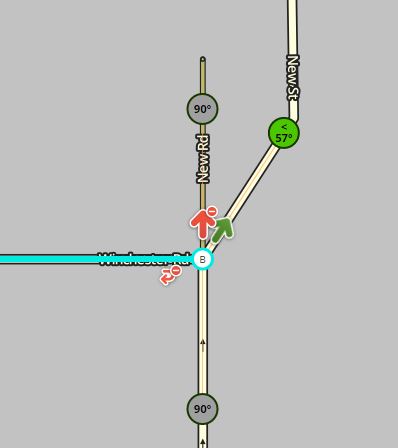
I’m dealing with a UR at Permalink. The reporter thinks there should be some indication that if you’re going right at the fork you should “Keep right” some distance before it.
The response to my request for clarity: “the road here is two lanes wide (one way). The left lane forks to the left where as the right lane forks to the right around a corner. I think a keep right instruction is needed because if you were in the left lane and traffic was busy you wouldnt be able to follow the route…”
Not sure how, or even if, to alter the map to achieve this. I guess you could split the road into 2 lanes earlier before the fork, but I’m not sure this is in line with the “keep it simple” mantra of Waze mapping.
Advice please?
Martin
My own opinion is that our number 1 priority should be giving users routing instructions which are as accurate and as easy to follow as possible. If, within the current limitations of the editing environment, this means we have to ignore the KISS mantra and construct something which looks a bit hairy but which works wonderfully well, then so be it.
I can’t see the UR as it’s out of may area but I believe the reporter is not getting a keep (or turn) right at all. The answer is very simple just change this section of road to a Major Highway, or better still insert an extra node so that you only create a very short section of major highway.
Now I hear you asking “why.”
As the road stands Waze will give a keep left but not a keep right because it see’s the Major Highway as the natural continuation of the road, however if the road splits into two Major Highways then it will need to give you directions whichever way you go. There is one more rule to consider here, if the road before the split and one of the roads after the split have the same name but the other road is different then we are back to rule one. However in this case all three roads have different names so as long as they are all the same road type you will get directions.
To see how this works look at this motorway slip road. We want to give a keep right to those staying on the motorway at this point so make a very short section of the slip road a motorway type. Also note that both those short sections are unnamed, if the short section that stayed on the M25 was named it wouldn’t work.
Have a look at the Interactive junction algorithm, it takes a bit of getting used to (you may need to read the instructions at the top) but it works well.
As for moving the split back I would shout “Noooo” :lol: in fact I would argue that it should be moved the other way. If you look at it in StreetView you will see that Tudor Road should be able to route straight across the junction (there is only cross hatching to split the lanes) and GPS traces in Waze show that this happens, however the way we have it mapped you can only turn left out of the end of Tudor Road. I’m surprised this hasn’t raised some MP’s. You could argue that this is a slightly dangerous move so best to leave as it is which is fine as there are alternative routes. If you moved the split any further to the west you would have to be careful that you didn’t cause the same problem with Thomas Road.
Agreed. Don’t forget that once the road type is changed as above and junction is generating a ‘Keep Right’, then Waze will give advance notification as usual, e.g. in 200 yards, keep right
On Basingstoke’s New Rd there’s a UR with a similar scenario - I can see it would be useful to have a “keep right” for traffic continuing onto New St, but again this sacrifices simplicity for clarity.
Please could someone confirm if I’m on the right lines here before I go ahead and try?
[edit: looking at Streetview, there are several signs warning of the lane restriction, though the last two are obscured by street furniture or at an odd angle. I’m not sure a non-local would know whether Winchester Rd was where they were going or not]
I’m happy to apply the relevant tweak, but while New Rd & Winchester Rd are autolocked at 2, New St is autolocked to 3 so I’m not sure I can save the required changes to the junction.
I would say, the street furniture and road markings are indeed unclear to a local and therefore a ‘keep left’ ‘keep right’ split would be helpful. If you neatly set it up at the junction it would not even be visible on the app.
Having just looked at the junction again, my ideal instructions would be ‘turn left’ and ‘keep right’ which I’m not sure we can make Waze produce. See if someone with more experience than me has a good solution.
This isn’t easily possible with the way Waze works currently.
The use of Turn v Keep is determined by whether the junction is more or less than 45 degrees, so you think, just set the left turn to 90 and the right to less than 45
… but …
if there is just the one exit that is less than 45 it will be selected as the “best continuation” and so no instruction will be given! https://wiki.waze.com/wiki/How_Waze_determines_turn_/_keep_/_exit_maneuvers#Best_Continuation
So at a 3 way junction, if you want both exits to have an instruction you can have Keep Left/Keep Right or Turn Left/Turn Right, but not a mixture of the 2.
If there is a fork before the existing junction, with all three segments the same level (primary street), with left exit (left lane) bearing the name of the entry road, and the right lane being “no street”, then I’m expecting that fork to generate a “keep right” but no instruction for the left lane. Then where the left lane meets Winchester Rd it does so at 80 degrees so this should give the “turn left”. Or am I missing something?
Lot’s of people seem to be having fun answering all the questions in this topic, so I’m not going to try (it’s late at night and I’ve just had a lift back from the pub).
What I will say is download the Junction Angle Info (JAI) script. Then when you think you’ve got all the turns set to give the instructions you want, click on the segment and the colours that JAI gives will tell you whether you’re right or not.
No. That should work - you’ve effectively using two different junction nodes to give the two different instructions. You’d also need to join everything back together so that Winchester Rd and the right lane are connected back onto New Street. As I said, it’s not easy, and not possible with a single junction.
Hang on. It’s ‘New Road’ before the junction and ‘New Street’ after :shock: - odd, but I’ve checked OS and it appears to be the correct. In which case you don’t need an unnamed right lane as it changes name already!
I think I have found a single-node solution - but you have to use a 4-way junction.
If you introduce a dummy “best continuation” segment with the same name then you can set the angles to get what you want; i.e. there are 3 outs with Turn Left / No Instruction / Keep Right as illustrated below by the JAI colours.
I’ve exaggerated everything here to illustrate, but in practice the extra segment can be tiny and almost (but not completely) overlapped by the real continuation.
It can also have turns restricted from elsewhere (e.g. Winchester Rd) so instructions from that direction are unchanged.
Already have - and very useful it was too when coming up with my cunning idea
Thanks PealRinger for your single-node solution - it is clever & minimal, but I expect this would need to be locked to stop the uninitiated from simplifying this again. Not sure how frequently this junction style is warranted, but if rare then I would prefer the three-node version, as it tracks reality more obviously.
Thanks. To be honest - which ever solution you use it’s probably worth manually locking something like this where you’ve put some effort into a situation. It just helps flag to everyone that there is something unusual to look for before making any future changes.
I’ve modified the junction with PealRinger’s solution (permalink). I’ll give it a couple of days to show up and check the routing directions, then request an uplock.