Just a random question for a script maker: Are you able to create a script that moves segments, similar to how this script works for roundabouts? Sometimes, moving the segments is enough instead of redrawing them by moving the handlers (geo nodes) one by one. I would appreciate it if anyone could do this since I don’t have the skills to create such a script.
2 Likes
Hi @MapOMatic and @sulstore , would either of you be interested in developing this script? This tool would be particularly valuable in regions that have received major imagery updates. Currently, editors need to painstakingly adjust each segment individually - a time-consuming process, especially when only minor X/Y axis alignment corrections are required. Your expertise could save the community countless hours of manual work!
1 Like
HI @AndyLaode Rapid Koi Road does this for new segments. I can think of something for existing segments.
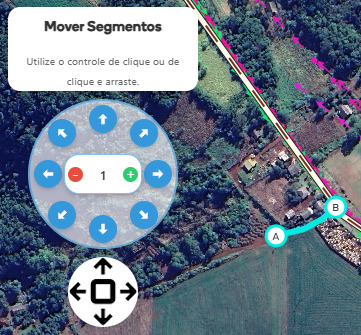
3 Likes
I’ve successfully installed the browser extension and verified that the feature works as described. One observation: the “Move Segment” button only appears once per session. After initial use and subsequent dismissal, the button doesn’t reappear for later adjustments.
Yes, this is the expected behavior, it appears while only after approving the KOI, so that you correct the geometry, when you remove the segment selection, the control is also removed.
May I request a feature to manually enable or disable the ‘Move Segment’ control after a segment is created? This is for two reasons:
- Sometimes we accidentally click away from the selected segment, making it unselected—and the ‘Move Segment’ control disappears permanently, even though we still need it.
- With this feature, it would fully achieve my original request: to move an existing segment along the X or Y axis.
Whether this is added to the ‘Rapid Koi’ browser extension or released as a separate extension is entirely up to you.
1 Like
Do you want to move new segments that have not been saved yet (like KOI approvals), or do you want to move old segments that are connected to other nodes?
Can we have both functions?
Currently, Rapid Koi won’t move new segments that haven’t been saved yet if we click away from them (deselecting them). But my original request was about moving old segments that are connected to other nodes.
I imagine that this could cause a lot of problems, because depending on where the segment is moved, invalid geometry and very tight curves will appear. I don’t know how it would be possible to get around this.
I don’t know the logic behind this script, but it works with roundabouts - which I think are more complex than segments. It can move the roundabout, rotate it, and make it smaller or bigger. Would applying the same logic to segments be difficult?
1 Like
I definitely vote for a script like this, as in many countries with lesser developed Waze maps, the import still need to be corrected. I have had a script that did the work, and sure there were problems like @sulstore describes: indeed you need to check all connected segments and their junctions with the selected segments afterwards. But still it saves a lot of work in a city and RSI in the end. The other issue is that you probably get throttled
1 Like
Waze is developing an SDK for creating scripts, when this is finished, it will provide continuity. How do you prove what the interface should be? Fixed control on the canvas, floating button (same toolbox) and option to expand or control? Automatically open a or select segment? Open a or access or script menu?
@AndyLaode and @moweez
1 Like
how about control at the sidebar just lilke FUME aerial shifter? so the function always there but it will not disrupt workflow
this is an example of it I created a script to correct the misalignment of satellite images - Map Editors Community / Addons, Extensions, And Scripts - Waze Discuss
The simpler the better, but I´m not a techie so I´m afraid it is difficult to answer your questions directly… I don´t mind a floating button like the tool for the roundabout, as long as I can put it somewhere where it stays. Also, as one does not always shift segments, it shouldn´t open all the time. For how I work, I prefer that the function remembers the last position and state, so that when I want to use it, it is there without having to hard-refresh and until I close it (all preferably with less than 2 clicks  ). But I’m sure other people would have different desires.
I remember the former script was only available to GCs because of the possible implications . It needs to be taken into consideration that it might elicit point hunting behavior, although I think it will also be throttled very quickly. The possible invalid geometry afterwards will be warned for when trying to save. But still you need to know what you are doing using scripts anyway 
I was informed that there is already a script for this:
1 Like
great news