Routing detours drivers south on SR-247 versus allowing them to drive on base.
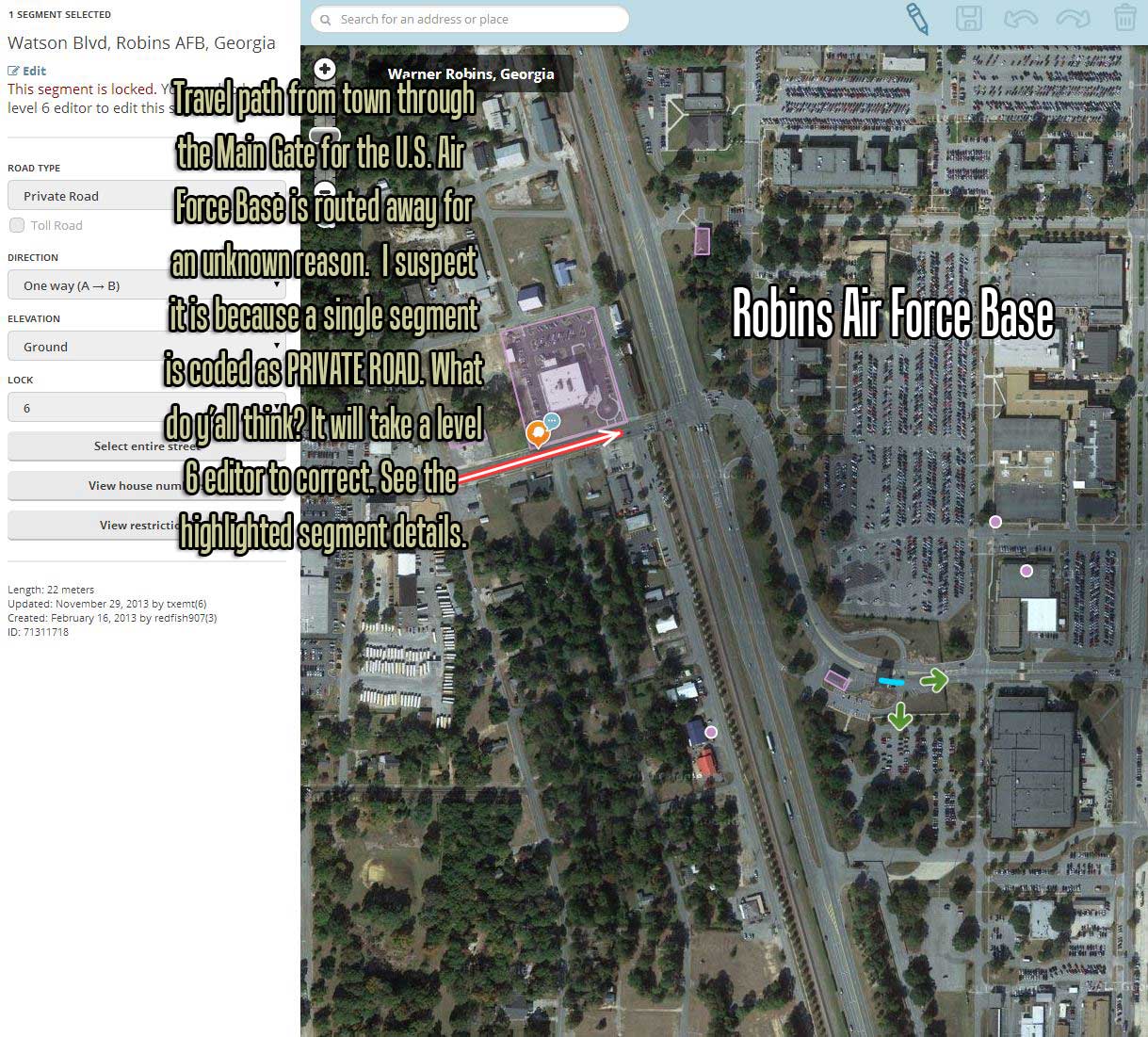
Routing detours drivers south on SR-247 versus allowing them to drive on base.
That is correct. The Private type segment applies a penalty and will not allow routing through the AFB so long as the destination address is not in located within the actual base. In this specific case there is another way in 247->Robbins Pkwy, which has no Private segments leading into the base, so Waze will choose that route over the penalized one. In order to correct the routing IN to the base, we need to make sure all applicable entrance points are typed Private as well. So making this segment a Private road, should fix this. See the Private Installations wiki for more details. You should also consider marking the gates with area places - eg. Military Personnel Only, Visitors Entrance etc.
See this section of the wiki:
https://wiki.waze.com/wiki/Military_installations#Preferred_Treatment:_Larger_Installations
HuckD
Great information from you both, I am reading these WIKI’s and learning more everyday.
The problem with the routing to an on-base address was that there was “one” gate without the private segment designation at or beyond the gate therefore routing ALL traffic miles out of the way and away from the main gate of the large installation.
This was exactly as you predicted. I have made the change adding private road to the one lane inbound to the base. I will check tomorrow if the routing is completely fixed.
Thank you @Kobes1878 and @HuckD

Well, the routing is still messed up somewhere as it again bypassed the base’s Main Gate in favor of another smaller entrance that was farther away. I checked when I got into work expecting that preferred gate to not have a Private Road segment, but it did. This has me stumped for now. I continue to inspect the segments between the main gate and my destination, believing I will find something along the path that isn’t right.
A success story, however, at the start of my ride into work each day there was a section of SR-96 that deviated via side roads around an area where the road splits apart into a divided highway. I found two segments on top of each other with the bottom segment limiting road travel via the red arrows. I am certain this was what was causing the navigation errors. I will test that tonight when I get home.
First off, Im not sure when you made the edit to private but it would have had to have been prior to the tile update, which is what reflects the changes on the map. You can check the times of the update @ http://status.waze.com/. Keep in mind that by just changing the road type an update may not be triggered, so you may want to move a junction slightly to ensure you get the desired result when the next update comes around.
Making this slightly more complicated, the segment I recommended you change to private, seems to have been switched back to none private, bringing us back to square one.
My recommendation is to contact one of the local Area Managers via Private Message (go to your User Control Panel) like HuckD, burpee1282 or a Local Champ like spankdog and ask them to have the segment in question locked at a higher level, so it cant just be changed back. For military bases, level 6 is preferable. You should also show them the fork in the highway so they can look into the overlapping segment further.
You can also contact the other editor who last edited the segment by the base, explaining why it needs to be that way and pointing them to this thread. maybe there is an entirely separate routing issue that they are having and we would need to figure out a solution that works for everyone.
Breeze, after you’re sure the changes have been updated on the server as Kobes1878 mentioned above you also need to be sure your APP is current. It doesn’t reload the maps every time you use it - to save on data usage. Try manually refreshing/updating the map tiles to make changes show on your phone. Tap the menu icon in the lower left, then Settings (lower left tiny icon), Advanced, Data transfer, Refresh Map of my area. Cheers!
It appears that this SEGMENT was set to Primary by arcs_n_sprks(1) today. I’ve changed it to Private and locked it at level 4 and will send him a PM.
I’m going to be the first to admit I’m not the most knowledgeable about military bases. Txemt had the USMC base in Albany pretty well covered when I started editing and I’ve stayed away from them for the most part.
That being said I played with some routing onto Robins this afternoon and found that Waze would route onto the base using N Davis Dr on the north end. I cannot tell where the gate control for this end is for the base but did set this segment to Private. I cannot check the routing until the maps update so I’ll look at this again tomorrow. HuckD
Hmmm, closer inspection reveals that this end is fenced off. I’ve disconnected this segment of N Davis Dr and see if that doesn’t help. HuckD
@HuckD - Yep, that is the editor I was referencing in my post. Thanks for reaching out to him.
I see txemt was actually the one to lock some of the other Private roads around this base to 6. “Enlisting” his help here is a good idea. In my limited experience with Military bases, due to the sensitivity of the destination, crucial segments around these installments are locked at the highest level possible.
To add to this (in case anyone searches and finds this)…it is best to ask txemt or myself about base issues, especially routing. I have dealt with them a lot also, but not as many as tx. Thanks.
I am adding your’s and TXEMT to my small but growing address book. Thank you guys for doing the heavy lifting in the early days of making these maps right; I only have to deal with today’s easy task of simply fine-tuning stuff in my area. 
I have allowed several days to patiently pass before making a formal statement, but the changes made in this thread have appeared to correct all avenues of navigation on to Robins AFB.
It was good advice to let the maps have a couple days to synchronize. Being new I thought that changes would be reflected fairly immediately. For me, this is a great example of why WAZE is such a useful tool - we are all beta testers making this product better!
My wife told me this morning that the Today show did a special segment on the Waze App and cheered it on! Awesome!! I guess mundanes aren’t much into optimized routes http://www.cnet.com/news/locals-upset-at-googles-waze-for-sending-traffic-to-their-streets/
Breeze …and so it begins. Your first community, team-effort success story. Welcome aboard!
Its always important to check status.waze.com to ensure that the edits were propagated over to the main server. I would actually recommend subscribing to the site - click the follow button in the bottom right corner and enter your email - to receive (almost) daily emails as to when the tiles were last updated. The status report will also cover other important information, like when there is a delay in the server or scoreboard and the like.
I’ve actually been following that story when it first ran about a month ago. Good to hear the Today show was promoting Waze. The article you linked sums up it up perfectly. I-405 is a daily nightmare and drivers are always looking for a way around the freeway. The roads in question are not actually private; some folk found Waze and alas they have someone to point fingers at. Thankfully the reports they are submitting have zero effect on routing, so win-win. 