Is there anyway to alter or effect the directions that Waze gives to people. There have been numerous reports of Waze taking them the long way around a area. I have researched these and have not found any broken arrows or junctions that would force the directions to take them the long way.
Could be any number of reasons. Bad data, connections, turn restrictions, traffic, etc. Have you got an example?
Sent from my GT-I9505 using Tapatalk 2
Yes, please post examples when you come across them. If there is a map problem it is more likely to be found with a few other editors looking at this issue. If there is not a map problem, the coordinators or experts can forward the issue on to waze personnel.
In Maryland specifically, I have noticed a lack of Primary Roads and Minor Highways. This causes a lot of routing issues as Waze does not know which roads are best for travel since they aren’t labeled correctly. I’ve fixed quite a bit of these roads over the past month or so in the city but there is still lots left in the counties.
Well we don’t know where this one is as we don’t have any examples whatsoever. Pretty pointless without those.
Sent from my GT-I9505 using Tapatalk 2
That’s not an example of where I would want editors to have the ability to alter what waze calculates as the fastest route. There are plenty of times where it is faster to go around the block. It not like waze won’t route straight through. Sure the routing algorithm can be improved and even if perfect could give bad results if waze gets bad or insufficient data. But its really hard to tell whether this is an error or not. If the traffic is backed up on Adams I wouldn’t want some editor to later look at this track and say oh we need to alter the roads to force the route to go straight through there.
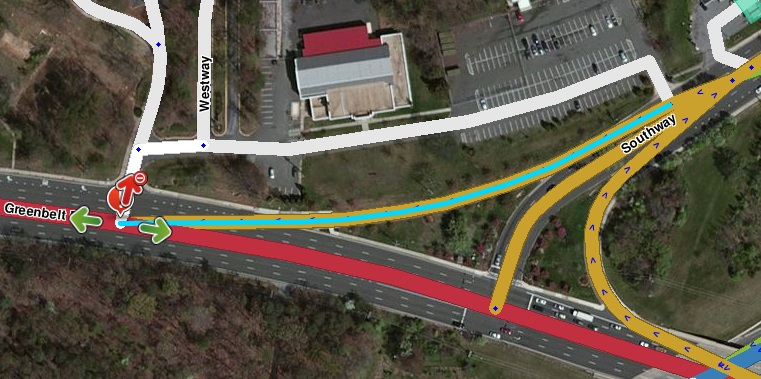
Here is another I could use advice on. This one is routing through a parking lot road instead of the nearby street.
https://www.waze.com/editor/?zoom=6&lat=38.84312&lon=-77.06467&layers=BFTFFTTTTFTTFTTTTTTTTTFTT
Thanks!
One more to look at:
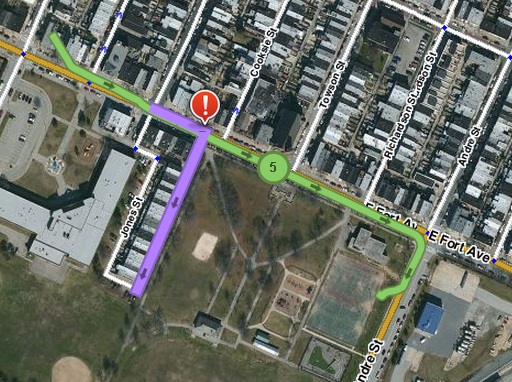
https://www.waze.com/editor/?zoom=5&lat=39.26878&lon=-76.59237&layers=BFTFFTTTTFTTFTTTTTTTTTFTT&segments=21896252
Thanks!
These are tough. The issues are that the evidence is that the problems can be triggered by very old tracks, although Sept, 2012 would really be pushing it. For the first example, the green average line taken makes it look like at least some of tracks that ignored the turn in the parking road had a destination right near the parking lot road, which might make the routing reasonable. All that plus the fact that I can’t currently get waze to route through the parking lot road, would lead me to just close the map problem. There are many of these “Most users did not follow the suggested route” flags that I close without finding a current issue with the map or altering the map.
Regarding the second, I’m guessing that many of these are caused by a user not taking the provided route. Waze then gives a recalculated route that is trying to turn the user around. The user does not take the attempted U-turn and where several of these not taken U-turns occur these map problems are presented. In this case I would go ahead and address all the soft turn restrictions in the Latrobe/Jones/Clemm/Hull loop. I’d consider restricting the U-turn at the end of Latrobe Park.
I fixed the second issue as suggested. Will give it a test the next time I drive near that area. Thanks
CBenson, one other tricky one for you:
https://www.waze.com/editor/?zoom=5&lat=39.63054&lon=-75.76071&layers=BFTFFTTTTFTTFTTTTTTTTTFTT&segments=68383295
Don’t know.
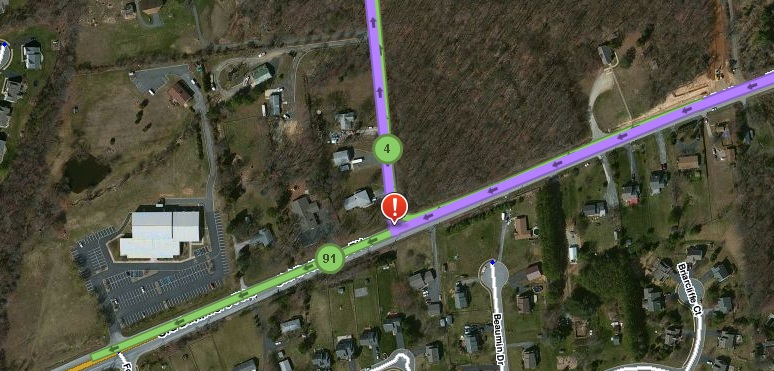
I could make some wild guesses about spurious GPS tracks near the interstate or long loop uturns for the interstate, but without any evidence. I don’t see any map issues in the area (although there are soft turns from Whitaker to Baltimore Pike). I’d close and move on.
Hard to say for sure. I would suggest making the u-turns hard at these segment ends to prevent incorrect use for u-turns. Without knowing the destination(s) it’s hard to say for sure.
AlanOfTheBerg, I did as suggested. Will keep an eye on this junction to see if that helps.
Some other things to note when you come across these issues is the date the roads were last edited. I often find that Waze will route a user using “Stale data” when the roads were just recently updated. I’ve seen Waze route users with stale data that has been updated within the last 4 months and it somehow still uses the old data. This, obviously, is out of our control. Otherwise, it could route a user a specific way due to traffic conditions or a faster route as CBenson mentioned.