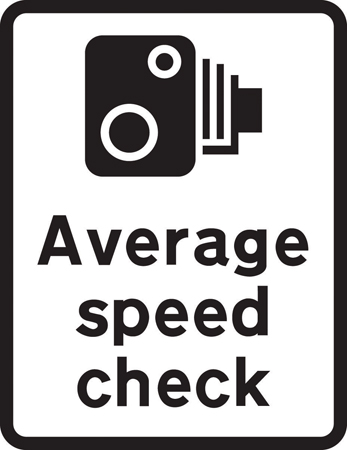
Average Speed Check sign
Introduction
When Wazers follow a navigation route, the App will:
- announce when approaching an average speed check zone
- announce when entering the average speed check zone
- show a progression bar on the side of the screen
- announce when leaving the average speed check zone
When Wazers are free-wazeing (no navigation set), the App will:
- announce when entering the average speed check zone
- announce when leaving the average speed check zone
When Wazers are free-wazeing (no navigation set), the App will not:
- announce when approaching an average speed check zone
- show a progression bar on the side of the screen
The App does not compute or display an average speed, instead it continues to show the live speed if the user has that feature enabled.
Adding average speed zones
 |
You may wish to use the WME Color Highlights script to help visualise which average speed zones have been set already. |
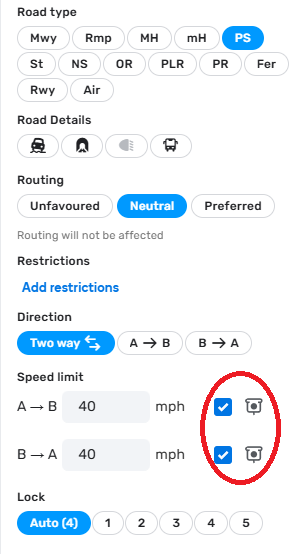
WME screenshot. For 1-way segments, only one box is shown. A segment subject to Average Speed Check should have the tick in the relevant direction.
Ensure the speed limits are mapped correctly along all segments within the average speed zone.
The average speed check zone should be mapped from the first camera to the last camera.
- If the distance from the previous node to the first camera is less than 325 feet / 100 metres, then the entire segment should be set to Average Speed Check without a new node placed at the camera.
- If the distance from the last camera to the next node is less than 325 feet / 100 metres, then the entire segment should be set to Average Speed Check without a new node placed at the camera.
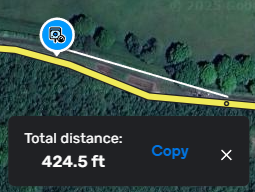
Example 1: Node distance exceeds 325 feet / 100 metres, create new node at camera for start/end of Average Speed Check Zone
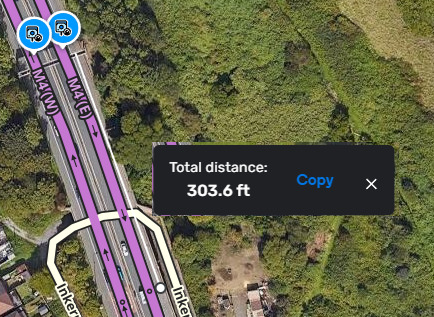
Example 2: Node distance less than 325 feet / 100 metres, therefore no new node at camera required, set entire segment to Average Speed Check Zone
Each camera location should be mapped and for each direction of enforcement. WME doesn’t have a specific camera type for average-speed cameras, so the same standard-speed cameras should be used.
Temporary average speed zones
Mapping average speed zones for events or roadworks may cause more issues than they solve due to the requirement for a map tile update before the changes reach the App. With advice from the UK Country Managers, careful consideration should be made when mapping long-term roadwork projects. If you do apply a temporary average speed zone, you must be prepared to be responsible for maintaining it and reverting it to a standard road when the roadworks are complete.
 |
Editors should also read the Average Speed Cameras - Mapping Guidelines on the UK forum |