Buenos días,
Me gustaría saber si a alguno de vosotros, usuarios de iPhone (iOS) os funciona bien el GPS dentro de los túneles de la M30.
Conecto el móvil con bluetooth para el CarPlay, y aún así, cuando entro en la M30 el GPS se vuelve loco y se piensa que no estoy dentro de los túneles.
Hay algo que esté haciendo mal? O es que todavía no funciona en iOS como debería?
Gracias por la ayuda!
Hola Arximono.
No se como va en iPhone.
He encontrado esto, a ver si te sirve.
Un saludo.
Me pasa lo mismo en pixel. Google Maps funciona sin problemas, Waze se pierde. Tiene los permisos concedidos y está actualizada, no se que hacer
Hola granbonobo.
Bienvenido al foro de Waze.
En principio con tener el bluetooth encendido y dando permiso a la app para utilizarlo (en algunos móviles aparece como “Dispositivos cercanos”) debería funcionar.
Un saludo.
Confirmo que no es así, 2 dispositivos diferentes Pixel con permisos activados y no he podido hacer que funcione
Me pasa igual. He probado con tanto por cable conectado al coche como por Bluetooth, en iPhone, que supuestamente es solo tener activado el Bluetooth, y es adentrarme un poco en los túneles, y la señal se vuelve loca. Interpreta que voy por la superficie, en vez de por los túneles.
Vamos a hacer unas pruebas, por partes.
1.- Quitar los permisos a la app para que utilice Bluetooth, pero mantener el Bluetooth del móvil encendido.
En Android a veces aparece como “dispositivos cercanos”, en iPhone no se como se hace, pero no será muy distinto.
2.- Iniciar Waze, de momento en el móvil, no en el coche.
3.- Poner como destino “Parking APK2 Plaza de Oriente, Madrid”.
4.- Seleccionar el destino y dar a “Ir ahora”.
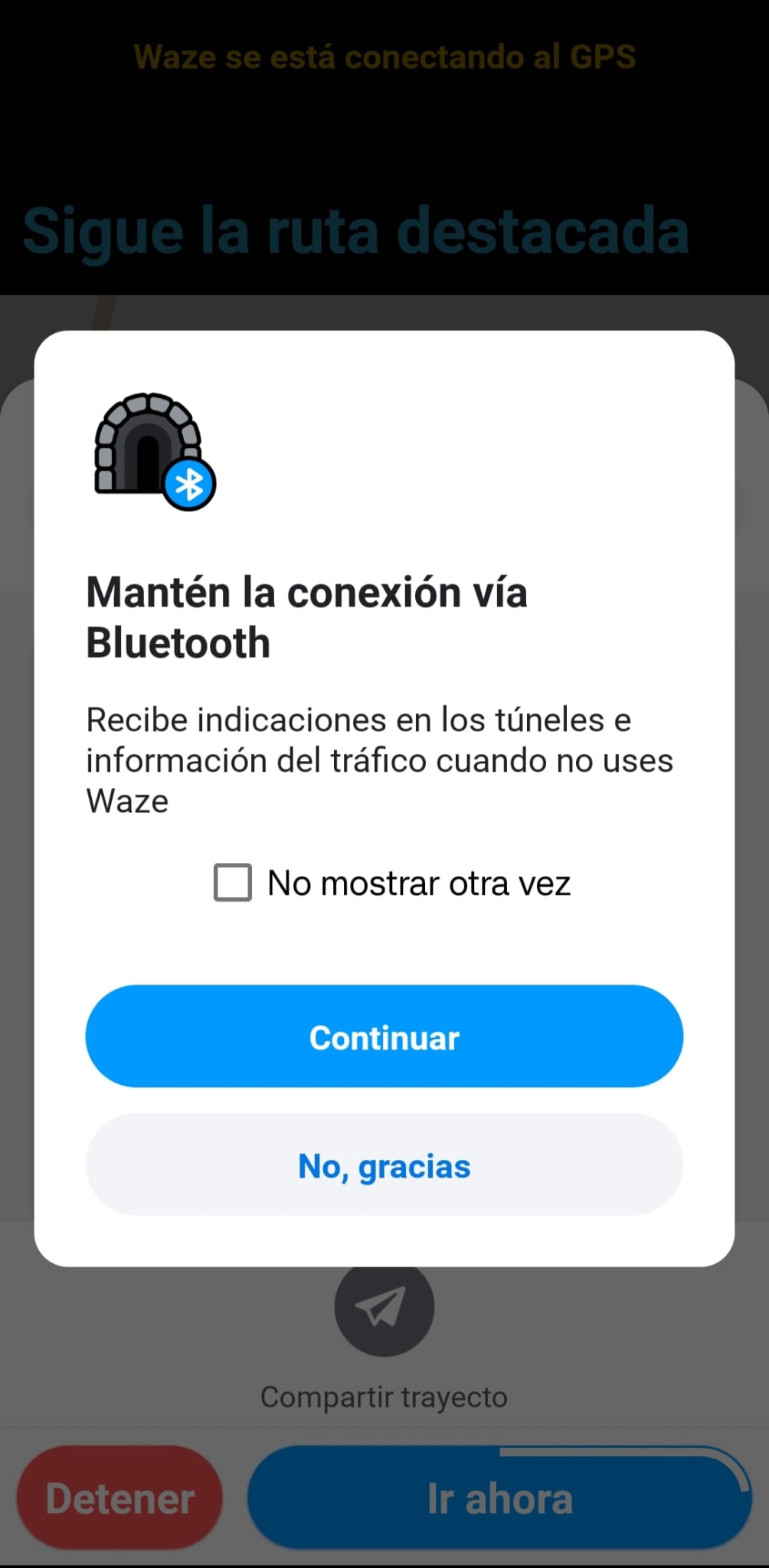
5.- Debe de aparecer un mensaje de aviso como este:
6.- En el aviso hay que dar a “Continuar”, NO marcar la opción “No mostrar otra vez”.
7.- Apagar Waze y comprobar que Waze tiene asignado el permiso para utilizar el Bluetooth (dispositivos cercanos).
8.- Volver a encender Waze e iniciar la ruta hacia “Parking APK2 Plaza de Oriente, Madrid”.
9.- Ahora Waze no debe dar ningún tipo de aviso de alerta.
10.- Waze ya está preparado para funcionar con las balizas de la M-30.
Yo probaría a circular por los túneles de la M-30 en principio solo con el móvil, no con el dispositivo del coche.
1 Like
hola @parallrob gracias por las instrucciones. Confirmo que hice lo que me dijiste y Waze ahora funciona en el movil dentro de la M-30. Por desgracia, si está mostrándose en mi Renault Kadjar mediante Android Auto sigue quedándose perdido nada más entrar. Confirmo que tanto mi Android, Android Auto y Waze están actualizados y con todos los permisos concedidos
Hola @granbonobo.
Me alegro que por lo menos te funcione en el móvil.
Lo de AA no sé que más decirte.
Intenta buscar (no se si existe la posibilidad) alguna opción para que el móvil siga la señales GPS propias, no las que le pueda dar el coche (si es que existe esa posibilidad, ¿apagando el GPS del coche?).
Si no, solo se me ocurre que comentes el problema directamente con Waze, puedes hacerlo desde la app.
En el menú, en Ayuda y comentarios, hay una opción de Informar de un problema.
Yo he pasado por los túneles de la M-30 y por otros que tienen balizas y me funciona bien, tanto en el móvil como en AA.
Un saludo.