Conversations have been with us for a while now and we have clear guidelines for dealing with URs. In particular, “URs should not be closed without an explanation or an attempt to get more information from the reporter”. The effort required to add a comment before closing a UR is hardly extreme.
Now closed URs are also visible on the map - and what I am seeing is not pretty. A quick scan has turned up 66 URs closed without a single comment. I know some are probably fixed or for self-ceated URs, but the Country Admins have already received complaints about one Area Manager closing multiple URs without comment or action and I have just encountered another.
This behaviour is not acceptable. Editors - particularly Area Managers - have a responsibility to the drivers who report these URs to deal with them properly and make a reasonable effort to resolve them. The comment you leave may also assist other editors dealing with URs that appear for the same problem, but before a map update has taken effect in the App.
If you are not prepared to make a minimal effort to resolve URs properly, we would rather you left them alone.
Area Managers can now see when other editors are prematurely closing URs in their area. In the first instance, AMs should send a polite message to the offending editor with a gentle nudge towards the guidelines.
If they do not read their message and/or continue to close URs without action, please get in touch with the UK admins (email address in wiki).
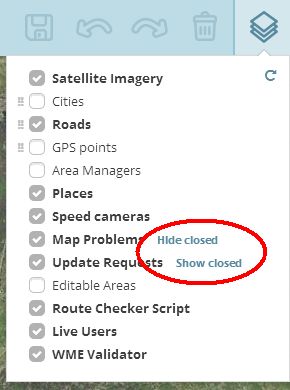
In the layers menu, next to the “Map Problems” and “Update Requests” lines should be the text link “Show closed”. If you click on that, closed URs/MPs should appear on the map in green and the text link will change to “Hide closed”.
I know that new editors will always be with us and it’s always a problem - although suspension of editing rights often promotes communication quite quickly. In this case the problem is editors who have been with Waze for a long time, who have AM privileges and at least have forum accounts - even if they’re not visiting the forums as often as they should.
I have no intention of dropping hints or implying that this thread is aimed at particular editors. The difference is that now everyone can see it is being done. Any editor can see if someone else is behaving like this and report it to us.
The UK has a policy on dealing with URs. The Self-Management Policy makes it clear that we expect AMs to be regularly checking the forums and staying up to date. If editors repeatedly refuse to follow the rules, the SM Policy sets out the actions we may take, including level demotion, removal of AM/CM privileges, temporary or permanent loss of editing rights.
I see no reason why you shouldn’t still send a PM. If you’re not sure of the reason, you could perhaps use language like “can you tell me why…” rather than “you shouldn’t be…”. It’s possible they have a reason for doing so.
It’s also possible they are doing it wrong. Being with Waze since 2011 isn’t a badge of infallibility; neither is level 5 or 6. We all of us make mistakes and I am certainly always ready to admit I’ve done something wrong.
I may be a Country Admin now, but I’ve been with Waze for less than 2 years. I’m aware that there are editors who have been with Waze much longer than I have. But all of us need to keep up to date with the Wiki and work according to the latest standards.
Contacting other editors is part of an AM’s responsibilities - but if there’s an editor you feel uncomfortable about contacting, you can always refer the issue to one of us.
Where I’ve created a UR while out driving and then fixed it myself on WME, it’s been my usual practice to “solve” the UR without comment. I certainly don’t need to send myself a comment.
Is this still OK, or are you asking for UR’s fixed by the reporter to be commented? If this is a requirement, it would be worth explicitly stating it in the guidelines, otherwise I’m sure others will like me assume that they needn’t comment UR’s they’ve raised themselves.
Oh dear, re-reading the guidelines, I notice that the 7-day warning which I’ve recently been omitting in the interest of brevity is a requirement. Is it really necessary though?, in my experience reporters either reply almost at once or (more usually) not at all. I have difficulty imagining someone thinking that they would reply but not this week being persuaded to reply earlier by being given a 7-day deadline.
Final query from me, what is the status of the suggested answers Wiki page? I notice that the 7-day bit is missing from that too.
When I’ve nudged editors, who have closed URs I’m working on without comment, and I’ve pointed them in the direction of the wiki guidelines - without fail I’ve got a “thanks, that’s useful info” or “thanks for the feedback. Good to know that someone is keeping an eye on newbies like myself.” reply back. One today in fact.
I think the majority, therefore, are innocent/oblivious.
The problem is that there are some editors who close URs from other Waze users without action. I know it’s not always easy to leave text in your own UR, even with keyboard shortcuts. But the effort required to type “self UR” or something similar when in the editor is minimal - and that way other editors won’t be wondering if you’re being a naughty boy! :lol:
The 7 day “warning” isn’t intended to make reportes respond more quickly. 7 days is primarily intended to be a guideline to us, to say that you should leave them for at least that long. Reports may be left by someone going on holiday, or who only uses Waze at the weekend. Ideally we might leave them longer than that but we have to strike a balance between keeping the map clear, giving reporters a chance to respond and the knowledge that response rates go down rapidly the older the report is.
Also, I think it’s polite to put it in your comment. If the reporter reads it but doesn’t respond at the time; then you close the UR before they do; they may feel less aggrieved because they had fair warning. Did I really intend the “7 days” text to be compulsory? No - but I think it should be there.
Indeterminate. :lol: It was David’s idea, but he’s left now. I do want to look at taking it forward, but work has been burying me for the last few weeks. Hopefully things will be back to normal by the end of the month and I can get into it. I’ve been playing with a couple of ideas; possibly related to producing a script for this. (i.e. I have the ideas and persuade someone else to make the script :lol: )
In the meantime, I am finding the LinkedNotes Chrome addon very useful for inserting “standard” pieces of text into URs.
I’ve wanted to write a short bit of JS, which will take the name of the road segment you have selected at the time and insert it into my stock opening spiel.
“Hi there, volunteer map editor here, responding to the map issue pin you dropped on <segment_name> in <segment_city>. Can you give me some more details so I can take a look?”
Oh yes, please! Then with LinkedNotes, posting a query in a UR would be really quick. I’m not saying it’s slow now, with the ease of copying and posting from a Notepad file, but the first bit - identifying where the report was raised - is always more time consuming that it need be.
I have been using Auto Text Expander for Google Chrome™, which allows you to define shortcuts to insert expanded text, and it also lets you insert the contents of the clipboard into the text.
So I just copy the segment name then type “urmi” and it expands into the full text (with the segment name inserted appropriately.


 In this case the problem is editors who have been with Waze for a long time, who have AM privileges and at least have forum accounts - even if they’re not visiting the forums as often as they should.