Here are some more markdown and BBCode examples that seem to work. Some are included in the post above, but this post provides a few more details.
This website has a good article for Getting Started in markdown and some handy pages for editing markdown Basic Syntax, Extended Syntax, & Hacks.
This Discourse post has some useful information - Formatting posts using markdown, BBCode, and HTML.
This website has a lot of markdown examples, I’m not sure if they all work in Waze Discuss.
Headings
When used in the original post the # Heading structure below will also create a table of contents on the right side.
# Heading 1
## Heading 2
### Heading 3
#### Heading 4
##### Heading 5
Heading 1
Heading 2
Heading 3
Heading 4
Heading 5
Text
[u]Underline[/u]
[s]Strikethrough[/s]
[u][s]Underline strikethrough[/s][/u]
This has <sup>superscript</sup>
This has <sub>subscript</sub>
These are <kbd>Keyboard</kbd> letters
Some more <kbd>⌥⌘C</kbd>
This is a [spoiler]spoiler[/spoiler] -- click the blur to see the spoiler text
[email]nowhere@example.com[/email]
Underline
Strikethrough
Underline strikethrough
This has superscript
This has subscript
These are Keyboard letters
Some more ⌥⌘C
This is a spoiler – click the blur to see the spoiler text
nowhere@example.com
Details
Change Click to expand below to whatever suits your needs.
[details="Click to expand"]
blah
blah
blah
[/details]
Click to expand
blah
blah
blah
Footnotes
Are displayed two ways, Inline & Non-Inline, depending on how the Admin has set the page preferences. This page is using Inline footnotes.
Inline footnotes are accessed by clicking the three dots.
Below is an image:
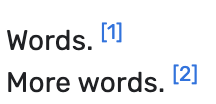
Non-inline footnotes will be located at the end of the page. Clicking the number will take you to the footnote at the end of the page.
Below is an image:
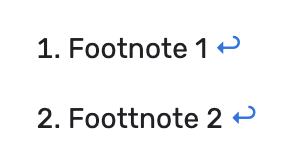
At the bottom of the page the footnotes will appear as a list:
Words. [^1]
More words. [^2]

[^1]: Footnote 1
[^2]: Foottnote 2
Words.
More words.
Tables
| Waze 1 | Waze 2 | Waze 3 |
|---|---|---|
| Details1 | Details2 | Details3 |
| Details4 | Details6 | Details6 |
| Waze 1 |
Waze 2 |
Waze 3 |
| Details1 |
Details2 |
Details3 |
| Details4 |
Details6 |
Details6 |
Table Alignment
- Left-aligned:
|:---|
- Center-aligned:
|:---:|
- Right-aligned:
|---:|
| Waze Left | Waze Center | Waze Right |
|:---|:---:|---:|
|Waze is on the left | Waze is in the center | Waze is on the right |
| Waze Left |
Waze Center |
Waze Right |
| Waze is on the left |
Waze is in the center |
Waze is on the right |
More on tables - Adding a table to your post using markdown