It seems to me waze will only create directions with roads other wazers have already driven, which makes this app super frustrating. I love the traffic but waze needs to implement some kind of routing algorithm based on distance.
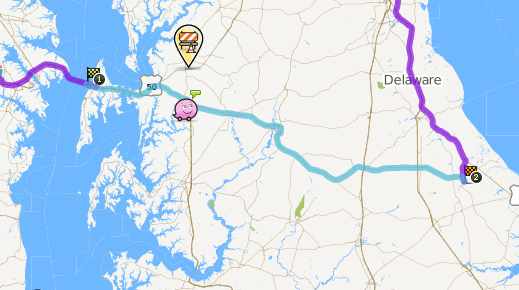
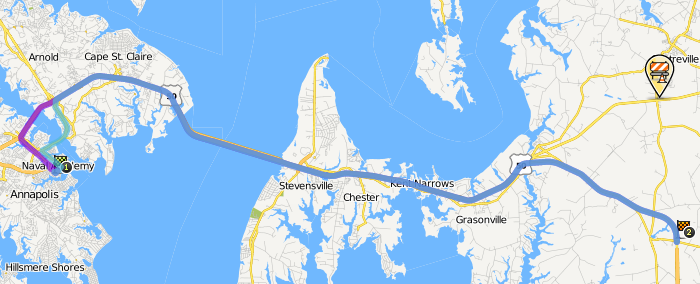
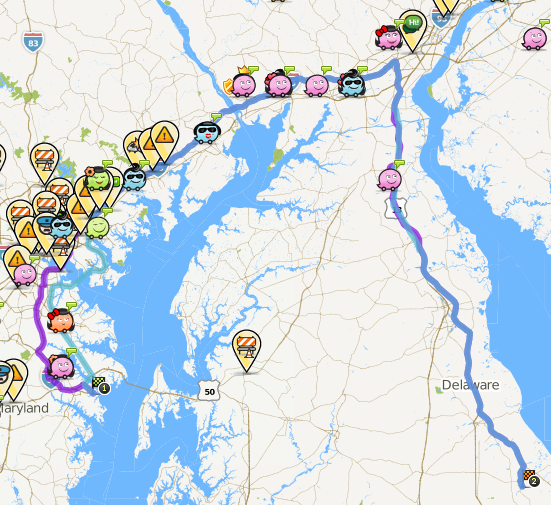
For example go to the waze live map and click directions and make it from Annapolis md to milton de. You can clearly see that waze misses going over 5o east over the bay bridge and into delaware. It adds a whole hour onto the trip.
I am planning a trip to milton this weekend and want to use waze to get there and see traffic cops etc. But I can not “teach” it to drive to milton if I myself do not know how to get there.
This is a major flaw waze. I wish I could get the waze live updates onto my google navigation, then I would have the best information and best reports.
There are clearly map problems between the Bay Bridge and Milton. We need some editors to work on the map on the Eastern Shore before it will be terribly useful. I may extend my area in that direction once things are under control between Annapolis and Washington. I do run both waze and google nav in areas that are not well developed on the waze map to get the best information, the best reports, and improve the waze map.
You can help in the easiest way possible by driving around with the Waze app running. No need to set a route, just drive. Once Waze has enough data on the roads you’ve driven it’ll start giving more useful routes.
Remember to mix it up a bit now and then though, or you will never get alternatives. You could always turn the cookie munching option on, and drive down the roads Waze suggests. Of course, after it starts giving you sensible routes, and it shouldn’t add any more than 10 minutes on your journey using this option.
Editing is always another option, but isn’t for the faint-hearted
The waze maps are user maintained, so if you would like to help out that would be great. You can edit the map within about a mile of where you have driven with waze on. If you have driven US-50 on the Eastern Shore with waze on before, you should be able to make some critical improvements to the map.
I was going to point you to some map errors that might be the root of your problem, but the old cartouche editor let me correct them. Maybe by the weekend these edits will be enough to get waze to route you across US-50.
why does waze need us to drive on roads before it takes them into calculations for the shortest route?
From a programming perspective couldn’t waze easily implement something like Dijkstra’s algorithm, which could find the shortest route “miles” wise.
Then as more users drove a route they could take the data and change the “cost” of each route, and change the “cost” based on traffic and other factors. This would make the most sense, and it seems odd that waze has not done this already and relies on users to have driven on a road first before they use it for routing users. As a result waze gives lots of poor directions in places where there are not a lot of waze users.
The algorithm you mention is cpu intensive. The difference in different gps manufacturer’s is the “tricks” they use to reduce the computations needed. Waze has an array of costs associated with each “edge” and will use them based on your preferences, shortest, fastest, avoid dirt, turns, highways, etc. The original structure of nodes and edges comes from public domain sources some of which known to be out of date. They made the decision to put high costs on all edges that were not verified. These costs are also kept in both directions and due to other wazers are dynamic and time of day dependent. The map importing process also left some roads disconnected and it also may have generated problems with underpasses and overpasses. Hence, we edit and we drive. Welcome to the group.
I agree with Rick. Its not that waze need drives on the roads before it takes them into calculations, rather the more correct data waze has the better the calculations. In your particular case what I believe is happening is that there was a section of eastbound route 50 (just past the route 50/301 split) that was labeled as type street. One of the “tricks” that waze uses to reduce the computations needed is not to even look at streets for long routes except near the ends of the routes. Thus, waze only found the route around the top of the Bay that is all freeway and highway. It’s my understanding that no amount of driving (there are already a lot of GPS tracks over route 50 toward the beaches) would have corrected this problem. It required correction by an editor.
As long as the map is correct. Again if it is an import problem (Wrong type roads, bad splits, mangled intersections), then it will require some map editing to clean those issues up, and then the drive data will have an easier time being collected.
Waze is not yet correctly routing along US-50. Back when I first responded to this topic, I was able to change the street type from “street” to “major highway” for a number of eastbound segments of US-50. On my phone I now can see most of them as major highway. However, this segment and the adjacent segment to the west (that connects to the ramp) still show as streets. Anyone have any idea why they don’t show as highway?
Well Carl, i have been updating the redskins stadium area for the last week. it is so jacked up with no entry and incorrect one ways that it’s taking for ever and even the edits i made my first day, about 9 days ago do not show up in the live map or the client. it is taking an extremely long time for the “live” updates in papyrus to show up. now for you guys that know more than me, is there a way to get some of the more important updates (my fix for the allentown road/branch ave intersection in clinton md as an eg.) to the server managers for a quicker update.
There is no way that any of us ‘Wazers’ can do anything to speed up map updates going live. That process is in Waze’s control. They have been working on improving the processes recently hence the longer delay than usual. You’ll have to wait.
And FWIW, someone going to the Redskins game will figure our how to get into the parking lot without Waze instructing them!
The current status is that all the segments now show as highway on my phone.
Waze will route over the segments if they are near the end of the route as seen here and here.
But waze does not route through them when they are in the middle of the route as seen here.
This routing behavior occurs both on the live map and on my phone. Are the recent edits not yet being used by the routing server? Or are there other problems on the map here?
I will be driving down through 301 from jersey to annapolis today hopefully this will help waze out a little if it does not try an re0route me the whole time like it tried to once
This “ramp” might have something to do with it. Other than that there’s a whole lot of work, and I do me a lot, that needs to be done along the route from the bridge to Milton. Excessive junctions, IGN damage, reverse connectivity (dunno if that matters), bad turn restriction, two-ways that should be one-way, messed up geometry and junctioning at intersections, intersecting but not junctioned roads, etc etc.
Nothing, other than it being a Ramp in the middle of a desired route when the alternate doesn’t have one.
Other than the ramp, I’d guess mostly all the excessive junctions, the two routes from the bridge should have been a big hint. We also have no idea on the relative cost of each road type once the routing server switches to “long route” mode, we only know that Streets have a very high cost in relation of Freeway/Major/Minor/Primary. If it isn’t the excessive junctions then that would seem to imply that Major and Minor also have a higher cost than Freeway, but lower cost than Primary and Street, when doing long routes.