I’m new to this and apologize if this is clear to everyone else, but one of my biggest frustrations is correct address, but wrong location. It might be off by a block or an alley, but the directions always lead you to the wrong place. Since these are valid directions and turns I can’t eliminate these, but they aren’t the right ones. A similar problem is you are at or close to the location and parked and it’s still trying to route you. I need a way to tell the program I’m there already.
In some posts they mentions an FAQ on correct address but wrong location. I did that search and for some odd reason couldn’t find it. In another post I saw that you should go on Bing or Google Maps and move the pin, but there is NO information on how to do this. It may be perfectly obvious to many of you, but to us novices we don’t know what you mean by pin and what you have to do to move it and when and how this affects WAZE.
The is covered in the FAQ. go to the wiki and type faq for the search.
We don’t document how to change addresses on external systems because the process is already documented for their systems. Google maps makes it pretty easy with an address search pin to select “Move”
I believe this is the FAQ entry you are referring to http://bit.ly/1aSBffb but what do you do when the pin on Google Maps is placed in the correct place but the location on the Waze map is off by a block and thus navigating you to the wrong street?
Could you provide an example? Remember, unless the address search comes up empty for Google, Waze house numbers are not used. Since this is the House Numbers forum, I must assume you are not talking about a POI/name search.
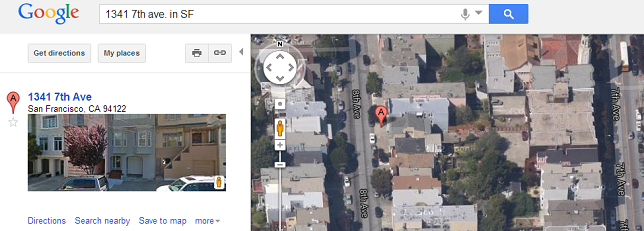
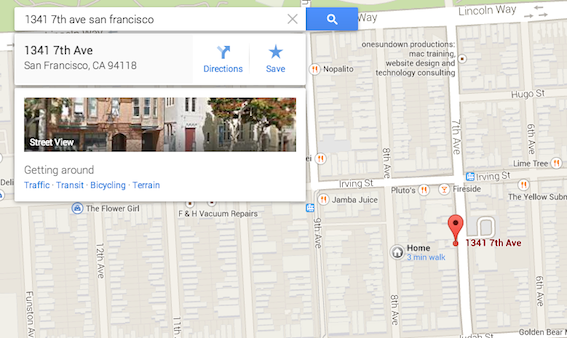
The place I’m referring to is 1341 7th ave. in SF. This shows up as the right place in Google maps and the house no. is placed in the right place in the editor too but when I enter it in the navigation in the app it takes me to 8th ave. How do I change this? I tried to move the house no. a little closer to 7th ave without any luck.
I have found addresses that have multiple pins on Google Maps depending on how you search for them. If you leave out the Zip code, you will sometimes get a different pin location; if you use the abbreviation instead of spelling out street, road, or whatever this may turn up a different pin location. The fact that Waze can try a number of 3rd party providers and then fall back to its own internal database makes the problem much worse in terms of trying to figure out how someone got bad directions somewhere. And then points of interest aren’t necessarily pinned to the same location as if you did a search on the address.
I’ve noticed lately that when I search for things like grocery stores and restaurants by name, with the Waze icon selected for search, Waze will often display the results from Yelp instead of Google, and my experience is that Yelp usually has the correct address listed, but the pin location is frequently off, sometimes by several miles.
The search returns for Google for businesses within the Waze app are very annoying now because they just list the city and not the address of the location in the list. This may be why Waze is defaulting to using the Yelp results for some of these searches now. So you do a search for McDonalds with Google selected for the search, and it lists the 10 or more in your city, you have to select each one and select the Info tab to see which one is at the address you were looking for. The Google searches used to show the address in the list.
In Waze, favorites and recents are saved as locations, not as a search for that location. When you save your “Home” favorite in Waze, it saves that exact location and it will not change.
Yes, at this time, Waze uses Google almost exclusively, in the US, for address-based lookups. Keep in mind that search engines and databases are very specific. The same address without the zip code may be different. The same address, but using the name of the primary city instead of the suburb, are likely to give different results. There may be several variations of the address which people may use.
If people are typing in business names, lately the results seem to come from Yelp a lot, which causes a lot of confusion when the person reporting the UR is told that the location needs to be corrected in Google, and they find that Google already has the correct location.
The most difficult part of this is not knowing what sources Waze uses for the “default Waze” search results. The other tabs are easy to know where to fix. House numbers and POI whose results appear in the default results are still mostly Google. Not sure how we know if yelp or other provider results are sneaking in there.
Today it’s default to showing me Google results for searches for local businesses. The other day it was defaulting to showing me Yelp results for the searches for local businesses.
When I start a search it initially shows the Waze icon while the spinning busy icon is on the screen. When it finishes the search and shows results, it scrolls to the icon of whatever search engine results it is listing.
You can then select another icon and do the search on another engine. If I select the Waze icon, I’m guessing the results are coming from the Waze database. The results are formatted differently than any of the other search engines, and there are a lot fewer results. Often the nearest locations aren’t listed at all. And sadly, like the Google results, no addresses are shown in the listing. Unlike the Google listings, the info tab is not available when you select one of the items, so you can’t get the address of the search result at all (for businesses), but you just have to guess what the address might be looking at the map location.
A couple more things I just noticed, if I change the phone from landscape to portrait or vice versa, it restarts the search from the beginning, showing the Waze icon while doing the search, then jumping to whatever search engine results it decided to list.
I just did a search for McDonald’s. This time it defaulted to showing me the Waze search results, which had no McDonald’s listed, but one advertisement for Wafu of Japan. Clicking other search engines, the ad is still listed first, but many many McDonald’s are listed. I thought this was a particularly strange result. If I keep repeating the search, the ad sometimes changes to an ad for a different local restaurant (not McDonald’s), and again the Waze empty search results are always shown.
I’m testing on my phone right now. If after I perform a search, I click on the Waze icon, I now get results that are definitely NOT the Google results. If I start a new search fresh, then today it’s defaulting most of the time to showing me Google results, but I can click on a specific icon to get different results, and the Waze icon is definitely not showing results that come from any of the other search engine.
We know addresses shown in the Waze tab come from Google. POI searches will show google results in the Waze tab sometimes, but we don’t know where they come from. I know Waze landmarks appear in the Waze tab for POI searches.
This saves the change in my waze app but it doesn’t change it on the server. So, when someone else, like an Uber driver, tries to use it to find me they end up on the wrong street.
I’d like to know how to get waze to fix it on their database so others will see the correct directions as well as just my own waze app.