So, if I understand this correctly (and I may not): even though my condo building address shows up in the Waze app on the wrong street and the wrong block, and even though I read the documentation and understood most of it, learned how to make map edits, and fixed the problem and several other house numbers in my neighborhood in Map Editor, it’s basically the same functionality as the placebo button at a crosswalk until Waze decides to use internal numbers? So why are even allowed to change house numbers in Map Editor?
Yes and No. Eventually the internal numbers will be used, if none are put in correctly when that happens the searches will not improve.
It’s often quite advisable to have the data updated and ready for release prior to making the search function use it. If the data was horribly bad and addresses were a wasteland, then releasing the search functionality would result in thousands of complaint posts and tweets, and users say they are “never going to use Waze again with such horribly incorrect address data.”
This is not hyperbole. Similar situations have happened in the past where exactly all that happened.
I guess in that case I would be happier if there was an announcement of a target date at which time the internal house numbers would be used.
In my years with Waze, I have never known them to announce a “release date” of any kind for anything. I’ll say a word at your wake should you decide to hold your breath. 
So…if Waze in the US gets its house numbers now from Google Maps (instead of Bing), and there is no indication when or if Waze will ever actually use the house number corrections that we make in Waze Map Editor, why would we not instead go to Google Maps and use the Report a Problem function to fix the house numbers at the source? Anyway, that’s what I did today, and I will report back to the group when (or if) Google Maps picks up my corrections and if they are subsequently implemented in Waze.
More to follow…
As of today, it appears that the Google navigation app has picked up the correct location of my house (building) address, as has the Waze app, so making the house number changes in Google Report a Problem only took 2 days to populate to Waze. However, strangely enough, when I search for the building address in Google Maps on my PC, it still shows the old, incorrect address (and yes, I did refresh). Oh well…
“Google address data” doesn’t populate in Waze. Once google does the update, it is available for any app which uses their search API. It would happen in Waze the same second it happens in Google.
Now, since it doesn’t show correctly in Google on your browser tells me that google didn’t actually fix it yet. Though, there is always a difference between searching by address or by name. Two different sets of data.
Waze could have updated their search code to bring back internal house numbers without telling us. That would be surprising, but not very surprising.
It now shows the correct address in Google in my browser as well…it would be great to know if Waze is now using internal house numbers, because as it stands, I could not recommend that anyone correct or add house numbers in Waze Map Editor instead of Google. It’s just a little too much like self-abuse: makes you feel good for a while, but doesn’t really help anyone else. 
I must love self-abuse. As much time as I have spent working on house numbers, I’m surprised a couple of GIS map layers haven’t burned into my secondary display.
Given the current state of house numbers, should the Wiki have a caveat that mentions that Addresses (House Numbers) can be added via Google Map Maker to see nearly immediate corrections?
I’ve updated the Waze house numbers when requests come in about inexact addresses leading to inaccurate routing, but simultaneously I’ve added/edited those address markers in Google Map Maker. The results of the edits being made in Google has meant the marker updates show up nearly immediately and at least resolve the user issues without requiring a map tile update.
I really like the functionality of Waze’s house number editor, but in terms of seeing results… Google Map Maker seems to be the best course of action. Some additions may not be immediate in Google and might require a review, but I’ve had great success lately in updating POIs and address markers in Map Maker. I’ve avoided using the “Report a data problem” link in Google Maps as I didn’t always get a response and the Map Maker side is a bit more transparent to show what’s published and what’s still needing review.
It does already have a warning. Since it’s global, Google isn’t appropriate to put in there because not every country uses google for address lookup.
I’ve seen URs that seem to show that Waze is using its own addresses in some cases, yet not in others. Every time I get a wrong address UR, I check both, and I fix it in both, if necessary. Better safe than sorry.
Google has rejected some of my map updates in the past. The sooner we can get off it, the better, although there remain some problems with Waze’s house number system.
I do think we should consider putting in something in the Wiki for where Waze is using Google map data for the addresses when we know about it.
I have not personally looked at how to edit Google Maps for this issue, but I think if we provided some guidance (when we know that is the source) we could save ourselves some repeated URs.
Currently, if you try to use Google Map Maker you get a message that it is down for maintenance as Google is combining its backend systems to strengthen the connection between Map Maker and other Maps products. So this seems to be a particularly bad time to be composing instructions on how to edit Google Maps. Maybe nothing will really change, but maybe things will be different in a few days.
It’s actually been fairly simple, although Waze’s integration is a much more elegant solution in terms of snapping an address to a road segment. With Google Map Maker you just add a place marker that’s of category “Address” and fill in the appropriate fields.
Google Map Maker has actually been offline for maintenance for the past several days, but at least it’s an option in terms of editing in the US and for other countries that rely more on Google markers.
I’ve actually been able to entice responses via comments when it’s clear a location marker doesn’t exist or is placed incorrectly in Google Maps. Their response allows me to fix via both editors and suddenly something like a house or business that never mapped to the right spot is resolved.
I only today started looking at the Google Map Editor to try to address some of these issues for the US. I did find something that makes me think Waze actually has a bug that Google already solved in its routing that Waze should already be able to correct.
The case is when a house on one street is geographically closer to another street than the one to which its address is tied. This example is for a house on Rimini Lane. It is part of a long driveway that pushes the actual house deeper into the property making it physically closer to Gleason Drive.
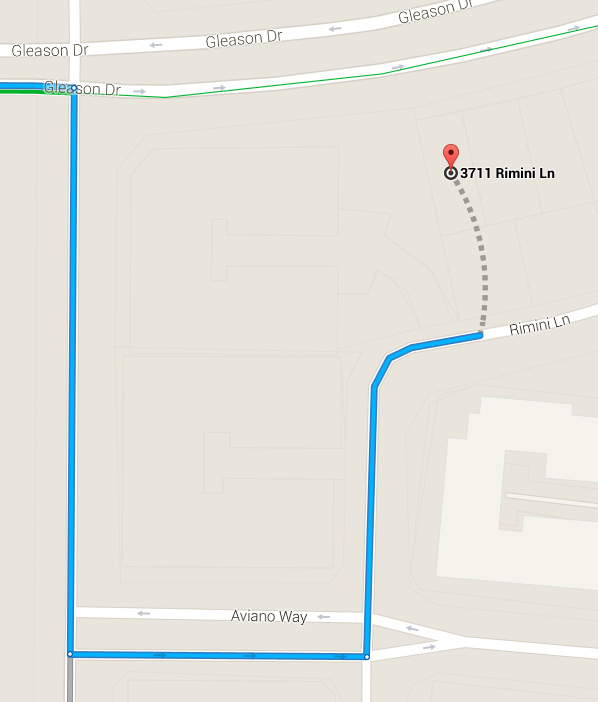
Notice that when Google Maps is told to route to this address on Rimini Lane it knows to head onto Rimini Lane and then determine where on Rimini Lane to enter.
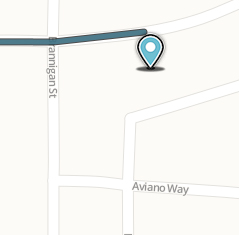
In the case of Waze Maps, if Waze is getting the GPS info for this address from Google Maps, why does Waze try to reach it from the street that clearly does not match the address given? Have we already been told by Waze staff that there is a problem in routing preventing this from working properly? Once they switch to internal house addresses I assume this is fixed because it routes to the stop point.
I would think either Google Maps has a different solution or also has the same stop point information like we are setting up in Waze. So why can’t Waze get the stop point as well as the GPS point so this problem is solved at the system level; not by wasting the thousands of hours of editors’ time.
Maybe not getting that information is what they mean by waze and Google will remain separate operating entities for the time being.
I agree on the stop point transfer issue as a likely possibility.
What I don’t get is why their routing algorithm does not take into account combining the actual street name into the computation. What I mean is they are routing to a GPS point. They know the street Gleason is the closest to that particular house GPS coordinate, so we know they can calculate where on a street it is closest. So why not tell the routing to search outward radially from the GPS point until they cross the actual street name in question. That will have a 99% higher chance of getting to the actual destination than the current routing that stops at any street name that could easily be separated by 5 miles of fence either direction. Then even if the driveway is around a corner and that particular point on the street the driver can more easily continue driving until they see the entrance. At least they are on the right street.
Of course all this is in place of getting internally addressing working, but with past history there are always many more higher priority items to get going. 
I doubt this is true. Sure stopping at the nearest point on the named road in the address will have a much higher chance of not being separated by 5 miles of fence in either direction. But its not going to have a 99% higher chance of getting to the closest point on the road network. There are just too many destinations where the ultimate stop point should be on a parking lot road, or the driveway is around the corner on a different road than the address, or the address is a vanity address (my vanity examples are usually the office building in DC that have Pennsylvania Ave addresses even though their connection to Pennsylvania Ave can be somewhat tenuous).