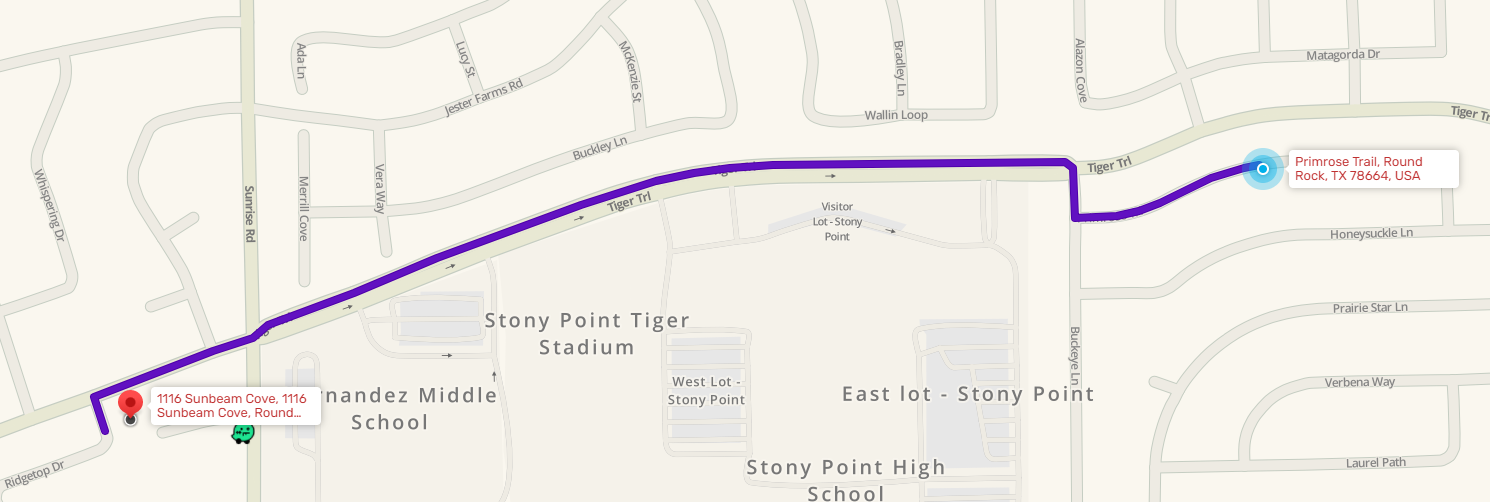
Waze is attempting to route to this address via Ridgetop Dr, This is physically impossible, as no house in the Sunbeam Cv cul-de-sac is accessible by any other street than Sunbeam Cv. I have attempted to manually add the house numbers in the past and verify that all of them are associated with Sunbeam Cv, yet it still wants to route to Ridgetop Dr.
If possible, please explain what’s going on. I am a fledgling editor, and I would like to learn from this experience, so that I may correct errors, potentially like this one, in the future. Please see the attached image below for the bad routing.
DESTINATION: 1116 Sunbeam Cove, Round Rock, TX 78644
Welcome to Waze map editing. First off, we would like to extend an invitation to our South Central Region Discord Chat Server https://discord.gg/CXtzyEN. This is a great way to meet fellow editors and senior editors, learn more about Waze editing and connect yourself with the Waze community.
Now to your issue.
There are a couple things going on.
Waze LiveMap uses Google Maps points instead of Waze points
The Google Maps location for the address is closer to Ridgetop than Sunbeam.
If you search for the address in the app, you will get the Waze point and proper directions.
I have submitted a request to Google Maps to see if I can get them to move their pin location closer to Sunbeam, but that is not in our control.
While LIveMaps is a great tool, it does not work well for researching destination points all the time. I always recommend testing the routes in the app to see if the issue exists for the actual app user.
Thank you! The main reason that I submitted this forum post is due to the fact that in-app I have gotten misroutes multiple times, and even after manually adding street numbers in the editor, it still misroutes, depending on the direction I’m traveling to get to Sunbeam
Another significant detail in using the app is that the geo location of a destination you’ve selected before which is in your Waze search history won’t change for you in the app until you remove it from your history and then and only then do a new search. Then there’s a better chance of picking up the updated/moved locations.
So please remove any instance of this address from your history and favorites (including ‘Home’ if saved there) by tapping the ‘…’ (3 dots) at the end of the old entry and then ‘trash can’ and then ‘remove from history’. Then search for the address again. And unfortunately, there are additional factors as well that can play into this but removing the old history will likely get it correct.
I have tested in my app and get routed to Sunbeam as expected.
I would recommend following FTWMikeC recommendation and remove any prior search results in your list and do a new search.
While I don’t think it would be an issue, I would also not recommend including the zip code while searching since Waze does not use zip codes for directions and the zip code you provided was for Lockhart (78644) not Round Rock (78664).
Google did respond to my request to move their pin and said it should be moved in a few days so hopefully that will help with Livemap searching.