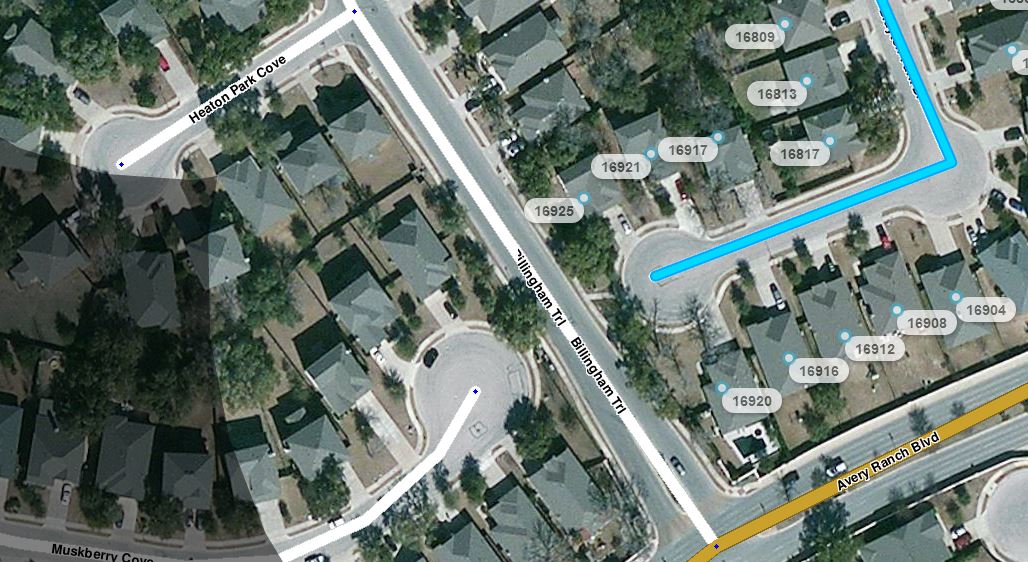
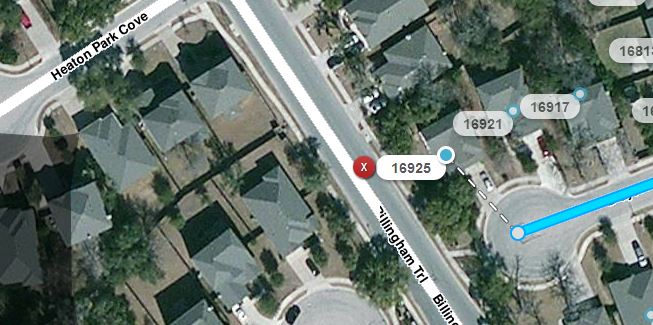
When routing to my house, Waze stops the route when I pass the side of my house when entering the subdivision. This is not where I stop because I have to continue down this road then turn onto my street which loops around and ends in a cul-de-sac adjacent to the entrance road. Waze tells me to stop on the entrance road at the side of my house instead of continuing around the cul-de-sac.
I am routing to my address saved in “Home”. Your suggestion may work for me but it doesn’t really fix the problem. It’s more of a workaround. It works for me because I know where my house is. If someone else is trying to get to my house and doesn’t know where it is, Waze won’t get them there with my address.
Address information is served up in the US by bing. Check your address location in bing to see if it is in the same wrong location as Waze shows it.
You can do two things: 1) figure out how to get bing to change your address pin location; 2) Use the Cartouche editor to add the address directly to the street location it should be located on and then wait for Waze to fix the algorithm which is supposed to give preference to addresses in Waze.
I posted this a while ago but the problem still exists. I checked on Bing and the address is in the correct place and Bing routes correctly. Waze has the address in the right place but the route is wrong.
Since the earlier posts Waze is now building in the functionality to maintain house numbers in Waze Map Editor vs. doing the lookups with Bing. As discussed previously the issue is that the GPS coordinates for your house are located closer to Billingham Trl. than Brayton Park Dr. See picture:
Waze is currently NOT using this data for routing. So it will be resolved at some future time when Waze enables this functionality. Waze will route to GPS coordinates of where your house is connected to the road vs. the location of the house number sitting over the house itself.
FWIW, Bing Maps routing has nothing to do with how Waze routes. Waze is only using the house number lookup from Bing. Where the roads are placed on the Waze Map vs. the gps coordinates of the house number lookup are what is currently relevant.
Yes. Have a read of the House Numbers wiki page for the full info on House Numbers and caveats. The Waze FAQ also addresses the question about Waze not routing to the correct location.