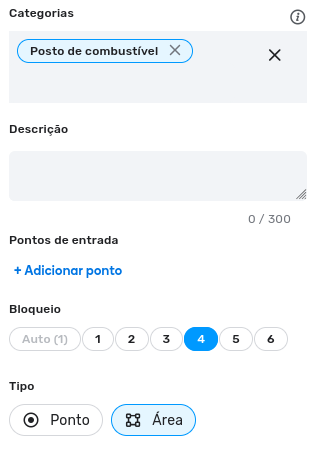
Issue with Gas Station Mapping Field Disappearing

Is this a…:
Performance issue
Steps to reproduce this issue:
Hi,

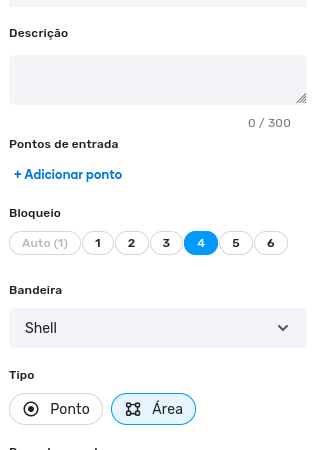
I’d like to report an issue that’s affecting me and other users. In Brazil, we are conducting a task force to map multiple gas stations. I’m not sure how it works in other countries, but here we need to fill in the distributor of the gas station, which we call the “Bandeira.”

The field for this information sometimes disappears, and I have to click to refresh for it to reappear.

Could you look into this issue?

Environment where the bug occurs…:
All environments
Permalink:
https://waze.com/pt-BR/editor?env=row&lat=-21.27479&lon=-47.30356&zoomLevel=21&venues=204932659.2049326593.38818595
Browser name and version:
Firefox 134.0.2 (64-bits).
Are you using scripts? Please detail which ones.:
Toolbox


1 Like

Same problem here.

I can reproduce here.

Browser name and version:
Firefox 134.0.2 (64-bits).

Can it be reproduces without Toolbox running?

Also, do you know if it only happens in FF or does it also happen in Chrome (both with and without Toolbox)?

Olá @jm6087

I have disabled all scripts and extensions, but the issue persists.

When @DMZamora alerted me about the error, he had already tested it in three different browsers. That’s why I decided to report the issue.

You can try these links. I opened all four, and on the third one, the “Bandeira” field was already missing.

To make it appear, I need to click the refresh button on the right side of the WME screen.

LINK
LINK
LINK
LINK

I was able to duplicate it on the all those links in incognito.

My steps to reproduce:

  1. Copy the PL from post
  2. Paste PL in incognito browser and press enter
  3. Select the gas station
  4. Brand is not showing
  5. Soft refresh WME
  6. Brand is now showing

Here is a video for the last link:

1 Like

I just noticed one thing about the links ~ they all were for PURs (URL has venueUpdateRequest= in it), but none of them appear to have a PUR for them (or at least I am not able to see them). I am not sure how the URLs were pulled.

https://waze.com/pt-BR/editor?env=row&lat=-22.881186&lon=-42.025766&zoomLevel=19&venueUpdateRequest=208406051.2083863904.38818315

But if I use the venue link only (url has venues=, the gas station opens up with the brand available.
https://waze.com/pt-BR/editor?env=row&lat=-22.881186&lon=-42.025766&zoomLevel=19&venues=208406051.2083863904.38818315

In this recording, I used the venues URL and it shows the brand in the left panel immediately. when I searched using the venueUpdateRequest URL and then selected the gas station, the brand was not there.

I’ll check it out about that.

Waze sent us a spreadsheet with all the links containing venueUpdateRequest= that we need to review for a large number of PURs. I’ll probably keep encountering this bug until the raid is completed. :sweat_smile:

I would probably recommend replacing “venueUpdateRequest=” with “venues=” and that would most likely solve your issue.

1 Like

The spreadsheet I’m working on has four tabs of PURs. In the two that are already complete, I did what you suggested — I replaced venueUpdateRequest= with venues=. Since I’m reviewing some edits from other users, I’ll be able to test this in the completed tabs.

My concern about making this change in the other tabs, where the process is still ongoing, is that the PUR window might not appear, potentially causing issues. But I’ll be checking that soon as well.

I believe what you suggested worked! I corrected the links across the entire spreadsheet, and so far, everything is functioning normally — I can see the field for the gas station brand.

Thanks for your help, @jm6087! If the issue happens again, I’ll report it here in this thread.
1 Like

i think it worked in my case