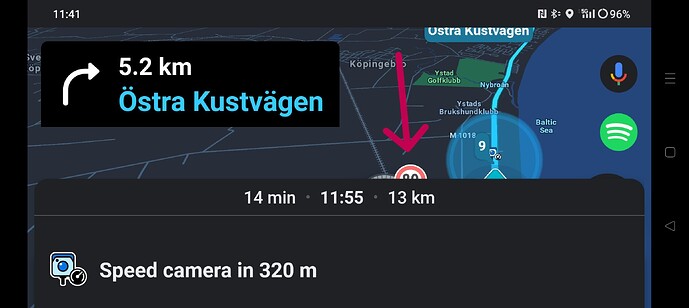
The speed camera warning dialog obscures both the max road speed as well as my current travel speed. I can only partially see the upper part of the speedometer. When a speed camera is coming up is when I really want to know both the max road speed and my current speed which makes this bug really annoying.
This happens on both my android phones OnePlus 11 and Oppo Find N5. I know it happens in landscape and believe it happens in portrait as well.
NB: i have “large fonts” enabled on os level.
See attached screenshot from OnePlus 11 in landscape.
Hi, have you submitted a bug report directly to Waze regarding this? Since you wrote in English!
It doesn’t happen for me and I’m running in portrait mode
Hi are you running prod or beta ?