The new left panel: blank left panel field is displayed for the logged out user.
UI: Unknown button is shown in case of multiple segments selection
The new “Add and adjust” flow only for “New places” PURs: details about the place opens when clicking the “reject button” but information is grayed out.
Map suggestions: Address validation sign disappears in case user changes other parameters.
Very small size of the place icon if the place is added via PUR as a “new place” remains.
When we apply “prohibited for all Vehicles” the various vehicle types (Electric, motorcycle, etc) are still enabled and can be selected.
Segment: in the Routing section: No spaces in the message about the “Routing road type”.
The new left panel: Map shifts a bit when toggling the drawer or when we select the node in case we use the street view option and . Scripters: please note we’ve deprecated W.selectionManager.getSelectedFeatures()[0].model, please check this thread for more information. Thanks bedo2991! Map suggestion:
Segments: We added a visual display of why sometimes it is impossible to remove a street name for segments with House numbers.
Compact mode: Enabled buttons for road details.
New features/enhancements:
Issue Tracker: some design alignment to filters field made:
Segment: style changes applied to the history section elements.
Segment: we changed the style of the verify speed limit change button.
Segment: the direction buttons a-b background colors changed from blue to gray.
Header: gradual changes applied. The style of the “Save”, “Redo”, “Undo” and “Delete” tooltips changed.
Places: when a point venue is selected show the category icon with white background color.
EV charging stations: Removed EV charging stations for parking lots. Bug fixes:
We’ve released 16 bug fixes:
Issue Tracker: Issue Tracker automatically opening when a map issue is clicked while staying on the scripts tab. - fixed.
Alternate names on multiple selected segments - fixed
Restrictions start/end time are not grayed out when All day is checked - fixed
Segment: in the Routing section: the message for the “Neutral” type is displayed incorrectly - fixed.
The new left panel: Map should not glitch when toggling the drawer - fixed
The new left panel: Left panel is missed in case the user turns off snapshot mode - fixed.
The new left panel: Map shifts when user deletes the segment or venue - fixed.
Sometimes “Delete” doesn’t work from the first click - fixed.
Practice mode: black screen is opened in case user re-open video tutorial second time - fixed
History: history isn’t fetched when selecting a new feature - fixed
Issue Tracker: No tab is selected in case of hard page refresh - fixed
Issues Tracker: Specific area filter not working on 2nd try - fixed.
Issue Tracker: Clicking Reject on PUR shouldn’t open the edit screen in Left panel - fixed
EV charging stations: need to remove the ‘Delete’ button for Network field - fixed.
EV charging stations: Payments methods and chargers are added second time, hard to clear added value - fixed.
EV charging stations: Cannot add charger to venue created before introduction of new PURs (old charging stations) - fixed
It used to be quite convenient to have point places being transparent when selected; it makes it easier aligning them to artefacts on satellite images. Could this be reinstated please? Not a fan of the size either, but that is something I will grow over.
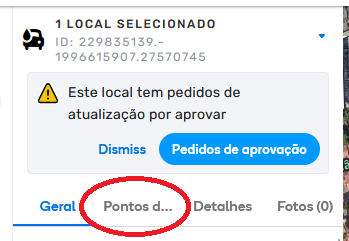
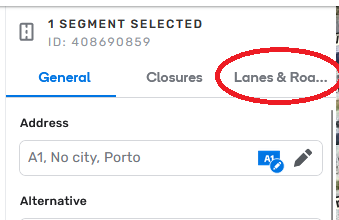
This is not a problem of this particular version, but something that keeps being an annoying/issue from some time now: the name of some tabs are not fully visible on some languages.
Example of an electric charger POI
(text localized to Portuguese-Portugal)
Segment with Lanes
Can’t be implemented a solution that, when we hover the mouse on top of the tab name, the full name is shown on a kind of tooltip text box!?
And I’m glad to see this change. The transparent point places were hardly noticeable on a satellite background. Sometimes I had to disable the satellite layer in order to locate the selected place.
The bug from the previous version where some editors that should be able to place level crossing warnings can’t because it is greyed out remains in this version.
Some users are able to get it to work with a simple reload of the tab, others need to use the work around through a “fresh” incognito mode tab and for others neither works. Some times it becomes available on it’s own during normal editing. It seems only L4 editors - the lowest level that should be able to place them - are affected.
I see the issue with URs being poled from the Descartes URL when zoom levels are < 12 is still an issue. Can this be confirmed? Are you all working on preventing this from happening? It was listed as a known issue in the Issue Tracker Google Sheet…
I don’t know if this is a known issue or by design, but the reload button in the upper right of the editor (the Waze reload button, not the browser) acts differently depending on which object was selected last in the URL. For example, with most selected items (segments, venues, etc), pressing the reload button will reload the current screen, something I do frequently thanks to the still-present disappearing Places issue.
When the last URL I used was for a UR, however, the reload button takes me back to that UR instead of refreshing the screen where I currently am.
To clarify (and maybe overexplain a bit), I often start my editing session by either navigating to UR replies or segment unlocks. If I start with a UR reply, the URL looks like this: https://www.waze.com/editor/?zoom=5&lat=33.955508&lon=-84.516902&mapUpdateRequest=10628537&env=usaAfter dealing with that UR, I move around the map, editing as needed. When the Places vanish and I press the refresh button below the layers button, the screen snaps back to the UR instead of staying where I was.
On the other hand, an unlocked segment request might look like this: https://waze.com/en-US/editor?env=usa&lat=34.25950&lon=-84.35973&zoomLevel=20&segments=523183482
After I edit the unlocked segment, I again move around the map to edit as needed. When the Places vanish and I press the refresh button, the screen stays at the current location and zoom level while refreshing the layers and re-displaying the Places.
I hope this makes sense. Please let me know if you need more details.
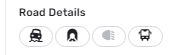
It will take time to get used to Road Detail buttons but there’s also one problem with one of those, the Unpaved. If you select multiple segments of which only some are marked as unpaved the icon does not show that at all, it looks the same as if all would be paved. In pic attached I have selected 2 segments, one paved, one unpaved and you see how it looks. And this is often quite necessary info at least for me.
Issue tracker - filtering issues by area seems to have broken in the latest release. If I select to filter by map area, sometimes it shows no issues in current area even if I know that there are. If I select to filter by ‘area I manage’ and pick an area which I know has maybe 40+ issues within it, sometimes only a few (maybe 7 or 8) will show in the list.
Often - but not always - this seems to be fixed by selecting filtering to a specific area and selecting the whole United Kingdom, then switching back to the desired filter area. After a while it reverts to the problematic behaviour. I’ve tried to see a pattern in this, and work out whether there’s a combination of actions which consistently breaks, and fixes, it, but nothing’s obvious. But it’s definitely not functioning correctly.
A couple things I’ve noticed/encountered and are repeatable on different computers, all in chrome, with and without scripts, in production.
Zoom function stops working - I can’t nail down what is causing it, but frequently zoom will stop working - via the WME zoom buttons or my mouse wheel, I am not able to zoom in or out, I have to Reload the whole page. I have noticed this behavior with and without scripts enabled.
Moving the map “speeds up” - I notice this when you inadvertently move the map before its “done loading” this could be from a zoom in/out or it could be from a save or a hard refresh, the map will move very quickly & very far compared to your mouse movement. You move the map a little bit to one direction and it takes you far away quickly. I can repeat this on multiple different computers, it doesn’t seem to happen in wme beta.
I cannot access the issue tracker from the practice mode; the run video panel cannot be removed. I am attempting to locate charging station PUR’s, but because of my phone and my rate limited connection, I am unable to log in. Thanks!
I can verify this, once it happens it also stops drawing roads when moving so mostly impossible to edit before refresh. And this isn’t new problem, I just never remembered to say it here.